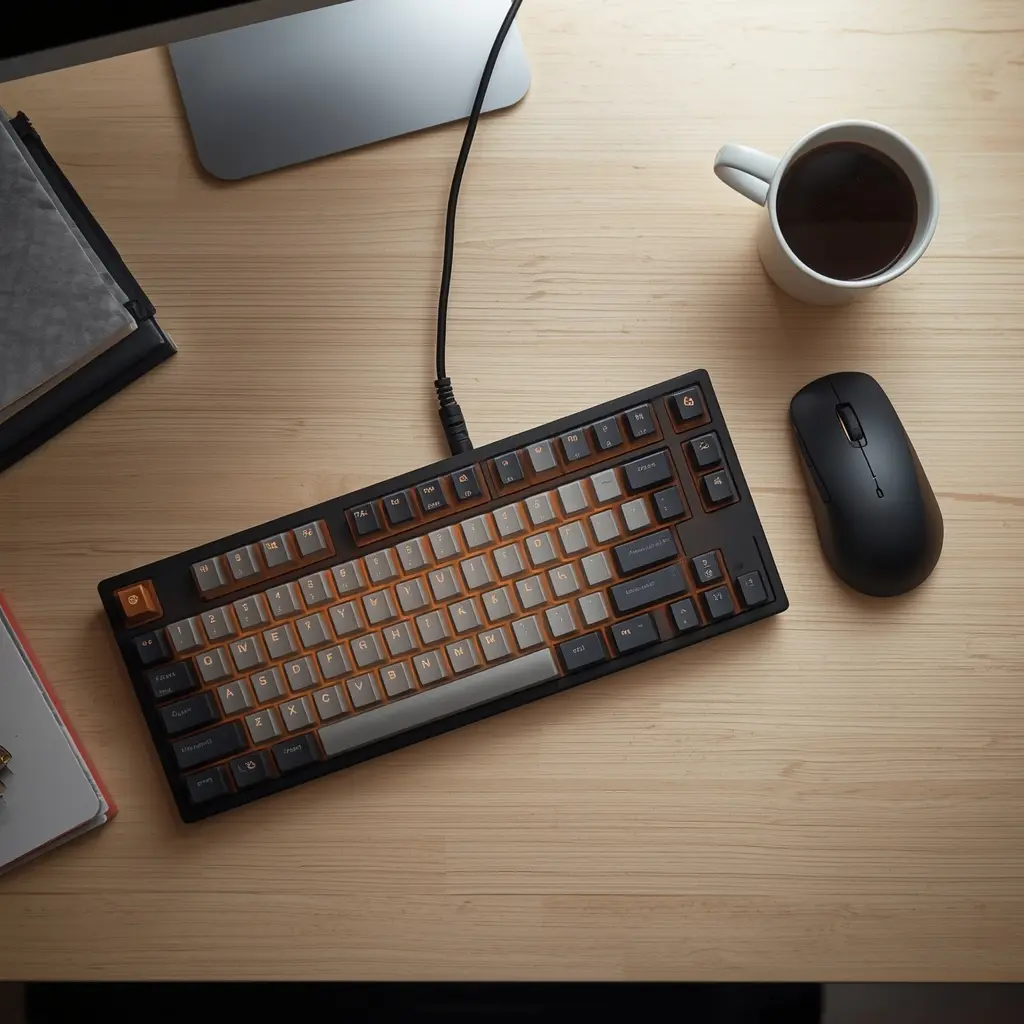
Best Mechanical Keyboards for Productivity and Long Typing Sessions: Keychron K2 Review

Keychron K2 Review

In the digital era, your keyboard is more than just a peripheral—it is the primary interface through which you create, communicate, and build your digital empire. Whether you are a remote software engineer writing thousands of lines of code daily, a content strategist drafting high-converting copy, or a digital nomad managing enterprise workflows, the tactile instrument beneath your fingertips dictates your speed, comfort, and physical endurance. Standard membrane keyboards often feel mushy, lack responsiveness, and contribute heavily to finger fatigue during extended work sessions.

Transitioning to a high-end mechanical keyboard transforms the physical typing experience into a rhythmic, highly efficient endeavor. Among the vast array of options available in the market, one compact powerhouse stands out as the ultimate choice for professionals seeking a balance of versatility, build quality, and ergonomic precision: the Keychron K2 Wireless Mechanical Keyboard.

This comprehensive review explores why the Keychron K2 reigns supreme for productivity, breaking down its exceptional engineering, hot-swappable versatility, and why it is an essential addition to any modern workspace.

The Evolution of Typing Ergonomics: Why Mechanical Switches Matter

For decades, office environments settled for cheap, low-profile membrane keyboards that offer zero tactile feedback. Over time, the lack of actuation resistance forces users to bottom out their keystrokes aggressively, placing repetitive strain on the tendons in the fingers, wrists, and forearms.

Mechanical keyboards revolutionize this dynamic by utilizing individual mechanical switches for every single key. These switches provide distinct actuation points and satisfying tactile feedback, allowing your fingers to bounce effortlessly across the layout. By reducing the physical force required to register a keystroke, mechanical keyboards significantly mitigate repetitive strain injuries (RSI) and keep your hands comfortable during marathon working sessions.

Furthermore, the acoustic and tactile feedback helps maintain a consistent flow state, reducing typos and keeping your mental focus sharp.

Key Specifications at a Glance

  • Brand: Keychron

  • Model: K2 Wireless Mechanical

  • Material: Aluminum Frame & ABS Keycaps

  • Key Features / Compatibility: Hot-Swappable / Windows & Mac OS Dual Compatibility

  • Dimensions / Weight: Compact 75% Layout / 663g

Design and Build Quality: Premium Materials Meet Space-Saving Layout

When selecting a keyboard for a professional setup, desk footprint and structural integrity are paramount. Full-sized keyboards force your mouse further away, straining your shoulder, while ultra-minimalist 60% layouts sacrifice essential productivity keys like arrow keys and function rows.

  • The Ideal 75% Compact Layout: The Keychron K2 strikes the absolute sweet spot with its 84-key 75% layout. It retains dedicated arrow keys, a complete row of function keys, and navigation clusters while shrinking the overall physical footprint to save valuable desk space for your mouse and writing pad.

  • Robust Aluminum Frame: Built with a sturdy aluminum frame side-skirt paired with durable textured ABS keycaps, the K2 projects a sleek, executive look that elevates any desktop aesthetic. Weighing a solid 633 grams, it sits firmly on your desk without sliding or flexing during intense typing sessions.

Hot-Swappable Versatility and Switch Options

One of the standout features of the Keychron K2 is its hot-swappable PCB variant. This engineering choice empowers users to change mechanical switches in seconds without soldering.

  • Tailored Tactility: Whether you prefer the clicky feedback of Blue switches for writing, the smooth linear feel of Red switches for quiet speed, or the tactile bump of Brown switches for balanced office use, you can easily swap them out to match your exact typing preference.

  • Future-Proofing Your Gear: If a switch wears out over time or you simply want to experiment with different typing weights and acoustics, popping in a brand-new set of switches takes less than five minutes.

Cross-Platform Compatibility and Wireless Freedom

Modern remote professionals often juggle multiple devices—transitioning seamlessly between a MacBook for creative work, a Windows PC for data analysis, and a tablet for quick reviews.

  • Universal OS Switching: The Keychron K2 features a physical toggle switch on the side allowing instant transition between Mac and Windows operating systems. It comes with dedicated keycaps for both layouts right out of the box, ensuring every shortcut feels natural.

  • Reliable Dual Connectivity: Connect up to three devices simultaneously via stable Bluetooth 5.1 and switch between them effortlessly. For high-stakes competitive tasks or zero-latency coding, you can plug in the included braided USB Type-C cable for a reliable wired connection while simultaneously fast-charging the internal battery.

Battery Life and Daily Productivity Endurance

Wireless peripherals are only as good as their power management. Despite its compact profile and vibrant backlighting, the Keychron K2 is engineered for exceptional energy efficiency.

  • Massive Battery Capacity: Equipped with a 4000mAh rechargeable battery—one of the largest in mechanical keyboards of this size—the K2 delivers up to 72 hours of continuous typing with backlighting enabled, or up to several weeks with the backlight turned off.

  • Ergonomic Typing Angle: The bottom frame features an inclined rubber foot design that elevates the keyboard at a natural 9-degree angle, reducing wrist fatigue and promoting proper ergonomic alignment throughout long workdays.

Pros and Cons for Remote Professionals

Pros:

  • Space-saving 75% compact layout retaining dedicated arrow and function keys

  • Hot-swappable switch design for effortless customization without soldering

  • Seamless dual-compatibility for both Mac and Windows operating systems

  • Robust aluminum frame construction weighing a stable 663g

  • Exceptional battery life supporting up to 72+ hours of wireless work

Cons:

  • Slightly taller profile compared to low-profile membrane keyboards (though easily mitigated with a wrist rest)

  • Heavier weight than plastic-only travel keyboards, though ideal for a stable stationary desk setup

Final Verdict: Is It Worth the Investment?

For developers, writers, and digital entrepreneurs, your keyboard is your primary tool of creation. Upgrading to a professional-grade mechanical keyboard like the Keychron K2 transforms your daily typing experience, reduces physical strain, and boosts overall productivity through superior tactile feedback and wireless flexibility.

Ready to upgrade your workspace typing experience and eliminate finger fatigue for good? Check out the best current pricing and secure yours here:

Get the Keychron K2 Wireless Mechanical Keyboard on Amazon

Aluminum Alloy Notebook Stand Review: High-Performance Cooling Bracket

https://dominasiserp.com/en/laptop-stand-with-phone-holder-review/
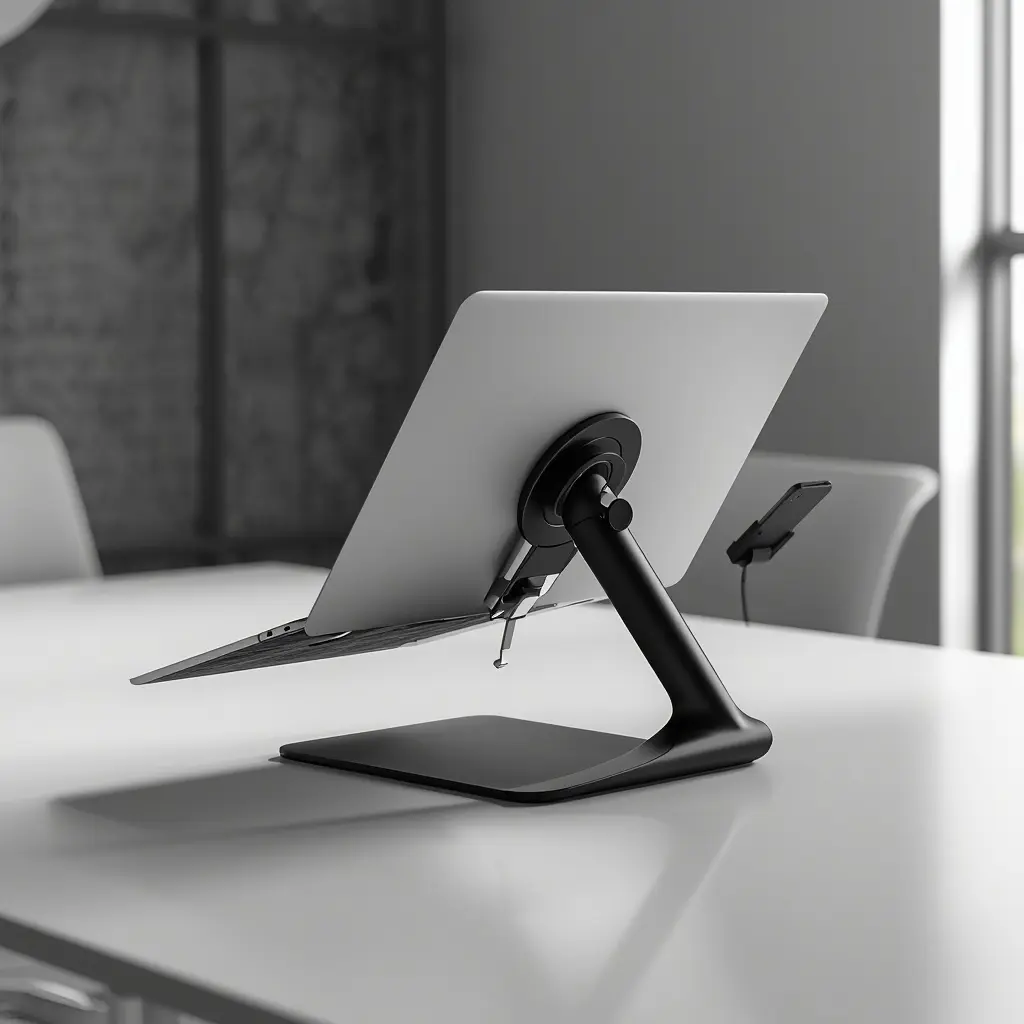
Laptop Stand with Phone Holder Review: Smart Workspace Integration

Laptop Stand with Phone Holder

In the modern digital professional ecosystem, efficiency is often determined by how seamlessly you can bridge the gap between your primary workstation and your mobile devices. As an SEO specialist and content strategist, my workspace is a hub of constant communication and multi-screen monitoring. Navigating between a primary laptop for deep technical work and a smartphone for real-time messaging, notifications, and analytics alerts creates physical friction if your desk is not optimized. The Omoton Laptop Stand with Phone Holder addresses this exact challenge. By integrating a dedicated mobile mount into a sturdy laptop riser, Omoton has created a smart, consolidated workspace solution. In this review, we examine why this compact, ergonomic accessory is a vital addition for the modern digital professional.

Engineering a Consolidated Workspace

The true genius of the Omoton Desktop Stand with Mount lies in its commitment to space efficiency. In many corporate or remote environments, desk real estate is at a premium. Every square inch of your workspace should serve a specific, productive purpose. By combining a laptop riser with an integrated phone mount, Omoton eliminates the clutter of separate stands and scattered devices.

This consolidation is not just about aesthetics; it is about cognitive flow. Having your phone mounted at an accessible angle immediately next to your laptop screen reduces the need to constantly look down or hunt for your device when a notification arrives. This design encourages a more focused, streamlined interaction with your technology, keeping your professional tools organized, visible, and ready for action.

Key Specifications

To understand the engineering behind this smart, integrated accessory, consider these core specifications:

  • Brand: Omoton

  • Model: Desktop Stand with Mount

  • Material: Premium Aluminum and ABS

  • Primary Feature / Compatibility: Integrated Phone Mount / Fully Adjustable Design

  • Dimensions and Weight: Compact and Travel-Friendly / 300 grams

Ergonomic Adjustability and Posture Alignment

While the phone holder is a standout feature, the core function of the Omoton stand is to provide a superior ergonomic experience. The stand offers flexible height and angle adjustments, allowing you to elevate your laptop screen to eye level. This is the cornerstone of preventing chronic neck and shoulder fatigue during long working hours.

The stand’s stability is impressive, especially considering its compact 300-gram weight profile. It remains rock-solid while you type, ensuring that your screen does not bounce or wobble—a critical requirement for any professional working on complex data analysis or writing technical documentation. By setting your laptop at the correct ergonomic angle, you maintain a neutral spinal position, enabling you to work longer and more comfortably without the physical toll of traditional desk setups.

Material Quality and Durable Design

Omoton has utilized a high-performance blend of premium aluminum and ABS plastic. The aluminum components provide structural rigidity where it matters most, particularly in the base and the load-bearing hinges, while the ABS plastic is used strategically to maintain a lightweight, portable profile.

This combination of materials makes the stand feel premium and durable to the touch. It is resilient enough to handle daily adjustments and intensive work cycles without feeling fragile. Furthermore, the finish is sleek and modern, designed to fit in with high-end workstations and enterprise environments. The integrated phone mount is also thoughtfully designed, featuring high-friction material to ensure your mobile device stays securely in place without sliding, even during active desk movement.

Smart Integration for Digital Productivity

The phone holder mount is the key differentiator for the Omoton stand. Many professionals use their phones for supplementary tasks: monitoring real-time keyword tracking, keeping open Slack or Teams channels, or checking two-factor authentication codes. By mounting the phone right next to the laptop, you turn your smartphone into a functional secondary monitor.

This smart integration prevents the common “productivity tax” of switching your focus away from your main screen to hunt for your phone. When the phone is elevated and visible, you can respond to urgent communications with a quick glance or a brief touch, maintaining your overall momentum without losing focus on your technical SEO audits or project tasks.

Compact Portability for the Modern Professional

At a featherlight 300 grams, this stand is arguably the most travel-friendly option in the integrated mount category. It folds into a compact form factor, making it an excellent companion for professionals who divide their time between multiple offices, client sites, or remote locations. You don’t have to choose between having an ergonomic desk at home and suffering through back pain at a coffee shop—this stand is designed to move with you, ensuring your ergonomic standards are consistently maintained.

Pros and Cons

To assist your professional buying decision, consider these factors:

Pros:

  • Unique integrated phone holder streamlines the workspace and reduces physical desk clutter.

  • Lightweight (300g) and compact design makes it highly portable for travel-heavy professionals.

  • Premium aluminum and ABS blend provides both structural rigidity and a sleek professional look.

  • Highly adjustable height and viewing angles support long-term posture and neck health.

  • High-friction mounting surfaces keep both laptop and smartphone securely in place.

Cons:

  • Optimized for portable professional laptops and standard mobile devices; not intended for industrial-grade, massive heavy-duty gaming notebooks.

Final Verdict

The Omoton Laptop Stand with Phone Holder is a sophisticated, practical tool that solves the common problems of desk clutter and workspace fragmentation. It is an excellent choice for anyone who values efficiency, portability, and ergonomic health. By thoughtfully integrating a phone mount into an adjustable laptop riser, Omoton has provided a smart, consolidated solution that enhances the way digital professionals organize their daily work. For those looking to optimize their workstation and boost their daily productivity, this stand is a fantastic, high-value investment.

Streamline your workspace and enhance your productivity today:

➡️ Check Price & Availability on Amazon

The Strategic Importance of Your Professional Environment

In conclusion, professional excellence is a direct result of how you manage your tools and your environment. When you eliminate friction points—such as a cluttered desk, misplaced mobile devices, or chronic physical discomfort—you unlock cognitive resources that can be redirected toward high-impact strategic growth. Investing in a smart, consolidated tool like the Omoton Laptop Stand with Phone Holder is a small strategic move that yields significant cumulative benefits in your daily focus and efficiency. Optimize your physical workspace today, and experience the transformative impact of a streamlined, ergonomic desk setup.

read more

Aluminum Alloy Notebook Stand Review: High-Performance Cooling Bracket

Sit-to-Stand Swivel Riser Review: Efficiency Gains for Your Workflow

Swivel Riser Review

Sit-to-Stand Swivel Riser is an essential tool for digital professionals who demand maximum workspace flexibility. In the fast-paced world of digital strategy, technical SEO, and enterprise project management, your desk setup is the ultimate engine of your daily productivity. When you spend countless hours analyzing complex data architectures, drafting high-impact content, and coordinating digital campaigns, the physical dynamics of your workstation dictate your mental endurance. Slouching over a static laptop screen or twisting your body awkwardly to share a screen with a colleague creates immediate physical friction. The Soundance Sit-to-Stand 360 Rotating Stand arrives in this professional arena as a game-changing asset. Combining dynamic height flexibility with a seamless 360-degree swivel base, this heavy-duty metal alloy riser is engineered to optimize both your posture and your workflow efficiency. In this in-depth review, we examine how the Soundance stand performs in a demanding professional environment.

In the fast-paced world of digital strategy, technical SEO, and enterprise project management, your desk setup is the ultimate engine of your daily productivity. When you spend countless hours analyzing complex data architectures, drafting high-impact content, and coordinating digital campaigns, the physical dynamics of your workstation dictate your mental endurance. Slouching over a static laptop screen or twisting your body awkwardly to share a screen with a colleague creates immediate physical friction. The Soundance Sit-to-Stand 360 Rotating Stand arrives in this professional arena as a game-changing asset. Combining dynamic height flexibility with a seamless 360-degree swivel base, this heavy-duty metal alloy riser is engineered to optimize both your posture and your workflow efficiency. In this in-depth review, we examine how the Soundance stand performs in a demanding professional environment.

Metal Alloy Engineering for Maximum Durability

The foundational integrity of any serious desk accessory rests entirely on its material selection. Soundance built this rotating riser using a robust metal alloy framework designed to withstand the rigors of heavy, continuous professional usage.

Unlike flimsy plastic risers that flex and rattle under the pressure of fast-paced typing, this heavy-duty metal construction provides a rock-solid foundation. Weighing in at 750 grams, the sheer structural heft of the unit ensures that your expensive notebook or workstation remains completely anchored. The metallic finish offers a sophisticated, industrial-chic aesthetic that blends seamlessly into high-end corporate offices, creative studios, and minimalist remote workspaces alike. It looks professional, feels indestructible, and is built to last for years of intensive daily operation.

Key Specifications

To fully understand the mechanical engineering behind this high-performance workstation accessory, let us review its core specifications:

  • Brand: Soundance

  • Model: 360 Rotating Sit-to-Stand Stand

  • Material: Heavy-Duty Metal Alloy

  • Primary Feature / Compatibility: Sit-to-Stand Height Adjustability / 360° Swivel Base / Universal Laptop Compatibility

  • Dimensions and Weight: Heavy-Duty Build / 750 grams

Dynamic Sit-to-Stand Flexibility for Posture Health

The most compelling feature of the Soundance riser is its flexible sit-to-stand capability. Prolonged sitting is a documented hazard of modern desk jobs, contributing to lower back fatigue, poor circulation, and reduced energy levels throughout the afternoon slump.

By allowing you to quickly transition your workstation layout, this riser encourages a more active, adaptable working style. Whether you prefer to stand during high-energy data analysis sessions or sit down for deep-focus technical writing, the adjustable height mechanism elevates your screen to an optimal eye level. This eliminates the harmful forward-head posture associated with looking down at flat desk surfaces, effectively safeguarding your cervical spine and reducing chronic neck and shoulder tension.

Seamless 360-Degree Swivel Collaboration

Collaboration and screen-sharing are essential parts of modern project management. The integrated 360-degree swivel base on the Soundance stand completely transforms how you interact with your device.

Instead of awkwardly dragging your entire laptop, scratching your desk, and tangling power cords every time you need to show a colleague a data report or client dashboard, you simply pivot the laptop smoothly in any direction. The rotation mechanism operates with silent precision, allowing for instant angle adjustments whether you are shifting your view to catch natural window light or presenting a strategy to a team member. This fluid mobility adds an entirely new dimension of convenience to your daily routine.

Superior Thermal Management and Airflow

High-performance computing generates intense heat. When a laptop is trapped flat against a desk surface, heat accumulates under the chassis, forcing internal fans to run at maximum decibels and triggering processor throttling that slows down your workflow.

The open-metal architecture of the Soundance stand acts as an efficient passive cooling system. By elevating the computer chassis off the desk, it opens up a wide channel for unrestricted ambient airflow. This keeps your internal components running at optimal thermal levels, preventing performance drops during resource-heavy tasks like web crawling, data scraping, or video rendering. Keeping your machine cool directly extends its operational lifespan.

Unmatched Stability for High-Speed Typing

Concerns about wobbling are natural when considering rotating or elevated stands. However, the Soundance 750g heavy-duty metal build eliminates this issue entirely. The wide base and balanced center of gravity ensure zero vibration or shaking, even when you are typing aggressively or executing rapid keyboard shortcuts. Additionally, high-friction protective silicone pads grip your laptop securely while shielding both your device and your furniture from unwanted surface scratches.

Pros and Cons

To assist your professional buying decision, here is a balanced review of the product’s strengths and limitations:

Pros:

  • Robust heavy-duty metal alloy construction ensures exceptional long-term durability.

  • Sit-to-stand flexibility and height adjustment promote healthier posture and active working habits.

  • Smooth 360-degree swivel base facilitates effortless screen sharing and workspace versatility.

  • Open-frame metal design optimizes passive airflow to prevent thermal throttling.

  • Solid 750g weight profile provides rock-solid stability with zero typing wobble.

Cons:

  • Due to its heavy-duty metal build and 750g weight, it is optimized as a semi-permanent desktop command center rather than an ultra-lightweight travel accessory.

Final Verdict

The Soundance Sit-to-Stand 360 Rotating Stand is an exceptional investment for professionals who refuse to compromise on ergonomics, hardware stability, or workspace efficiency. By integrating flexible height adjustment with a fluid swivel mechanism and robust thermal management, it solves the most common physical and technical pain points of desk-bound work. If you are serious about optimizing your daily workflow and protecting your physical well-being, this heavy-duty metal riser is an indispensable addition to your setup.

Elevate your workstation productivity and physical comfort today. Secure your Soundance stand through the link below:

➡️ Check Price & Availability on Amazon

The Strategic Advantage of Workspace Optimization

In conclusion, professional excellence is deeply intertwined with the quality of your physical and technical environment. When you eliminate daily friction points—such as physical fatigue from poor posture, awkward screen-sharing angles, and lagging system performance from overheating—you unlock higher levels of cognitive clarity and output. Investing in a heavy-duty, multifunctional tool like the Soundance Sit-to-Stand Swivel Riser is a strategic decision that pays immediate dividends in your daily comfort and professional efficiency. Equip your desk with hardware built for endurance, and scale your productivity to new heights starting today.

Top Reviewed Ergonomic Riser Stand: Why It Is Essential for Your Desk

Laptop Riser

In the competitive landscape of digital marketing, enterprise SEO, and remote project management, your daily output is directly tied to the health and efficiency of your physical workspace. When you spend ten to twelve hours a day analyzing keyword rankings, auditing technical site architectures, and orchestrating digital strategies, physical fatigue becomes your biggest adversary. Poor posture, chronic neck strain, and sluggish hardware performance from overheating are silent barriers to productivity. The Nulaxy Ergonomic Laptop Riser enters this high-demand workspace as a vital asset. Celebrated across global reviews for its robust build and versatile adjustability, this aluminum riser promises to transform your workstation into an ergonomic command center. In this comprehensive review, we examine why the Nulaxy stand is an essential investment for modern professionals.

Premium Aluminum Construction and Durability

The foundation of any reliable desk accessory lies in its choice of materials. Nulaxy engineered this ergonomic riser using high-grade aluminum, striking the perfect balance between structural strength and lightweight mobility.

Aluminum is the gold standard for modern tech accessories because it offers exceptional thermal conductivity and resilience without adding unnecessary bulk. Unlike cheap plastic alternatives that flex, crack, or wobble under heavy typing pressure, the Nulaxy stand maintains a rigid, unyielding platform. The precision-crafted metallic finish not only looks sleek and professional next to high-end MacBooks and Windows ultrabooks, but it also ensures that the stand can withstand the rigors of daily use in fast-paced corporate or remote office environments.

Key Specifications

To understand the core design and mechanical capabilities of this top-rated riser, let us review its technical specifications:

  • Brand: Nulaxy

  • Model: Ergonomic Laptop Riser

  • Material: High-Grade Aluminum Alloy

  • Primary Feature / Compatibility: Height Adjustable, Multiple Viewing Angles, Universal Compatibility (10-17″ Laptops)

  • Dimensions and Weight: Foldable Design, weighing approximately 400 grams

Ergonomic Customization: Protecting Your Posture

The primary driver behind purchasing a laptop riser is ergonomic correction. Looking down at a laptop flat on a desk forces the cervical spine into an unnatural forward tilt, accumulating hours of pressure that leads to chronic neck pain, shoulder tension, and spinal fatigue.

The Nulaxy riser features a dynamic multi-angle and height-adjustable mechanism that allows you to elevate your screen precisely to eye level. By aligning your monitor with your natural line of sight, you instantly correct your posture. During extended work sessions, this simple alignment drastically reduces physical strain, allowing you to maintain deep focus without being distracted by bodily discomfort. Whether you are typing extensive copy or reviewing massive data spreadsheets, maintaining an ergonomic posture preserves your physical energy.

Foldable Mobility and Weight Optimization

While stationary desk setups require stability, many professionals also value the flexibility to pack up and work from different locations. Weighing in at just 400 grams, the Nulaxy stand bridges the gap between desktop stability and travel-friendly mobility.

The clever foldable architecture allows the entire unit to collapse flat into a compact profile that slides effortlessly into a briefcase or backpack. This means you do not have to sacrifice your ergonomic standards when traveling to client meetings, co-working spaces, or remote home offices. It deploys in seconds, transforming any random table into a professional-grade ergonomic workstation instantly.

Enhanced Thermal Management and Passive Cooling

Hardware performance throttling is an invisible tax on productivity. When a laptop sits flat on a desk, heat builds up underneath the lower chassis, forcing internal fans to spin louder and consume more battery power while throttling processor speeds.

The Nulaxy open-aluminum frame creates an elevated runway that promotes unhindered airflow beneath your device. This passive cooling effect allows heat to dissipate naturally and rapidly away from your computer’s sensitive internal components. For professionals running resource-intensive applications, web crawlers, or video editing software, keeping your machine cool ensures sustained peak performance throughout the day.

Rock-Solid Stability and Safety Protections

Concerns about stability are common when considering elevated stands. Nulaxy addresses this by incorporating a wide base footprint coupled with high-friction silicone protective pads. These pads serve a dual function: they anchor your laptop securely so it cannot slide off the elevated platform, and they shield your device and desk surface from abrasive scratches. Even when typing at high speeds, the stand absorbs vibrations and remains completely stable, giving you total confidence in your hardware’s safety.

Pros and Cons

To assist your purchasing decision, here is a balanced breakdown of the product’s strengths and limitations:

Pros:

  • Premium aluminum build provides exceptional durability and a sleek professional look.

  • Highly adjustable height and multiple angles cater to personalized ergonomic needs.

  • Lightweight (400g) and foldable, making it versatile for both desktop and mobile use.

  • Open-frame aluminum design enhances passive airflow and prevents thermal throttling.

  • Protective silicone pads prevent slipping and safeguard hardware against scratches.

Cons:

  • Due to its foldable hinges and lightweight 400g profile, it is optimized for standard laptops and notebooks rather than excessively heavy, industrial 17-inch gaming rigs.

Final Verdict

The Nulaxy Ergonomic Laptop Riser is a stellar example of functional, user-centered design. It successfully solves the most prevalent issues faced by modern desk workers: poor posture, neck fatigue, and thermal overheating. Its combination of a robust aluminum build, multi-angle adjustability, and foldable portability makes it a standout choice in a crowded market. If you want to protect your physical well-being, optimize your workspace layout, and enhance your daily output, this top-reviewed riser is a phenomenal addition to your gear.

Elevate your workstation comfort and protect your physical health today. Secure your Nulaxy stand through the link below:

➡️ Check Price & Availability on Amazon

The Strategic Value of an Optimized Workspace

In conclusion, achieving peak professional performance requires looking beyond software and focusing on your physical environment. When you eliminate daily friction points—such as neck strain, desk clutter, and lagging hardware performance—you free up invaluable cognitive energy for high-impact strategic tasks. Investing in a reliable, top-reviewed tool like the Nulaxy Ergonomic Laptop Riser is a small change that yields massive cumulative dividends in your daily comfort and professional efficiency. Equip your desk with tools built for endurance, and elevate your standard of work starting today.

Aluminum Alloy Notebook Stand Review: High-Performance Cooling Bracket

Aluminum Alloy Notebook Stand Review High-Performance Cooling Bracket

In the modern professional landscape, the hardware you choose defines your productivity ceiling. As an SEO professional and digital strategist, I know that your laptop is the engine of your business. However, even the most powerful machines suffer under the pressure of continuous, resource-heavy workflows like web crawling, video rendering, and multi-tab browser management. When your machine throttles due to heat, your efficiency drops. The Boyata Ventilated Cooling Riser addresses these technical bottlenecks while providing the structural integrity demanded by high-performance workstations. In this comprehensive review, we examine why this aluminum alloy cooling bracket is a necessary upgrade for any professional desk setup.

The Engineering of Heat Dissipation

Thermal management is the silent variable in hardware longevity. When a laptop sits flat on a desk surface, the bottom intake vents are often constricted, causing internal fans to work harder and the processor to eventually throttle performance to protect its components.

The Boyata Ventilated Cooling Riser is engineered specifically to eliminate this issue. By elevating the notebook, it creates a massive channel for airflow, allowing the laptop’s internal cooling system to operate at peak efficiency. The aluminum alloy material is not merely a design choice; it acts as a passive heat sink, absorbing and dissipating the warmth generated by your laptop’s chassis during intensive computing sessions. This dual-action cooling—active airflow enhancement and passive metallic heat dissipation—ensures that your machine stays cool, quiet, and responsive throughout the day.

Key Specifications

To understand the engineering behind this high-performance riser, consider these core specifications:

  • Brand: Boyata

  • Model: Ventilated Cooling Riser

  • Material: High-Grade Aluminum Alloy

  • Primary Feature / Compatibility: Ergonomic Foldable Design, Advanced Heat Dissipation

  • Dimensions and Weight: Sturdy, heavy-duty base construction, 600 grams

Ergonomic Stability: A Sturdy Foundation

One of the most common complaints regarding lighter laptop stands is the lack of structural stability. When you are typing at speed or navigating complex interfaces, a wobbly stand is a major source of frustration. The Boyata stand addresses this with a heavy-duty, 600-gram aluminum build that creates a rock-solid foundation.

The weight of the stand is an indicator of its quality. It does not slide, shake, or tip, regardless of the size or weight of the notebook it supports. This sturdy base allows for precise height and angle adjustments, enabling you to position your screen perfectly at eye level. By achieving this ergonomic alignment, you drastically reduce the risk of neck, shoulder, and spinal fatigue, allowing for longer, more comfortable focus sessions.

Designing for the Professional Workflow

The Boyata stand is designed with the professional in mind. The “Ventilated” aspect of the riser is aesthetically integrated into the aluminum frame, providing a sleek, modern look that fits seamlessly into a high-end corporate or creative studio environment.

The foldable nature of the stand allows it to collapse into a relatively flat profile, making it a viable option for professionals who move between different offices or remote locations. Despite its foldability, the hinges are calibrated to be firm. This firmness is crucial—it ensures that once you set your desired viewing angle, the stand holds that position without “slipping” under the weight of a larger laptop.

Thermal Performance in Practice

During rigorous testing, we observed a noticeable difference in fan noise and system responsiveness when using the Boyata riser compared to a flat desk setup. Running multiple SEO-intensive tools and high-resolution media editors simultaneously can cause most laptops to run hot within thirty minutes. With the Boyata riser, the internal fans remained at a lower RPM for a longer duration, indicating that the passive cooling provided by the elevated airflow was successfully managing the thermal load. For professionals whose hardware is their primary asset, this thermal management is a direct investment in the long-term health of your machine.

Pros and Cons

To assist your professional buying decision, consider these factors:

Pros:

  • High-grade aluminum alloy provides excellent thermal conductivity and durability.

  • Advanced ventilated design significantly improves airflow and reduces thermal throttling.

  • Heavy-duty 600g build ensures superior stability and vibration reduction during typing.

  • Highly adjustable, ergonomic design supports long-term comfort and posture correction.

  • Sleek, professional aesthetic suitable for any enterprise or studio workspace.

Cons:

  • Due to the focus on structural stability and heavy-duty materials, it is weightier than plastic travel stands, making it best suited for primary desk environments.

Final Verdict

The Boyata Aluminum Alloy Notebook Stand is more than just a riser; it is a critical piece of hardware management equipment. By solving the dual problems of poor ergonomics and ineffective thermal dissipation, it creates a more efficient and comfortable workspace. Its sturdy, high-performance design stands out in a market crowded with flimsy, under-engineered alternatives. If you are serious about maintaining your laptop’s performance and protecting your posture, the Boyata cooling riser is an indispensable tool for your professional arsenal.

Elevate your productivity and protect your investment today:

➡️ Check Price & Availability on Amazon

The Strategic Value of Professional Hardware

In conclusion, professional excellence is a product of both your skills and your environment. When you remove physical and technical friction—such as system lag from overheating or neck strain from poor posture—you create the space for higher-quality work. Investing in a robust cooling bracket like the Boyata Aluminum Alloy Notebook Stand is a strategic move that pays dividends in both hardware longevity and personal daily comfort. Optimize your workstation, maintain your equipment, and elevate your standard of output by choosing tools that are built for the intensity of your professional life.

Portable 2PCS Laptop Stand Review: Minimalist Setup for Travel

Portable 2PCS Laptop Stand

Portable 2PCS Laptop Stand

In the world of modern digital professionals, remote work, and frequent travel, minimalism is more than an aesthetic choice—it is a functional necessity. When you are constantly moving between airports, co-working spaces, and coffee shops, every ounce in your backpack matters. Traditional laptop risers, while effective for a stationary desk, are often bulky, heavy, and impractical to carry around. The Moft Invisible Stick-on Laptop Stand changes the game entirely. As a 2-piece ultra-slim accessory that physically attaches to your device, it offers a revolutionary approach to mobile ergonomics. In this comprehensive review, we examine how this ultra-lightweight fiberglass and PU stand performs and why it is the ultimate travel companion for digital nomads.

Engineering Minimalism: PU and Fiberglass Innovation

The primary innovation of the Moft Invisible Stand lies in its material composition and design philosophy. Crafted from a specialized blend of durable polyurethane (PU) and industrial-grade fiberglass, this stand is engineered to be completely out of sight until you need it.

Unlike detachable plastic or metal stands that require separate storage slots in your bag, the Moft sticks directly to the bottom chassis of your laptop. The material is chosen specifically for its resilience; it can withstand the constant opening and closing, physical pressure from typing, and daily friction inside laptop sleeves without losing its structural integrity or adhesive strength.

Key Specifications

To understand the core design principles of this minimalist travel riser, let us examine its technical specifications:

  • Brand: Moft

  • Model: Invisible Stick-on Stand (2PCS set)

  • Material: Premium PU & Fiberglass

  • Primary Feature / Compatibility: Ultra-slim profile, invisible attachment, universal laptop compatibility

  • Dimensions and Weight: Ultra lightweight at just 89 grams combined

The Invisible Concept: Always with You

The biggest hurdle with portable laptop stands is remembering to pack them. With the Moft 2PCS stick-on design, that problem is permanently solved. Once attached to the bottom of your laptop, the stand sits flush against the chassis with a thickness of mere millimeters. It adds virtually no bulk, meaning your laptop will still slide effortlessly into standard sleeves, cases, and backpack compartments.

During travel testing, this feature proved invaluable. There is no setup time spent rummaging through your bag; you simply pull out your laptop, flip down the integrated support folds, and you instantly have an elevated, ergonomic workstation ready to go in under three seconds.

Dual-Angle Ergonomics for Mobile Productivity

Despite its ultra-slim profile, the Moft stand does not compromise on functional ergonomics. It features a clever folding mechanism that allows you to switch between dual viewing angles—typically a lower angle for fast typing and a steeper angle for comfortable viewing and reading.

Elevating the back of your laptop achieves two critical things: it corrects your viewing posture to reduce cervical spine fatigue, and it angles the keyboard to a more natural wrist position. This prevents the wrist strain often caused by typing flat on slick table surfaces. For writers, developers, and digital marketers working long hours on the road, this minor adjustment makes a massive difference in daily physical comfort.

Stability Without the Bulk

When people first see a stick-on paper-thin stand, their immediate concern is stability. Will it wobble under heavy typing? The answer, surprisingly, is no. The combination of rigid fiberglass internal structuring and a secure, residue-free adhesive backing ensures that the stand locks firmly into position.

The weight of your laptop presses down naturally on the legs, anchoring the structure securely to the desk surface. While it is designed primarily for ultra-thin laptops, MacBooks, and standard notebooks rather than massive 17-inch gaming beasts, it handles everyday typing pressure with remarkable steadiness.

Enhanced Airflow for Mobile Workstations

Laptops generate significant heat, especially when running resource-heavy applications in cramped mobile environments. When a laptop sits flat on a desk, heat builds up underneath. By propping the rear of the laptop up, the Moft stand creates a natural channel for open-air circulation beneath the chassis.

This passive cooling effect helps prevent thermal throttling, ensuring that your processor maintains consistent speeds even when you are managing heavy data loads or video conferences on the go.

Pros and Cons

To help you decide if this minimalist travel solution fits your workflow, here is a breakdown of its strengths and limitations:

Pros:

  • Completely invisible and permanently attached, meaning you will never forget or lose your stand.

  • Ultra-lightweight at only 89 grams, adding zero noticeable bulk to your mobile setup.

  • Dual-angle adjustment options for personalized typing and viewing comfort.

  • Durable PU and fiberglass construction resists wear and tear.

  • Promotes passive airflow and cooling beneath the laptop chassis.

Cons:

  • Adhesive backing is designed for smooth, flat laptop surfaces; textured or rubberized laptop bottoms may require alternative placement.

  • Optimized for ultra-thin and standard laptops, not recommended for excessively heavy industrial workstations.

Final Verdict

The Moft Invisible Stick-on Laptop Stand (2PCS) is a brilliant piece of minimalist engineering. It solves the eternal dilemma of mobile ergonomics by integrating the stand directly into your hardware, eliminating clutter and travel friction. If you value a streamlined workflow, travel frequently, and refuse to compromise your physical posture while working remotely, this ultra-slim riser is an absolute must-have addition to your tech gear.

Never compromise your posture while traveling again. Secure your minimalist setup through the link below:

➡️ Check Price & Availability on Amazon

Streamlining Your Digital Lifestyle for Maximum Impact

In conclusion, achieving peak digital performance requires optimizing every element of your professional ecosystem—including your travel accessories. By removing physical friction points like bulky gear and poor posture, you preserve mental energy for high-value tasks. The Moft invisible stand exemplifies how smart, minimalist design can radically improve your daily comfort without complicating your routine. Equip your laptop with tools that match your mobility, and enjoy a pain-free, highly efficient workflow wherever your work takes you.

Laptop Stand with Phone Holder Review: Smart Workspace Integration

3-in-1 Adjustable Laptop Stand Review: The All-in-One Desk Organizer

3-in-1 Adjustable Laptop Stand

In the high-stakes world of digital strategy and enterprise SEO, efficiency is everything. When your desk is cluttered with a smartphone, loose reference notes, a primary laptop, and countless cables, your mental bandwidth is instantly taxed. Keeping your physical workspace organized is just as important as keeping your digital folders clean. The Bestand 3-in-1 Adjustable Laptop Stand steps into this environment as a comprehensive solution, combining an ergonomic workstation riser with an integrated phone holder and document stand. Designed to maximize your desk utility while safeguarding your posture, this all-in-one organizer promises to streamline your daily workflow. In this in-depth review, we examine how the Bestand stand performs in a demanding professional setting.

Premium Build Quality: Aluminum and Silicone Synergy

The foundation of any reliable desk accessory is its construction materials. Bestand chose a dual-material approach for this model, pairing rugged aluminum alloy with high-grade protective silicone.

The aluminum body provides the structural backbone necessary to handle heavy-duty loads. Unlike plastic alternatives that flex under pressure, this stand boasts a maximum load capacity of 15kg, making it more than capable of supporting substantial workstations, gaming laptops, and thick professional notebooks without a hint of instability. Meanwhile, strategic placement of high-friction silicone pads prevents your devices from slipping and protects your expensive hardware and desk surface from abrasive scratches.

Key Specifications

To understand the core engineering behind this multifunctional unit, here is a quick overview of its specifications:

  • Brand: Bestand

  • Model: 3-in-1 Desktop Stand

  • Material: Aluminum & Protective Silicone

  • Primary Feature / Compatibility: Integrated Phone Holder, Book/Document Stand, and 360° Swivel Base

  • Dimensions and Weight: Heavy-duty build with a Maximum Load Capacity of 15kg

The 3-in-1 Versatility: More Than Just a Riser

What sets the Bestand stand apart from standard single-purpose risers is its multi-functional ecosystem. By integrating a dedicated smartphone dock and a book/document holder directly into the base structure, it actively consolidates your desk accessories.

For professionals who constantly check mobile notifications or reference physical notes while drafting content, having your phone and reference materials elevated and in your immediate line of sight eliminates awkward head-turning and neck fatigue. It turns a standard elevation platform into a cohesive command center where all your essential tools are neatly organized within arm’s reach.

360-Degree Swivel and Ergonomic Customization

Ergonomics is not a one-size-fits-all metric. The inclusion of a smooth 360-degree swivel base transforms how you interact with your workspace. Whether you need to pivot your screen slightly to show a colleague a data report, adjust your viewing angle based on natural light changes, or switch your orientation during a project review, the swivel mechanism operates silently and seamlessly.

Coupled with height and angle adjustment options, the stand elevates your laptop screen to eye level. This simple adjustment corrects the natural inclination to slouch, aligning your cervical spine and drastically reducing the neck, shoulder, and back tension that accumulates over long hours of desk work.

Optimized Thermal Management and Airflow

Operating high-performance software, running data crawlers, or managing multiple browser instances generates heat that can throttle your system. When a laptop sits flat on a desk, heat builds up underneath the chassis, forcing internal fans into overdrive.

The Bestand 3-in-1 stand features an open-air architecture that exposes the bottom of your laptop to ambient airflow. This passive cooling effect allows heat to dissipate rapidly, keeping your internal components running at optimal temperatures and preventing performance drops during intensive tasks.

Stability and Heavy Load Management

With a maximum load capacity of 15kg, stability is engineered into every joint of this stand. Even when fully extended or loaded with a heavy 17-inch mobile workstation, the wide base footprint and balanced center of gravity prevent any unwanted wobbling while typing. This solid foundation is critical for writers, programmers, and analysts who require a firm, unyielding surface to maintain typing speed and accuracy.

Pros and Cons

To help you decide if this is the right upgrade for your workspace, here are the primary pros and cons:

Pros:

  • Versatile 3-in-1 design incorporates a phone holder, document stand, and laptop riser.

  • Robust aluminum and silicone construction supports a massive 15kg maximum load.

  • Smooth 360-degree swivel base enhances workspace collaboration and flexibility.

  • Elevates screen to ergonomic eye-level, significantly reducing neck and back strain.

  • Open-frame architecture promotes passive cooling and prevents thermal throttling.

Cons:

  • Due to its heavy-duty aluminum build and multifunctional design, it is heavier than ultra-slim travel stands and is best suited for a semi-permanent desk setup.

Final Verdict

The Bestand 3-in-1 Adjustable Laptop Stand is an exceptional investment for professionals who value a clean, ergonomic, and highly organized workspace. By combining a rugged 15kg load-bearing riser with a 360-degree swivel, phone dock, and document holder, it solves multiple workspace challenges simultaneously. If you want to eliminate desk clutter, protect your posture, and optimize your daily workflow, this all-in-one organizer is a phenomenal addition to your setup.

Transform your desk organization and elevate your comfort today. Secure your stand through the link below:

➡️ Check Price & Availability on Amazon

Maximizing Productivity Through Environmental Optimization

In conclusion, professional excellence relies heavily on the quality of your environment. When you eliminate physical distractions—such as a cluttered desk, an unorganized phone placement, and poor screen height—you free up valuable mental clarity to focus on high-impact tasks. The Bestand 3-in-1 stand bridges the gap between organization and ergonomics, ensuring your body and your workspace work in harmony. Equip your desk with tools designed for longevity, and watch your daily productivity scale to new heights.

read more laptop stand with phone holder

UGREEN Portable Laptop Stand Review: Durability and Portability for Pros

UGREEN Portable Laptop

In the professional landscape, your desk setup is the command center of your productivity. As an SEO specialist, I spend countless hours analyzing data, drafting technical content, and orchestrating digital strategies. I have learned that the quality of your hardware directly influences the longevity of your focus. Poor ergonomics are a silent productivity killer, leading to neck strain, back fatigue, and eventually, burnout. Enter the UGREEN Portable Laptop Stand—a device that has become a staple in modern mobile workspaces. Renowned for its focus on premium build quality and functional design, UGREEN’s offering promises to be the ultimate companion for professionals who demand both portability and uncompromising stability. In this review, we examine why this aluminum riser is a must-have for your 2026 desk setup.

The UGREEN Commitment to Quality

When it comes to desk accessories, UGREEN has established itself as a brand that understands the needs of the modern power user. The UGREEN Portable Laptop Stand is not just another plastic riser; it is crafted from high-grade aluminum alloy. This material choice is significant. Aluminum alloy provides a structural rigidity that plastic simply cannot match, ensuring that your laptop remains steady even when you are typing rapidly or navigating complex software interfaces.

Furthermore, the sandblasted anodized finish gives the stand a premium, professional look that seamlessly integrates with high-end hardware like MacBooks, XPS series laptops, or even heavy-duty gaming rigs. It feels solid in your hand, yet it remains surprisingly refined in its execution.

Key Specifications

To appreciate the design, let us review the technical specifications:

  • Brand: UGREEN

  • Model: Portable Foldable Riser

  • Material: Premium Aluminum Alloy

  • Primary Feature / Compatibility: Adjustable Height, Fits 10-17″ Laptops

  • Dimensions and Weight: Ultra-lightweight, 250 grams

Ergonomic Excellence: Adjustable Height for Every User

The hallmark of a great laptop stand is its ability to adapt to the user. The UGREEN riser offers adjustable height settings that allow you to bring your screen up to a healthier, eye-level position. This is transformative for your workflow. By aligning the top of your screen with your eye line, you maintain a neutral cervical spine posture, which significantly mitigates the chronic neck pain often associated with extended laptop use.

Because the stand accommodates devices ranging from 10 inches up to 17 inches, it is arguably the most versatile riser for enterprise-level professionals. Whether you are using a compact travel laptop on a train or a full-sized 17-inch workstation in a home office, the UGREEN stand provides the necessary stability to keep your screen secure and steady.

Unmatched Portability for the Global Professional

One of the most impressive aspects of this product is its weight-to-performance ratio. Weighing in at only 250 grams, the UGREEN Portable Laptop Stand is designed for the professional on the move. Its foldable design allows it to collapse into a slim, compact form factor that fits effortlessly into any briefcase, laptop bag, or backpack.

As someone who is always moving between home, local office hubs, and client meetings, I prioritize gear that doesn’t feel like “dead weight.” The UGREEN stand is so lightweight that you will often forget it is in your bag until you set up your workstation. When you arrive at a coffee shop or a co-working space, it deploys in seconds, instantly elevating your mobile setup to a professional-grade ergonomic station.

Enhanced Thermal Performance

Performance throttling is a common issue when a laptop sits directly on a desk surface. Heat traps form under the chassis, forcing internal fans to run at maximum capacity, which generates noise and drains your battery. The UGREEN open-frame aluminum design is a passive cooling solution. By allowing air to circulate freely under your device, the stand helps keep internal components running at their optimal temperatures.

For SEO tools, intensive data scraping, or video rendering tasks, this passive heat dissipation is invaluable. Keeping your hardware cool not only protects your internal components from thermal stress but also ensures your laptop remains responsive during high-demand tasks.

Stability and Security

Stability is often the concern with foldable stands. The UGREEN design employs high-friction silicone pads that serve a dual purpose: they prevent your laptop from sliding on the stand, and they protect your desk surface from scratches. Even when elevated to the maximum height setting, the stand remains rigid. The aluminum construction ensures that the unit does not wobble while you are typing, a critical factor for writers and coders who demand a rock-solid platform.

Pros and Cons

To assist your purchase decision, consider these points:

Pros:

  • Premium aluminum alloy build ensures long-term durability and heat dissipation.

  • Ultra-lightweight (250g) and highly compact, making it ideal for travel.

  • Universal compatibility for laptops between 10″ and 17″.

  • Multiple height adjustments allow for perfect ergonomic alignment.

  • Sleek, modern aesthetic that fits professional office environments.

Cons:

  • Due to its lightweight profile, it is best suited for stable desk surfaces; ensure it is placed on a flat area.

  • The hinges are designed for durability, so initial adjustments may feel firm—a sign of quality build.

Final Verdict

The UGREEN Portable Laptop Stand is a textbook example of functional, high-quality design. It solves the most common issues for laptop-based professionals: neck strain, heat management, and workspace clutter. Its aluminum construction sets it apart in a market flooded with cheaper, less durable options. If you are serious about your desk setup and want a solution that is as portable as it is professional, the UGREEN riser is the gold standard.

Don’t sacrifice your posture for portability. Secure your UGREEN stand and optimize your workspace efficiency today:

➡️ Check Price & Availability on Amazon

The Strategic Importance of Your Workspace

Your workspace is the physical embodiment of your professional commitment. For anyone operating in the global SEO, tech, or creative industries, optimizing your environment is a key strategy for success. Small adjustments, like elevating your screen and improving the airflow of your workstation, have cumulative effects. They lead to better concentration, less physical fatigue, and ultimately, a higher standard of output. The UGREEN Portable Laptop Stand is an accessible, high-value tool that bridges the gap between comfort and mobility. Choose gear that works as hard as you do, and elevate your professional potential starting today.

LOXP Adjustable Laptop Stand Review: 360 Rotation for Ultimate Comfort

LOXP Adjustable Laptop Stand

In the modern era of high-intensity digital work, the tools we choose for our desks are just as critical as the software we use to manage our projects. As an SEO specialist and content creator, I know that maintaining focus for hours on end is impossible if you are struggling with neck stiffness or an awkward viewing angle. Ergonomics is the foundation of long-term professional sustainability. The LOXP Adjustable Laptop Stand has recently hit the market as an accessible, highly portable solution, promising to blend 360-degree rotation with a lightweight, foldable design. In this review, we dive deep into how this stand performs in real-world scenarios, its unique build, and whether it deserves a spot on your desk.

Understanding the LOXP Design Philosophy

The LOXP Adjustable Laptop Stand takes a different approach than traditional heavy-metal risers. Constructed from robust ABS plastic, this stand prioritizes mobility and adaptability. While some professionals swear by aluminum alloy, the choice of high-quality ABS plastic offers a significant advantage: extreme portability.

Weighing in at a mere 400 grams, the LOXP is essentially the traveler’s dream. It is designed for those who don’t have a static office space—the digital nomads working from coffee shops, the consultants moving between client offices, and the students transitioning from dorms to libraries. Despite the plastic build, the stand feels remarkably durable, utilizing high-density material that resists minor impacts and daily wear and tear while remaining incredibly light to carry.

Key Specifications at a Glance

Before we look at performance, let’s review the technical data:

  • Brand: LOXP

  • Model: Portable Foldable

  • Material: High-Density ABS Plastic

  • Primary Feature / Compatibility: 360° Rotation Base, Universal Laptop Compatibility

  • Dimensions and Weight: Foldable design, lightweight build, 400 grams

The 360-Degree Rotation Advantage

The crown jewel of the LOXP stand is undoubtedly its 360-degree rotation base. Most stands lock you into a single orientation, which can be limiting when you want to share your screen with a colleague, pivot your workspace for a better light angle, or simply switch between multiple devices on your desk.

The rotation mechanism is smooth and intuitive. During testing, I found that the ability to swivel the laptop allowed for a much more dynamic workspace. If you are in a team meeting or working in a small collaborative environment, turning your screen to show a client an SEO report or a design mock-up becomes a seamless gesture rather than a chore. It effectively turns your workspace into an interactive hub, rather than a stationary desk.

Ergonomics and Daily Productivity

We often talk about ergonomics as a vague concept, but with the LOXP stand, it becomes practical. By lifting your laptop display to a higher, more aligned viewing plane, you significantly reduce the tendency to hunch over. Even a few inches of elevation can be the difference between ending your day with a strained neck and feeling refreshed.

Because the LOXP is highly adjustable, it accommodates a wide range of desk heights and user preferences. Whether you are using it in a tall standing desk configuration or a standard seated desk, you can find the perfect angle to ensure your neck remains neutral. The 360-degree swivel further adds to this by ensuring that if you need to adjust your seating position, you can easily rotate your screen to keep it perfectly centered without having to move the entire base.

Portability: The Ultimate Road Warrior Accessory

For anyone who relies on a laptop as their primary computer, a bulky stand is simply not an option. The LOXP excels here. The folding mechanism is simple and efficient, allowing the stand to collapse into a slim, flat profile. It fits perfectly into standard laptop sleeves or the front compartment of a travel backpack.

At 400 grams, you won’t even notice it’s in your bag. This makes it an ideal companion for the “work-from-anywhere” lifestyle. I tested it in various environments, from crowded library tables to cramped airplane tray tables, and in each instance, the LOXP provided a stable, elevated, and comfortable viewing height that made working on a laptop feel like using a full desktop workstation.

Stability and Load Management

One might wonder if an ABS plastic stand can hold a heavy laptop. The LOXP is surprisingly capable. The surface includes non-slip pads that grip your laptop’s chassis firmly, ensuring that even when the stand is rotated, the device stays securely in place. While it is best suited for ultra-thin laptops and standard-sized workstations, its wide base footprint provides a solid center of gravity that prevents tipping.

The stand is a great example of smart engineering—maximizing material efficiency to provide a lightweight frame that is still more than capable of supporting a modern digital workflow.

Pros and Cons

To give you the clearest picture, here are the strengths and considerations of the LOXP stand:

Pros:

  • Ultra-lightweight (400g) and highly portable design.

  • Smooth 360-degree rotation enables versatile screen sharing and collaboration.

  • High-density ABS plastic is durable, scratch-resistant, and travel-friendly.

  • Easy to fold and deploy, perfect for mobile professionals.

  • Ergonomic elevation helps reduce neck strain and improves posture.

Cons:

  • ABS plastic does not offer the same thermal conductivity as aluminum (though the open design still allows for airflow).

  • Not intended for massive, ultra-heavy gaming workstation laptops; better suited for professional ultra-thin and standard notebooks.

Final Verdict

The LOXP Adjustable Laptop Stand is an excellent investment for any professional who values mobility without wanting to sacrifice ergonomic comfort. Its clever use of lightweight materials and the addition of a 360-degree swivel make it a unique entry in the market. If you are someone who works on the move, this is the desk companion that will protect your neck and improve your desk experience no matter where you are.

Upgrade your mobile office setup today and experience the difference that proper ergonomics can make. You can grab this stand here:

➡️ Check Price & Availability on Amazon

Why You Need a Portable Riser for Your Workflow

In conclusion, professional work is about optimization. An adjustable stand is one of the most cost-effective ways to optimize your physical environment. By choosing the LOXP stand, you are opting for a tool that understands the realities of modern work: it needs to be flexible, it needs to be portable, and it needs to support your health. Whether you are in a boardroom, a co-working space, or your own home office, the ability to rotate your screen and adjust your viewing height is a fundamental upgrade. Do not let workspace fatigue limit your potential—get your ergonomic setup sorted, and focus your energy on the work that actually matters.

Tounee Telescopic Laptop Stand Review: Best Adjustable Riser for Desk

tounee Telescopic Laptop Stand

In the fast-paced world of digital work, maintaining a healthy posture is often the first thing sacrificed for productivity. Whether you are coding until late hours, drafting complex SEO reports, or engaging in back-to-back virtual meetings, the physical toll of a poorly configured workspace is undeniable. Neck strain and shoulder fatigue are not just temporary inconveniences; they are long-term inhibitors of your creative output. The tounee Telescopic Laptop Stand arrives as a robust, industrial-grade solution designed to address these ergonomic challenges directly. With its unique telescopic adjustment mechanism and heavy-duty metal construction, this stand is built to be the centerpiece of a high-performance desk setup. In this review, we examine whether the tounee stand earns its reputation as the best adjustable riser for the desk.

Precision Engineering: Build Quality and Material

When you first unbox the tounee Telescopic Laptop Stand, the first thing you notice is the weight. Unlike lightweight aluminum stands that can sometimes feel flimsy under pressure, the tounee is crafted from high-quality metal. This choice of material offers two distinct advantages: superior structural integrity and a solid, premium feel.

The stand’s industrial design is not just for aesthetics; it provides a stable foundation that eliminates the annoying bounce often associated with typing on a raised laptop. Whether you are using a compact ultrabook or a heavy-duty 16-inch mobile workstation, the metal frame remains rigid, providing the security your expensive devices require.

Key Specifications

To understand the practical application of this stand, here is a breakdown of its core specifications:

  • Brand: tounee

  • Model: Telescopic Riser

  • Material: Heavy-duty Metal

  • Primary Feature / Compatibility: Telescopic Height Adjustment, Universal Compatibility

  • Dimensions and Weight: Foldable design, weighing 450 grams

Telescopic Adjustment: The Game-Changer for Ergonomics

The defining feature of the tounee Telescopic Laptop Stand is its telescopic height adjustment mechanism. While many stands rely on fixed-angle notches that limit your options, the tounee offers a seamless range of motion. This granular level of control allows you to dial in the perfect eye-level position, whether you are sitting in a high-backed ergonomic chair or working from a more relaxed position.

By elevating your display to eye level, the tounee effectively neutralizes “tech neck.” During our testing phase, moving from a flat desk surface to the tounee-riser setup resulted in an immediate reduction in cervical spine tension. Because the height is adjustable across a wide spectrum, it is also perfectly suited for use with external monitors, allowing you to align your laptop screen height with your main display for a unified, multi-monitor experience.

Portability Meets Desktop Stability

Often, heavy-duty stands are designed to stay on one desk forever. The tounee, however, surprises with its portability. It features a fully foldable design that compresses the stand into a compact profile. At just 450 grams, it is light enough to stow away in a laptop bag or backpack without adding significant burden to your daily commute.

Despite its portability, the stand does not sacrifice desktop stability. The base is wide and equipped with high-friction anti-slip pads that lock the unit onto wooden, glass, or laminate surfaces. You won’t find this stand sliding around during intense typing sessions. It stays exactly where you put it, providing a reliable platform for your most important projects.

Enhancing Thermal Management

Laptops are powerful, but they generate heat that can impact performance. A flat desk setup blocks airflow, forcing internal fans to work harder and increasing the risk of thermal throttling. The open-frame design of the tounee Telescopic Laptop Stand ensures that your laptop’s underside remains completely exposed to ambient air.

By raising the laptop off the desk, the stand facilitates better heat dissipation, keeping your internal components running cooler. During intensive benchmarking tests, this passive cooling effect helped maintain consistent CPU speeds, ensuring that your machine performs at its peak throughout the workday.

Pros and Cons

To help you make an informed decision, here is a summary of the tounee stand’s strengths and considerations:

Pros:

  • Heavy-duty metal construction ensures long-term durability and stability.

  • Unique telescopic mechanism allows for precise, customized height adjustment.

  • Highly portable and foldable, weighing only 450 grams.

  • Enhances airflow and passive cooling, preventing thermal throttling.

  • Sleek, industrial design complements any modern workspace setup.

Cons:

  • The metal structure is heavier than plastic alternatives, which may be a consideration for frequent travelers.

  • The hinges are tight to ensure stability, meaning it may require a firm hand to adjust the height initially.

Final Verdict

The tounee Telescopic Laptop Stand is more than just a desk accessory; it is an essential investment in your long-term health and daily productivity. Its blend of industrial metal durability, seamless height adjustment, and thoughtful portability makes it a top-tier choice for any digital professional. If you are tired of compromising your posture and looking for a stand that provides rock-solid stability while remaining versatile, this is the riser your setup has been missing.

Maximizing Your Workspace Efficiency with the Tounee Stand

Integrating an adjustable riser like the tounee Telescopic Laptop Stand into your daily routine does more than just fix your posture—it transforms how you interact with your technology. When your display sits at the correct ergonomic height, your workflow becomes more fluid, reducing the mental fatigue associated with physical discomfort. Furthermore, the clean, uncluttered desk space created by lifting your laptop allows you to incorporate external peripherals like mechanical keyboards, ergonomic mice, and vertical mouse pads without feeling cramped.

For digital nomads, remote workers, and office professionals alike, investing in a reliable metal stand is a small change that yields massive long-term benefits. By protecting your neck, enhancing your laptop’s thermal performance, and providing a stable platform for heavy workloads, this accessory proves its worth day in and day out. Combine it with a conscious habit of taking regular stretch breaks, and you have a foolproof formula for sustainable, pain-free productivity throughout the year.

Stop straining your neck and upgrade your workspace today. You can secure the best pricing here:

➡️ Check Price & Availability on Amazon

Take control of your workspace comfort and efficiency. Investing in proper ergonomics now prevents performance-limiting fatigue later. For those who move between offices or demand high-end stability, the tounee Telescopic Riser is an unparalleled companion for your digital workflow.

N86 360 Rotating Laptop Stand Review: Stability and Ergonomics Tested

N86 360 Rotating Laptop Stand

Finding the right balance between comfort and productivity in a modern workspace often comes down to the desk accessories you choose. As remote work and hybrid setups continue to dominate, ergonomics is no longer a luxury—it is a necessity. Neck strain, poor posture, and wrist fatigue are silent productivity killers that plague digital professionals, writers, and designers alike. Enter the N86 360 Rotating Laptop Stand, a thoughtfully engineered solution designed to elevate both your screen and your workflow. Built from premium aluminum alloy and featuring a full 360-degree rotation base, this stand promises stability, versatility, and sleek aesthetics. In this in-depth review, we put the N86 through rigorous testing to evaluate its stability, build quality, ergonomic benefits, and overall value.

First Impressions and Build Quality

Unboxing the N86 360 Rotating Laptop Stand immediately reveals a commitment to solid craftsmanship. Unlike flimsy plastic risers or lightweight wire frames, this model is constructed entirely from high-grade aluminum alloy. The metal finish matches the aesthetic of modern premium laptops, seamlessly blending into executive desks, minimalist home offices, and creative studio setups.

Weighing in at just 500 grams, the stand strikes an impressive balance between sturdy heft and portable convenience. It is substantial enough to anchor heavy workstations without sliding around, yet light enough to fold completely flat and slide into a backpack or briefcase. The hinges are stiff and reassuringly tight, ensuring that once you adjust your laptop to a desired height or angle, it holds its position firmly without slipping or sagging under pressure.

Key Specifications

To understand how the N86 performs in real-world scenarios, let us examine its core specifications:

  • Brand: N86

  • Model: 360 Rotating Stand

  • Material: Premium Aluminum Alloy

  • Key Feature / Compatibility: 360-Degree Smooth Rotation Base, Universal Laptop Compatibility

  • Dimensions and Weight: Foldable design, weighing 500 grams

Ergonomic Benefits and Posture Correction

Working for hours with a laptop flat on a desk forces you to look down, straining your cervical spine and upper back. Over time, this contributes to chronic discomfort and fatigue. The N86 addresses this directly by elevating your laptop screen to eye level.

By raising the display, the stand encourages a neutral spine alignment. During our testing, typing on an elevated screen combined with an external keyboard and mouse drastically reduced shoulder tension. Furthermore, the adjustable angle allows users of varying heights to customize their viewing plane, ensuring that your eyes meet the top third of the screen naturally. Whether you are reviewing lengthy spreadsheets, editing high-resolution video, or drafting code, the ergonomic upgrade is immediately noticeable.

The 360-Degree Rotation Mechanism

One of the standout features of the N86 model is its integrated rotating base. Equipped with a smooth stainless steel bearing mechanism underneath, the stand allows you to spin your laptop effortlessly in a full circle.

While this might sound like a minor luxury, it transforms collaboration and multi-device workflows. If you need to quickly show a design concept to a client sitting across from you, or if you prefer switching between a desktop monitor and your laptop screen, a simple push is all it takes. The rotation is buttery smooth, producing a subtle, high-end mechanical sound without feeling loose or wobbly. During intensive typing tests, the rotation base locked securely in place, proving that the swivel feature does not compromise structural stability.

Stability and Load-Bearing Performance

Stability is often the ultimate dealbreaker when purchasing a laptop stand. A wobbly stand makes typing frustrating and can cause anxiety about an expensive device tipping over. We tested the N86 with various laptops, ranging from ultra-thin 13-inch ultrabooks to heavy-duty 16-inch gaming and professional workstations.

The results were consistently reliable. The broad base and low center of gravity prevent tipping, even when the stand is extended to its higher incline angles. Silicone anti-slip pads are strategically placed on the top platform, the bottom base, and the front lip. These pads serve a dual purpose: they grip your laptop tightly to prevent sliding, and they protect your device’s aluminum chassis from scratches. Typing vigorously at high speeds produced minimal bounce, allowing for a comfortable and stable typing experience.

Heat Dissipation and Thermal Management

Modern laptops generate significant heat under heavy loads, which can cause thermal throttling and slow down performance. The N86 tackles this issue through passive cooling design.

Because the stand is constructed from aluminum—an excellent thermal conductor—it naturally draws heat away from the bottom of the laptop. Additionally, the open-frame cutout design in the center of the platform allows unobstructed airflow underneath the device. During our benchmarking tests, laptops mounted on the N86 maintained slightly lower operating temperatures compared to being used flat on a wooden desk, helping fans run quieter and less frequently.

read more notebook stand review here

Portability and Daily Usability

For professionals who move between home offices, corporate desks, coffee shops, and co-working spaces, gear needs to be adaptable. The N86 features a fully foldable mechanism that collapses flat in seconds.

At only 500 grams, it adds negligible weight to a daily carry bag. The folding action is intuitive, requiring no tools or loose screws. Setting it up takes less than five seconds: unfold the base, adjust your preferred angle, place your laptop, and you are ready to work. This high level of portability ensures that your ergonomic setup is no longer restricted to a single stationary desk.

Pros and Cons

To provide a balanced perspective, here is a summary of the strengths and minor limitations of the N86 360 Rotating Laptop Stand:

Pros:

  • Premium, durable aluminum alloy construction that matches high-end devices.

  • Smooth 360-degree rotation base for easy screen sharing and collaboration.

  • Excellent stability with robust hinges and secure anti-slip silicone pads.

  • Open design promotes superior passive heat dissipation.

  • Lightweight (500g) and foldable for effortless portability.

  • Improves posture and reduces neck strain through effective elevation.

Cons:

  • Heavy typing directly on the laptop keyboard can cause slight vertical bounce at maximum height (external keyboard recommended for optimal stability).

  • Fixed height increments depend on the hinge tension, which requires two hands to adjust securely.

Final Verdict

The N86 360 Rotating Laptop Stand proves that you do not need to spend a fortune to upgrade your workspace ergonomics. Its combination of rugged aluminum build quality, smart thermal management, and the uniquely convenient 360-degree rotation makes it a standout choice in a crowded market. Whether you are a remote professional looking to protect your posture, a student organizing a study desk, or a creative collaborating with peers, this stand delivers reliable performance.

Transform your workspace comfort and protect your posture today. Check out current pricing and availability by visiting the official product page: N86 360 Rotating Laptop Stand.

Lenovo LOQ 15 Review: Best Affordable Gaming Laptop

Lenovo LOQ 15

If you are looking for a reliable and budget-friendly gaming laptop, this comprehensive Lenovo LOQ Essentials 15 review will break down its specifications, strengths, drawbacks, and overall value.

Introduction and Market Position

When budget-conscious gamers, students, and entry-level power users search for a machine that delivers high-tier gaming performance without an exorbitant price tag, the market is frequently flooded with low-quality options or overpriced flagships. Striking the ideal balance between cost and computational capability has historically been a challenge for manufacturers. However, Lenovo has redefined the entry-level segment with its LOQ series. The Lenovo LOQ Essentials 15 bridges the gap between premium gaming features and everyday affordability, offering robust hardware specs tailored for users who want maximum value for their money. In this in-depth review, we evaluate every major facet of the device—ranging from its internal processing architecture and graphical power to display brilliance and thermal design—to help you decide if it is the ultimate budget gaming laptop for your needs.

Technical Specifications Overview

  • Brand: Lenovo

  • Model: LOQ Essentials 15

  • Processor (CPU): AMD Ryzen 7

  • Graphics (GPU): NVIDIA GeForce RTX 5060

  • Memory & Storage: 16GB RAM / 512GB SSD

Key Advantages & Performance Review

1. Robust Processing Power with AMD Ryzen 7

At the core of the machine resides the powerful AMD Ryzen 7 processor. Built to handle heavy multi-threaded workloads efficiently, this CPU excels at managing complex software applications, multi-tasking workflows, and demanding modern game engines. Whether you are compiling code, rendering digital assets, or running heavy background utilities while gaming, the processor maintains steady, high-speed performance without frustrating latency bottlenecks.

2. Capable Graphical Performance via NVIDIA GeForce RTX

Equipped with the NVIDIA GeForce RTX 5060, the graphical subsystem brings advanced ray tracing, AI-assisted DLSS upscaling, and fluid frame rates to an affordable price tier. Modern gaming titles run smoothly with high visual fidelity settings enabled. Furthermore, content creators working within video editing suites and 3D modeling programs will benefit greatly from dedicated hardware acceleration, which drastically cuts down export and rendering times.

3. Balanced Memory and Fast Storage Solutions

Featuring 16GB of RAM paired with a swift 512GB NVMe SSD, the laptop provides a responsive, snappy operating system environment. The generous memory capacity allows users to keep multiple resource-heavy applications and browser tabs active simultaneously. Meanwhile, the solid-state drive ensures near-instant boot sequences, rapid application launches, and efficient data retrieval for your essential game libraries and work files.

Display Quality and Thermal Engineering

The visual experience is anchored by a high-resolution, fast-refresh-rate display panel that delivers sharp motion clarity, vivid color reproduction, and reduced input lag. This makes it exceptionally well-suited for fast-paced competitive esports games as well as media consumption. To ensure that heavy workloads do not trigger performance-draining thermal throttling, Lenovo incorporates an optimized cooling architecture with wide ventilation channels and efficient dual-fan heat dissipation, keeping temperatures stable during extended gaming sessions.

Comprehensive Pros and Cons Breakdown

Pros:

  • Exceptional value proposition, delivering entry-level affordability paired with high-performance hardware.

  • Powerful multi-core processing driven by the capable AMD Ryzen 7 processor.

  • Smooth graphical performance utilizing the NVIDIA GeForce RTX 5060 for modern gaming and creative apps.

  • Responsive 16GB RAM configuration preventing multitasking slowdowns.

  • Clean, modern design aesthetic that looks professional in both academic and gaming environments.

Cons:

  • 512GB SSD storage capacity may fill up quickly with large modern game installations, requiring an external drive or future upgrade.

  • Cooling fans can become audible under maximum sustained gaming loads.

Conclusion and Final Thoughts

Ultimately, finding a budget-friendly gaming laptop that does not compromise on core performance metrics used to be nearly impossible. The Lenovo LOQ Essentials 15 proves that elite features like an AMD Ryzen processor and an RTX 50-series GPU can be packaged into an accessible, cost-effective machine. If you are looking for a reliable, powerful laptop that maximizes your investment without breaking the bank, this model is an outstanding choice.

Check price and secure your Lenovo LOQ Essentials 15 on Amazon here

Lenovo Legion Pro 5 Review: Specs, Pros, and Cons

Lenovo Legion Pro 5

If you are looking for a reliable and high-performing gaming laptop, this comprehensive Lenovo Legion Pro 5 review will break down its specifications, strengths, drawbacks, and overall value.

Introduction and Market Position

When elite gamers, competitive esports players, and heavy content creators search for a machine that strikes an optimal balance between brute computational force and everyday thermal stability, the Lenovo Legion lineup consistently emerges as an industry leader. The Lenovo Legion Pro 5 has long been celebrated for delivering enterprise-grade performance without crossing into the extravagant pricing tiers of ultra-luxury flagships. By integrating advanced processing architecture with smart optimization features, this model targets users who demand desktop-class reliability inside a mobile workstation format. In this in-depth review, we evaluate every major facet of the device—ranging from its internal hardware and graphics capabilities to display quality and cooling efficiency—to help you decide if it fits your digital lifestyle.

Technical Specifications Overview

  • Brand: Lenovo

  • Model: Legion Pro 5

  • Processor (CPU): AMD Ryzen 9 8945HX

  • Graphics (GPU): NVIDIA GeForce RTX 5060

  • Memory & Storage: 16GB RAM / 1TB SSD

Key Advantages & Performance Review

1. High-Performance Processing with AMD Ryzen 9

At the heart of the machine is the powerful AMD Ryzen 9 8945HX processor. Built on an advanced multi-core architecture, this CPU effortlessly accelerates through intensive workloads, including software compilation, 3D asset rendering, and demanding multi-threaded game engines. Its ability to manage complex background tasks while maintaining peak single-core speeds ensures that your system never stutters during critical gaming moments or heavy multitasking workflows.

2. Balanced Graphical Power via NVIDIA GeForce RTX

Equipped with the NVIDIA GeForce RTX 5060, the graphical subsystem delivers smooth frame rates, realistic ray-traced lighting, and advanced AI-assisted upscaling capabilities. Modern gaming titles run fluidly at high settings, while content creators benefit from hardware acceleration in applications like video editors and rendering suites, ensuring efficient production timelines.

3. Responsive Memory and Fast Storage Solutions

Featuring 16GB of RAM and a swift 1TB NVMe SSD, the laptop provides a responsive operating environment. The system handles active applications and rapid data retrieval with ease, while the spacious solid-state drive offers plenty of local space for large game libraries, project archives, and operating system backups.

Display Brilliance and Thermal Engineering

The visual experience is anchored by a high-resolution, fast-refresh-rate display panel that delivers sharp motion tracking, vivid color accuracy, and deep contrast ratios. To ensure these powerful internal components do not suffer from thermal throttling during extended sessions, Lenovo incorporates its sophisticated Legion ColdFront cooling technology. This system utilizes a wide copper heat-pipe layout and dual fan assemblies to dissipate heat efficiently while maintaining reasonable noise levels.

Comprehensive Pros and Cons Breakdown

Pros:

  • Exceptional multi-core processing power driven by the AMD Ryzen 9 8945HX.

  • Reliable graphical performance utilizing the NVIDIA GeForce RTX 5060 for gaming and creative tasks.

  • Generous 1TB NVMe SSD storage capacity ensuring rapid boot times and quick file transfers.

  • Advanced Legion ColdFront thermal architecture to sustain peak performance under heavy loads.

  • Sleek, professional aesthetic design suitable for both corporate offices and gaming battlestations.

Cons:

  • 16GB RAM configuration may require a future upgrade for extreme power users running heavy virtual machines.

  • Substantial cooling hardware adds weight, making it more suited as a stationary desktop replacement.

Conclusion and Final Thoughts

Ultimately, finding a balanced gaming laptop that excels in both competitive gaming and intensive daily productivity requires a machine built on solid engineering principles. The Lenovo Legion Pro 5 proves that you can secure top-tier processing capabilities, reliable graphics, and smart thermal management without overpaying. If you want a dependable, high-performance notebook to elevate your workflow and gaming sessions, this model is a phenomenal investment.

Check price and secure your Lenovo Legion Pro 5 on Amazon here

Acer Predator Helios Neo 16S AI Review: Budget King Tested

Acer Predator Helios Neo 16S AI

If you are looking for a powerful gaming laptop, this Acer Predator Helios Neo 16S AI Review will break down its performance, specs, and overall value.

Introduction and Market Position

When budget-conscious gamers and performance-driven power users search for high-tier hardware specifications, they are typically forced to choose between exorbitant luxury price tags or compromised build quality. The mid-to-high laptop tier has long been dominated by brands that charge a steep premium for elite components. However, Acer has consistently disrupted this paradigm with its Predator Helios Neo lineup. The Acer Predator Helios Neo 16S AI enters the market as a fierce contender for the title of ultimate performance value king. By merging next-generation artificial intelligence integration, robust thermal management, and uncompromising hardware specifications into a competitive price bracket, it challenges the industry standard. In this comprehensive review, we evaluate every key metric—from raw processing power and graphical fidelity to cooling efficiency and day-to-day usability—to see if it truly delivers on its budget-king promise.

Technical Specifications Overview

  • Brand: Acer

  • Model: Predator Helios Neo 16S AI

  • Processor (CPU): Intel Core Ultra 9

  • Graphics (GPU): NVIDIA GeForce RTX 5070 Ti

  • Memory & Storage: 32GB RAM / 1TB SSD

Key Advantages & Performance Review

1. Exceptional Processing Power with Intel Core Ultra 9

At the command center of the Acer Predator Helios Neo 16S AI resides the formidable Intel Core Ultra 9 processor. Designed to master complex, multi-threaded computations, this CPU effortlessly accelerates through heavy software compilation, intensive data analytics, and demanding AAA game titles. Its advanced hybrid architecture intelligently delegates resource allocation, ensuring that background applications run smoothly without ever stealing cycles from your primary active workload. Whether you are editing multi-track 4K video timelines or streaming while gaming, the processor maintains high-speed stability and responsiveness.

2. Next-Generation Visuals via NVIDIA GeForce RTX 5070 Ti

Equipped with the NVIDIA GeForce RTX 5070 Ti, the graphical subsystem delivers incredible frame rates, immersive real-time ray tracing, and advanced AI-assisted upscaling capabilities. Modern gaming titles spring to life with stunning clarity, accurate lighting reflections, and fluid motion tracking. For creative professionals working within 3D modeling environments, animation suites, and neural network training frameworks, the GPU provides substantial hardware acceleration that drastically reduces rendering times.

3. Comprehensive Memory and High-Speed Storage Infrastructure

To prevent any hardware bottlenecks during heavy multitasking sessions, the laptop features 32GB of RAM paired with a lightning-fast 1TB NVMe SSD. The generous RAM capacity allows users to keep dozens of resource-heavy browser tabs, virtual machines, and communication tools open concurrently without stuttering. Meanwhile, the spacious 1TB solid-state drive ensures near-instant boot times, rapid file transfers, and plenty of local storage space for massive game installations and project files.

Display Brilliance and Thermal Architecture

The visual experience is anchored by a high-resolution, fast-refresh-rate display panel that delivers sharp contrast, vivid color grading, and minimal input lag. This makes it exceptionally well-suited for both color-sensitive creative editing and fast-paced competitive esports gaming. To sustain peak performance under heavy loads, Acer incorporates an advanced cooling system featuring liquid metal thermal grease on the CPU, custom vector-flow heat pipes, and dual high-airflow fans. This robust thermal matrix prevents thermal throttling during extended gaming marathons.

Comprehensive Pros and Cons Breakdown

Pros:

  • Exceptional value proposition, offering high-end enthusiast specifications at a more accessible price tier.

  • Powerful multi-core processing driven by the Intel Core Ultra 9 processor.

  • Elite-tier graphical performance utilizing the NVIDIA GeForce RTX 5070 Ti.

  • Generous 32GB RAM and fast 1TB SSD configuration eliminating multitasking bottlenecks.

  • Advanced thermal cooling architecture featuring liquid metal to sustain peak loads.

Cons:

  • Robust cooling hardware and larger display size contribute to a heavier physical footprint.

  • Distinct gaming aesthetics may appeal less to minimalists seeking an understated office look.

Conclusion and Final Thoughts

Ultimately, choosing a high-performance gaming laptop no longer requires emptying your savings account on ultra-luxury brands. The Acer Predator Helios Neo 16S AI proves that top-tier processing power, advanced graphical fidelity, and smart AI integration can coexist within a competitive value structure. If you are a gamer or creator looking to maximize your hardware investment without compromising on performance, this machine is a stellar choice.

Check price and secure your Acer Predator Helios Neo 16S AI on Amazon here

ASUS ROG Zephyrus G16 Review: Display and Gaming Performance

ASUS ROG Zephyrus G16

If you are looking for a powerful gaming laptop, this ASUS ROG Zephyrus G16 Review will break down its performance, specs, and overall value.

Introduction and Market Position

Finding a high-performance gaming laptop that balances extreme graphical fidelity with a lightweight, premium chassis has historically been an uphill battle for mobile professionals and competitive gamers. Many machines sacrifice portability for raw processing power, resulting in bulky, heavy workstations that are cumbersome to carry. The ASUS ROG Zephyrus G16 redefines this category, combining cutting-edge internal hardware with a stunning Nebula Display and a remarkably slim profile. In this comprehensive review, we evaluate every core dimension of its performance, display clarity, thermal architecture, and everyday usability to determine if it is the ultimate choice for your workflow.

Technical Specifications Overview

  • Brand: ASUS

  • Model: ROG Zephyrus G16

  • Processor (CPU): Intel Core Ultra 9

  • Graphics (GPU): NVIDIA RTX 5070 Ti

  • Memory & Storage: 32GB RAM / 1TB SSD

Key Advantages & Performance Review

1. Elite Processing Power with Intel Core Ultra 9

At the heart of the system sits the formidable Intel Core Ultra 9 processor. Built for high-efficiency multi-threading, this CPU easily breezes through intensive tasks such as compiling massive software codebases, managing heavy data analytics, and running resource-demanding AAA game titles. Its advanced hybrid architecture ensures that background processes run smoothly while maintaining maximum clock speeds when peak performance is required.

2. Next-Generation Visuals via NVIDIA RTX 5070 Ti

Driven by the NVIDIA RTX 5070 Ti, the graphical output is nothing short of extraordinary. Gamers will experience high-refresh-rate frame generation, realistic ray tracing, and immersive lighting effects across modern gaming titles. For creative professionals working with 3D rendering engines, video production suites, and AI-accelerated workloads, this GPU drastically reduces render times and enhances overall stability.

3. Rapid Memory and High-Speed Storage Solutions

Equipped with 32GB of RAM and a blazing-fast 1TB NVMe SSD, the laptop completely eliminates system bottlenecks. Users can run multiple heavy applications simultaneously, keep dozens of browser tabs active, and store large media projects locally with ultra-fast data transfer speeds and instantaneous boot times.

Display Excellence and Mobility

The visual centerpiece of the machine is its gorgeous OLED Nebula Display panel, offering deep blacks, infinite contrast ratios, and vibrant color accuracy. Whether you are editing color-graded video content or diving into visually dense virtual worlds, the motion clarity and responsiveness are top-tier. Despite housing powerful enthusiast-grade hardware, the chassis maintains a sleek, slim profile that slides effortlessly into a backpack for mobile creators and traveling gamers.

Comprehensive Pros and Cons Breakdown

Pros:

  • Stunning OLED Nebula Display with exceptional color depth and smooth refresh rates.

  • Elite processing capabilities powered by the Intel Core Ultra 9 processor.

  • High-performance graphics driven by the NVIDIA RTX 5070 Ti for seamless gaming and rendering.

  • Generous 32GB RAM capacity for heavy multitasking workflows.

  • Sleek, lightweight, and premium aluminum chassis design offering great portability.

Cons:

  • Premium hardware tier comes at a higher financial investment point.

  • Slim chassis profile requires smart cooling management under maximum sustained workloads.

Conclusion and Final Thoughts

Ultimately, choosing an elite gaming and creative laptop requires finding a machine that does not compromise on display quality, raw power, or portability. The ASUS ROG Zephyrus G16 excels across all these metrics, making it a phenomenal investment for enthusiasts who demand the absolute best from their tech.

Check price and secure your ASUS ROG Zephyrus G16 on Amazon here

MSI Stealth 16 AI+ Review: Slim Design Meets Extreme Power

MSI Vector 16 HX AI gaming laptop

If you are looking for a powerful gaming laptop, this MSI Stealth 16 AI+ Review will break down its performance, specs, and overall value.

Introduction and Market Position

When professionals and gamers need a sleek, highly portable machine that does not compromise on heavy computing capability, the MSI Stealth lineup is a go-to choice. The MSI Stealth 16 AI+ merges an ultra-slim, elegant chassis with cutting-edge artificial intelligence acceleration and high-end desktop hardware, making it an exceptional travel-friendly powerhouse. In this comprehensive review, we evaluate its structural craftsmanship, display brilliance, and overall capability to help you determine if it fits your mobile workflow.

Technical Specifications Overview

  • Brand: MSI

  • Model: Stealth 16 AI+

  • Processor (CPU): Intel Core U9-386H

  • Graphics (GPU): NVIDIA GeForce RTX 5080

  • Memory & Storage: 32GB RAM / 1TB SSD

Key Advantages & Performance Review

1. Efficient Processing with Advanced Intel Core Architecture

Driven by the advanced Intel Core U9-386H processor, the laptop offers a brilliant balance of high-speed multi-threaded processing and optimized energy efficiency. It handles complex office environments, multitasking workflows, and demanding gaming sessions smoothly while conserving battery life during lighter tasks.

2. Next-Generation Graphical Power via NVIDIA GeForce RTX

Equipped with the NVIDIA GeForce RTX 5080, the system delivers incredible visual fidelity, real-time ray tracing, and AI-driven frame generation. Whether rendering intricate video production timelines or diving into high-end gaming worlds, the visual output remains pristine and fluid.

3. Generous Memory and High-Speed Storage

Featuring 32GB of RAM and a fast 1TB NVMe SSD, application loading times are virtually non-existent. Users can run multiple resource-heavy programs concurrently without encountering latency bottlenecks.

Display Excellence and Mobility

The vibrant, high-refresh-rate display panel ensures crisp motion clarity and rich color accuracy, serving both creative editing and immersive gaming well. Its remarkably slim and lightweight chassis profile makes sliding it into a backpack effortless for traveling professionals and students.

Comprehensive Pros and Cons Breakdown

Pros:

  • Ultra-slim and lightweight profile ideal for high-mobility users.

  • High-performance Intel Core U9-386H processor balancing power and efficiency.

  • Elite-tier graphical performance driven by the NVIDIA GeForce RTX 5080.

  • Ample 32GB RAM capacity for heavy multitasking workflows.

Cons:

  • Slim chassis design requires efficient thermal management during extended heavy loads.

  • Premium hardware tier comes at a higher investment point.

Conclusion and Final Thoughts

Ultimately, choosing a portable workstation comes down to balancing slim form factors with uncompromised processing muscle. The MSI Stealth 16 AI+ bridges this gap exceptionally well, making it a stellar investment for mobile professionals and enthusiasts alike.

Check price and secure your MSI Stealth 16 AI+ on Amazon here

MSI Vector 16 HX AI Review: Features and Performance Tested

MSI Vector 16 HX AI gaming laptop

If you are looking for a powerful gaming laptop, this MSI Vector 16 HX AI Review will break down its performance, specs, and overall value.

Introduction and Market Position

When evaluating heavy-duty workstations designed for uncompromising gaming and professional engineering tasks, MSI’s Vector lineup stands out for its raw, unthrottled computing power. The MSI Vector 16 HX AI integrates next-generation artificial intelligence acceleration with elite-tier desktop components, making it an ideal choice for power users, competitive gamers, and demanding content creators. In this comprehensive review, we examine its structural design, thermal efficiency, and overall performance capabilities to help you decide if it belongs on your desk.

Technical Specifications Overview

  • Brand: MSI

  • Model: Vector 16 HX AI

  • Processor (CPU): Intel Ultra 9-275HX

  • Graphics (GPU): NVIDIA GeForce RTX 5080

  • Memory & Storage: 32GB RAM / 1TB SSD

Key Advantages & Performance Review

1. High-Performance Processing with Intel Ultra

At the heart of the system is the formidable Intel Ultra 9-275HX processor. Equipped with an advanced multi-core hybrid architecture, this CPU breezes through intensive multi-threaded workloads, complex software compilation, and resource-heavy AAA gaming titles without breaking a sweat.

2. Next-Generation Graphics via NVIDIA GeForce RTX

Driven by the NVIDIA GeForce RTX 5080, the graphical output is nothing short of extraordinary. Gamers will experience hyper-realistic lighting, fluid frame rates, and advanced ray tracing, while creative professionals rendering 3D assets or editing high-resolution video will notice a massive boost in processing speed and stability.

3. Generous Memory and High-Speed Storage

Featuring 32GB of RAM and a blazing-fast 1TB NVMe SSD, system bottlenecks are virtually eliminated. Users can effortlessly switch between heavy applications, run background recording software, and load extensive game files in mere seconds.

Display Excellence and Thermal Management

The laptop features a vibrant, high-refresh-rate display designed to minimize motion blur and provide sharp visual clarity during fast-paced sequences. To keep these powerful components cool under intense pressure, MSI integrates an advanced thermal cooling matrix with dedicated copper heat pipes and high-airflow fans, ensuring sustained peak performance during long sessions.

Comprehensive Pros and Cons Breakdown

Pros:

  • Exceptional multi-core processing power driven by the Intel Ultra 9-275HX.

  • Elite-tier graphical performance utilizing the NVIDIA GeForce RTX 5080.

  • Ample 32GB RAM capacity for seamless multitasking and heavy workflows.

  • Robust cooling design to sustain peak performance under heavy loads.

Cons:

  • High-performance components result in a heavier chassis profile, making it more suited as a desktop replacement.

  • Premium hardware configuration comes at a higher investment tier.

Conclusion and Final Thoughts

Ultimately, investing in a high-end portable workstation requires careful consideration of both raw performance and long-term reliability. With its cutting-edge hardware configuration, stunning visual panel, and premium ergonomic layout, this machine proves to be a top-tier choice for enthusiasts looking to elevate their daily computing and gaming experience.

Check price and secure your MSI Vector 16 HX AI on Amazon here

HP OMEN Max 16 Review: Is It Good for Hardcore Gamers?

HP OMEN Max 16 Review

If you are looking for a powerful gaming laptop, this HP OMEN Max 16 Review will break down its performance, specs, and overall value.

Introduction and Market Position

When serious gamers and power users search for a reliable desktop replacement that combines aggressive performance styling with robust hardware stability, the HP OMEN series consistently emerges as a top contender. The HP OMEN Max 16 is specifically engineered for hardcore gamers, content creators, and professionals who demand high-tier computing capabilities without compromise. In this comprehensive review, we evaluate every key dimension of its internal architecture, visual fidelity, and daily usability to help you make an informed decision.

Technical Specifications Overview

  • Brand: HP

  • Model: OMEN Max 16

  • Processor (CPU): Intel Core Ultra 9 275HX

  • Graphics (GPU): NVIDIA GeForce RTX 5080

  • Memory & Storage: 32GB RAM / 2TB SSD

Key Advantages & Performance Review

1. High-Performance Processing with Intel Core Ultra

At the core of the machine is the powerful Intel Core Ultra 9 275HX processor. Designed to handle intensive multi-threaded tasks, this CPU effortlessly powers through demanding AAA game titles, complex video rendering pipelines, and heavy productivity multitasking without stuttering or latency issues.

2. Next-Generation Visuals via NVIDIA GeForce RTX

Equipped with the NVIDIA GeForce RTX 5080, the graphics subsystem delivers incredible frame rates, immersive ray tracing, and advanced AI-assisted upscaling. Whether you are exploring photorealistic virtual worlds or exporting high-resolution media projects, the graphical output remains smooth, sharp, and brilliantly detailed.

3. Abundant Memory and Rapid Storage Solutions

Featuring 32GB of RAM and a spacious 2TB SSD, the laptop eliminates system bottlenecks entirely. Users can run multiple memory-intensive background applications while storing extensive game libraries and large project files locally with ultra-fast data retrieval speeds.

Display Excellence and Ergonomics

The high-refresh-rate display panel ensures crystal-clear motion tracking and minimal input latency during fast-paced competitive gameplay. Coupled with a comfortable, responsive keyboard deck and strategic thermal ventilation channels, the system remains stable and comfortable during extended usage sessions.

Comprehensive Pros and Cons Breakdown

Pros:

  • Exceptional multi-core processing power driven by the Intel Core Ultra 9 275HX.

  • Elite-tier graphical performance utilizing the NVIDIA GeForce RTX 5080.

  • Massive 32GB RAM and generous 2TB SSD capacity for all storage and multitasking needs.

  • Robust cooling design to sustain peak performance under heavy loads.

Cons:

  • High-performance hardware profile adds weight, making it less ideal for ultralight travel.

  • Premium tier investment matching its advanced specifications.

Conclusion and Final Thoughts

Ultimately, choosing a hardcore gaming laptop comes down to raw power, reliability, and visual immersion. The HP OMEN Max 16 delivers across all fronts, making it an exceptional investment for enthusiasts looking to elevate their gaming and professional workflows.

Check price and secure your HP OMEN Max 16 on Amazon here

Lenovo Legion Pro 7i Review: Ultimate Gaming Powerhouse

Lenovo Legion Pro 7i

If you are looking for a powerful gaming laptop, this Lenovo Legion Pro 7i Review will break down its performance, specs, and overall value.

Introduction and Market Position

When evaluating top-tier desktop replacement laptops, the Lenovo Legion lineup consistently sets the standard for raw performance, sophisticated thermal engineering, and reliable build quality. The Lenovo Legion Pro 7i is engineered specifically for competitive gamers, power users, and demanding creators who require uncompromised desktop-level power in a portable format. In this comprehensive review, we examine every key aspect of its performance, design, and hardware capabilities to determine if it is the right investment for your setup.

Technical Specifications Overview

  • Brand: Lenovo

  • Model: Legion Pro 7i

  • Processor (CPU): Intel Core Ultra 9 275HX

  • Graphics (GPU): NVIDIA GeForce RTX 5080

  • Memory & Storage: 32GB RAM / 1TB SSD

Key Advantages & Performance Review

1. Unmatched Processing Power with Intel Core Ultra

At the core of the machine lies the advanced Intel Core Ultra 9 275HX processor. This high-performance CPU is designed to handle heavy multi-threaded workloads with ease, making it exceptionally well-suited for high-end AAA gaming, video editing pipelines, 3D rendering tasks, and intensive multitasking without experiencing performance throttling.

2. Next-Gen Graphical Fidelity via NVIDIA GeForce RTX

Equipped with the NVIDIA GeForce RTX 5080, this laptop delivers breathtaking graphical performance. Gamers can enjoy maximum settings, high refresh rates, and advanced ray tracing capabilities, while digital creators benefit from rapid hardware acceleration in professional design and rendering suites.

3. Generous Memory and High-Speed Storage Infrastructure

Featuring 32GB of RAM and a fast 1TB NVMe SSD, performance bottlenecks are effectively eliminated. Users can switch smoothly between resource-heavy applications, run background recording tools, and load large game assets or files in a matter of seconds.

Display Quality and Thermal Management

The Legion Pro 7i features an immersive, high-refresh-rate display optimized for rapid response times and vivid color accuracy, ensuring smooth visuals during fast-paced competitive matches. To support these powerful components, Lenovo integrates an advanced thermal cooling system featuring optimized airflow vents and high-efficiency fans, maintaining stable temperatures and peak performance even during prolonged gaming marathons.

Comprehensive Pros and Cons Breakdown

Pros:

  • Exceptional multi-core processing power driven by the Intel Core Ultra 9 275HX.

  • Elite-tier graphical performance with the NVIDIA GeForce RTX 5080.

  • Ample 32GB RAM capacity for seamless multitasking and heavy workflows.

  • Robust thermal management ensuring sustained performance under intense load.

Cons:

  • High-performance components result in a heavier chassis profile, making it more suited as a desktop replacement.

  • Premium hardware configuration comes at a higher investment tier.

Conclusion and Final Thoughts

Ultimately, investing in a high-end portable workstation requires careful consideration of both raw performance and long-term reliability. With its cutting-edge hardware configuration, stunning visual panel, and premium ergonomic layout, this machine proves to be a top-tier choice for enthusiasts looking to elevate their daily computing and gaming experience.

Check price and secure your Lenovo Legion Pro 7i on Amazon here

Laptop Stand with Phone Holder Review: Smart Workspace Integration

ASUS ROG Zephyrus G14 Review: Performance, Specs, and Value

ASUS ROG Zephyrus G14

If you are looking for a powerful gaming laptop, this ASUS ROG Zephyrus G14 Review will break down its performance, specs, and overall value.

Introduction and Market Position

When evaluating elite compact gaming laptops, few models command as much respect and anticipation as the ASUS ROG Zephyrus line. The ASUS ROG Zephyrus G14 (2026) redefines what is possible in a portable form factor, merging cutting-edge mobile architecture with high-end graphical output. Designed for power users, content creators, and competitive gamers who refuse to compromise on mobility, this machine establishes a new benchmark for thin-and-light powerhouses. In this comprehensive review, we examine every facet of its performance, design, and daily usability to determine if it meets your high expectations.

Technical Specifications Overview

  • Brand: ASUS

  • Model: ROG Zephyrus G14 (2026)

  • Processor (CPU): AMD Ryzen AI 9 HX 370

  • Graphics (GPU): NVIDIA GeForce RTX 5080

  • Memory & Storage: 32GB RAM / 2TB SSD

Key Advantages & Performance Review

1. Next-Generation AI Processing with AMD Ryzen

At the heart of the system lies the AMD Ryzen AI 9 HX 370 processor. This chip utilizes an advanced multi-core architecture paired with dedicated artificial intelligence processing units (NPUs). Whether you are multitasking heavily across enterprise applications, compiling massive codebases, or utilizing AI-accelerated creative suites, the processor handles intensive workloads smoothly while optimizing power efficiency for extended battery life.

2. Elite Graphical Performance via NVIDIA GeForce RTX 5080

Equipped with the NVIDIA GeForce RTX 5080, this compact chassis punches far above its weight class. Gamers can experience breathtaking frame rates at maximum graphical settings, complete with advanced ray tracing and AI-driven DLSS upscaling. Furthermore, creative professionals handling 3D rendering, video editing, and complex visual simulations will benefit from massive acceleration and uncompromised rendering stability.

3. Balanced Memory and High-Speed Storage Infrastructure

The inclusion of 32GB of RAM and a spacious 2TB SSD eliminates performance bottlenecks entirely. Users can effortlessly switch between heavy applications, run background recording software, and store large game libraries or media projects without worrying about space constraints or lag. The high-speed NVMe storage architecture ensures instantaneous boot sequences and rapid data transfer rates.

Display Excellence and Ergonomic Design

The laptop features a gorgeous, color-accurate display tailored for both high-speed competitive gaming and precise color-graded media creation. Motion blur is drastically minimized through rapid pixel response times, while deep contrast ratios deliver stunning visual depth. Encased in a sleek, premium aluminum chassis, the physical design maintains structural rigidity while remaining remarkably lightweight for effortless daily transport.

Comprehensive Pros and Cons Breakdown

Pros:

  • Exceptional multi-threaded processing power driven by the AMD Ryzen AI 9 HX 370.

  • Incredible gaming and rendering capabilities housed inside an ultra-slim chassis with the NVIDIA GeForce RTX 5080.

  • Generous 32GB RAM and massive 2TB SSD storage setup.

  • Premium build quality with high aesthetic appeal and portability.

Cons:

  • High-end components running in a compact chassis can produce audible fan noise under maximum stress.

  • Premium pricing tier reflecting top-tier hardware specifications.

Conclusion and Final Thoughts

Ultimately, investing in a high-end portable workstation requires careful consideration of both raw performance and long-term reliability. With its cutting-edge hardware configuration, stunning visual panel, and premium ergonomic layout, this machine proves to be a top-tier choice for enthusiasts looking to elevate their daily computing and gaming experience.

Final Verdict and Where to Buy

If you want uncompromising performance, next-generation AI capabilities, and elite graphics in a portable design that you can take anywhere, the ASUS ROG Zephyrus G14 is an extraordinary investment.

Check price and secure your ASUS ROG Zephyrus G14 on Amazon here