
Pros and Cons of Shared Hosting for International Projects

Shared Hosting

Shared Hosting for International Projects

As you expand your digital footprint with projects like DMS Global, choosing the right infrastructure becomes a strategic decision that impacts your reach, speed, and reliability across different geographical regions. While shared hosting is often the first choice for many, its suitability for international projects requires a careful evaluation of its advantages and limitations.

In this guide, we explore the nuances of using shared hosting for websites that serve a global audience and provide insights to help you make an informed decision for your long-term success.

Understanding the Shared Hosting Model

Shared hosting operates on the principle of resource sharing, where a single physical server hosts multiple websites. From an international project perspective, this model offers a specific set of benefits, particularly for testing markets and localized landing pages.

The Advantages for International Projects

  1. Cost-Efficiency for Multi-Site Testing: When launching localized versions of a project (such as separate sites for different target countries), shared hosting provides an extremely low-cost environment to validate business ideas before committing to more expensive infrastructure.

  2. Simplified Management: Many shared hosting platforms offer integrated dashboards that simplify the management of multiple domains, making it easier for a small team to maintain several international project sites from a single interface.

  3. Rapid Deployment: For projects that require quick deployment of static content or simple landing pages, shared hosting setups allow you to launch and iterate rapidly, which is essential for agile international marketing campaigns.

The Limitations for Global Reach

While the entry cost is attractive, international projects often face unique challenges in a shared environment:

  1. Geographical Latency: Most shared hosting providers operate out of a single data center. If your primary audience is in London but your server is in Singapore, the physical distance will introduce latency, leading to slower page load times that can negatively impact your search engine rankings and user bounce rates.

  2. Resource Throttling: International projects that gain sudden traction in specific regions can quickly hit the resource limits of a shared environment. When your site shares CPU and RAM with others, your performance becomes susceptible to the traffic patterns of your server “neighbors”.

  3. Security and Compliance: Managing data residency and security compliance—such as GDPR for European audiences—can be more complex on a shared server where you lack full control over the underlying server configuration and logging mechanisms.

Optimizing Shared Hosting for Global Audiences

If you choose to use shared hosting for international projects, you must implement specific optimizations to mitigate the inherent disadvantages of the shared model.

Leveraging Content Delivery Networks (CDNs)

A CDN is non-negotiable for international projects on shared hosting. By caching your content on a global network of servers, a CDN ensures that your visitors receive your site’s data from a server physically close to them, regardless of where your main shared hosting server is located.

Prioritizing Lightweight Architecture

To maximize performance, keep your web pages as lightweight as possible. Minimize the use of heavy scripts, optimize your images for web consumption, and use efficient coding practices to reduce the computational load on the shared server.

Database Efficiency

In an international context, database queries must be highly optimized. Regularly cleaning your database and ensuring that your site’s queries are efficient will prevent “bottlenecks” that occur when your site tries to fetch localized data for users in different time zones.

When to Transition to VPS or Cloud

The transition from shared hosting to more robust solutions like VPS or dedicated cloud hosting is usually a sign of progress. You should consider an upgrade when:

  • Your international traffic grows: You require dedicated, guaranteed resources to ensure consistent performance for users across different continents.

  • Security requirements become complex: You need full control over server settings to implement custom security protocols or meet specific regional data regulations.

  • Application complexity increases: Your projects transition from simple content sites to complex, database-driven applications that require custom server-side software installations.

Conclusion

Shared hosting can be a powerful tool for international projects if you understand its limitations and proactively implement performance optimizations. By focusing on CDN usage and lightweight architecture, you can provide a fast, reliable experience for a global audience. However, as your international footprint grows, maintaining a roadmap for scaling your infrastructure to VPS or cloud hosting is essential to ensuring the long-term authority and reliability of your digital presence.

related tags: shared hosting, international seo, global web performance, web infrastructure, website scalability
How to Maximize Performance While on Shared Hosting

Shared Hosting

Many startups and small businesses begin their digital journey on shared hosting. It is an affordable, accessible, and straightforward way to get a website live. However, the nature of shared environments—where you share server resources with others—means that you cannot simply rely on the host to do all the heavy lifting. To compete in today’s digital landscape, you must take an active role in optimizing your own performance.

Maximizing your organic performance while on a shared server is entirely possible if you apply the right technical optimizations. By focusing on resource efficiency and site speed, you can create a high-performing user experience that search engines like Google will reward.

The Pillars of Shared Hosting Optimization

Since you do not have control over the server’s hardware configuration in a shared environment, your strategy must focus on minimizing the load your website places on the server. Every millisecond saved in loading time is a win for your user experience and your SEO rankings.

1. Optimize Your Images

Images are often the largest files on a webpage. If they are not optimized, they will choke your bandwidth and increase loading times.

  • Use Modern Formats: Convert your images to WebP or AVIF formats. These provide superior compression compared to traditional JPEG or PNG files without sacrificing visual quality.

  • Implement Lazy Loading: Use native browser lazy loading to ensure that images below the fold only load when the user scrolls down to them.

  • Correct Sizing: Never upload an image that is larger than the display size required on your site. Use automated tools to serve appropriately sized images for different devices.

2. Leverage Browser Caching

Browser caching allows returning visitors to load your site much faster because their browser stores local copies of your static files (CSS, JavaScript, images). By setting appropriate expiry headers, you tell the browser how long it should keep these files before requesting them from the server again. This significantly reduces the number of requests sent to your shared server.

3. Minify and Combine CSS/JS Files

Every time a user visits your site, their browser makes multiple requests to the server for files. You can reduce this overhead by minifying your files—removing unnecessary characters like whitespace, comments, and line breaks—and combining smaller files into a single, larger file. This process reduces the number of HTTP requests, which is critical when you have limited concurrent connection limits on a shared plan.

4. Implement a Content Delivery Network (CDN)

A CDN, such as Cloudflare, is one of the most effective ways to maximize performance. It stores a cached version of your website on a network of servers around the world. When a visitor hits your site, the CDN serves the content from the server closest to them. This drastically improves speed and offloads a massive amount of traffic from your primary shared hosting server.

5. Utilize Efficient Caching Plugins

If you are using WordPress, a robust caching plugin is non-negotiable. Plugins like WP Rocket or W3 Total Cache can automate minification, browser caching, and database optimization. They effectively create a static version of your dynamic site, meaning the server doesn’t have to perform complex PHP calculations or database queries every time a page is requested.

Managing Your Database

A cluttered database can be a silent performance killer. Over time, your database accumulates unnecessary data, such as post revisions, spam comments, and transient options.

  • Regular Cleaning: Periodically clean your database to remove overhead.

  • Limit Revisions: Set a limit on the number of post revisions WordPress stores to keep your database footprint small.

  • Index Your Tables: Ensure your database tables are properly indexed, which allows the server to retrieve information much faster.

The “E-E-A-T” Mindset for Technical SEO

At DMS Global, we emphasize that technical performance is a key part of demonstrating your expertise and trustworthiness. Search engines interpret a slow, unresponsive site as a poor user experience. By proactively optimizing your site, you show search engines that your brand values its visitors’ time and data security.

Even on shared hosting, you can achieve impressive metrics if you treat your site as a lightweight application. Remember, the goal is to make your site “server-friendly.” The less work your host has to do to deliver your page, the faster it will load, and the better your chances of ranking higher.

When to Consider the Next Step

While these optimizations can maximize your current plan, there is a limit. If your startup is gaining significant traction and you find yourself constantly struggling to stay within your resource limits despite these optimizations, it is a sign of success. That is the moment to transition to a more powerful infrastructure.

Upgrading to a Managed VPS or a dedicated cloud solution will allow you to stop focusing on “survival” optimizations and start focusing on scaling your features and content. But until that day comes, the techniques outlined above will keep your shared hosting environment fast, efficient, and ready to convert your visitors into customers.

related tags: shared hosting, website optimization, page speed, technical seo, web performance

Shared hosting vs VPS: Why Your Growing Website Needs an Upgrade

Shared hosting vs VPS

For many website owners, starting with a shared hosting plan is a logical and cost-effective decision. It allows you to get your content online quickly without a significant financial investment. However, as your website grows, gains more traffic, and requires more complex functionalities, you will inevitably reach a point where shared hosting can no longer keep up with your demands. Understanding the fundamental differences between shared hosting and Virtual Private Server (VPS) hosting is essential for any business owner planning for long-term growth.

The Limitations of Shared Hosting

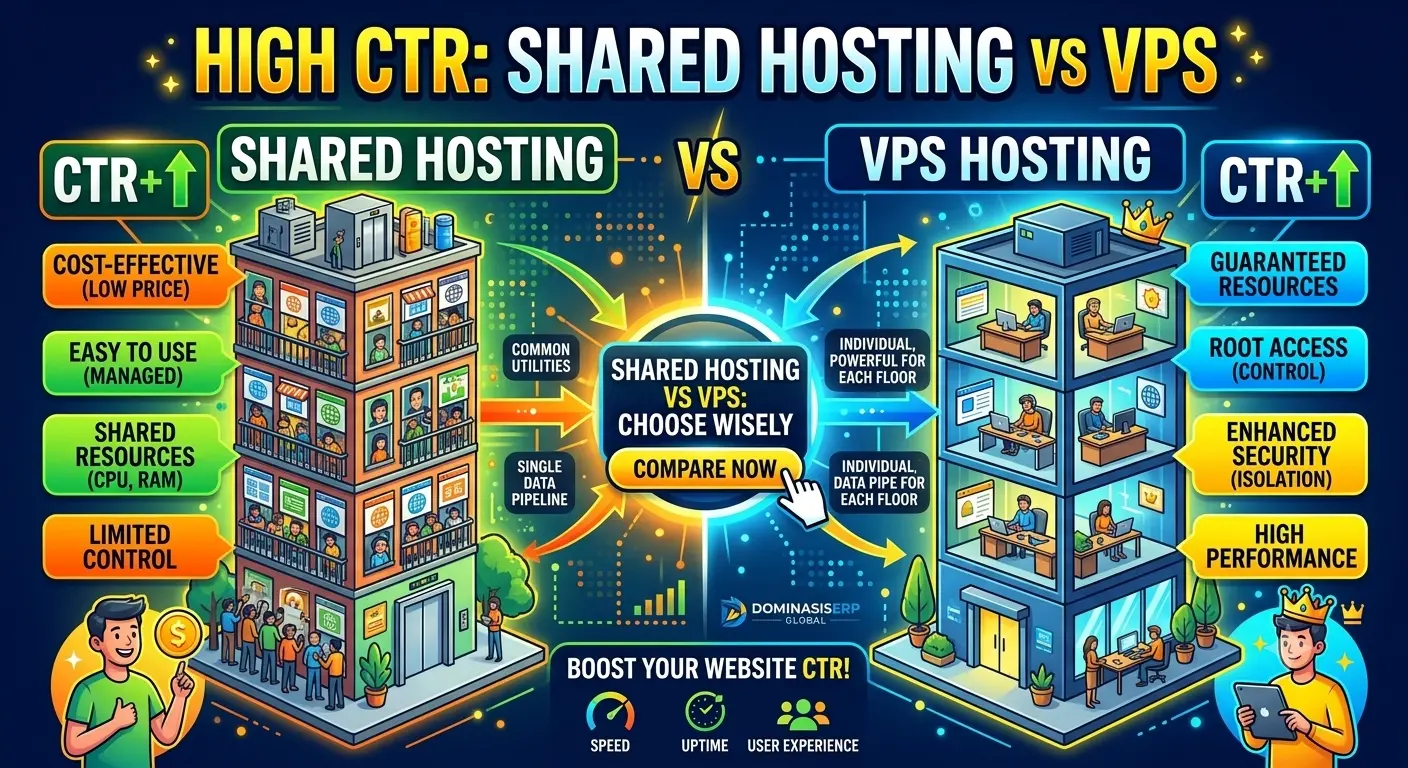
Shared hosting is essentially a communal living environment for websites. You share the server’s resources—CPU, RAM, and bandwidth—with hundreds, sometimes thousands, of other websites. While this keeps costs low, it creates several inherent limitations:

  • Resource Contention: If one “neighbor” on your server experiences a massive traffic spike, it can consume the majority of the available resources, leading to slower load times or even downtime for your site.

  • Limited Control: You have very little say over the server environment. You cannot install custom software, modify server-level configurations, or implement advanced caching mechanisms that might significantly boost performance.

  • Security Risks: Since you share an environment with many other users, your site’s security is only as strong as the weakest site on the server. If a neighbor is compromised, it can potentially impact your security.

The Power of VPS Hosting

A Virtual Private Server (VPS) takes the concept of shared hosting but adds a layer of virtualization. While you are still on a physical server with other users, a VPS creates a “virtual” environment that is entirely isolated from others. You are allocated dedicated portions of the server’s CPU, RAM, and storage, which remain yours regardless of what other sites on the server are doing.

Key Benefits of Upgrading to VPS:

  1. Guaranteed Resources: Unlike shared hosting, your allocated resources are guaranteed. This ensures consistent performance, regardless of traffic spikes or server load from other users.

  2. Full Root Access: With a VPS, you have “root” or administrative access. This means you can install any software, customize the operating system, and configure the server exactly to your specific needs.

  3. Enhanced Security: Isolation is the primary security benefit of VPS. Because your site operates in its own container, you are protected from the actions of other users on the physical server, and you can implement customized security protocols tailored to your application.

  4. Improved Scalability: VPS environments are designed to be scalable. If you notice your site’s traffic growing steadily, you can quickly and easily upgrade your resources without the need for a complex migration process.

When Is It Time to Upgrade?

How do you know when it is time to move beyond shared hosting? Watch for these common signs:

  • Consistent Performance Issues: If your site consistently takes more than 2-3 seconds to load despite your best efforts to optimize, it may be a resource limitation issue.

  • Frequent Downtime: If you find that your site goes down during peak hours, it is a clear indicator that your current plan cannot handle your concurrent user count.

  • Requirement for Custom Software: If your development team needs specific modules or server-side software that cannot be installed on a shared environment, a VPS is mandatory.

  • High-Volume E-commerce: For online stores, reliability and speed are directly linked to revenue. The improved stability of a VPS is a strategic investment for any e-commerce business.

Making the Transition

Moving to a VPS can seem intimidating, but for a growing brand, it is a milestone. Many managed VPS providers—such as those we recommend at DMS Global—offer assistance in migrating your existing site, ensuring minimal downtime and a seamless transition. By prioritizing your infrastructure now, you are building a solid foundation for the future success of your website.

In conclusion, while shared hosting is a perfect starting point, it is not meant for the long term. The transition to VPS hosting is a natural and necessary step toward creating a professional, fast, and secure digital experience for your users.

related tags: vps hosting, shared vs vps, website performance, server migration, hosting upgrade

Top 5 Affordable Shared Hosting Providers for Small Businesses

Shared Hosting

Choosing the right web hosting is a foundational step for any small business. For startups and growing brands, shared hosting provides an accessible entry point that balances cost-efficiency with the essential features needed to establish a digital presence. In 2026, the market offers several high-performing options that cater to entrepreneurs who need reliable uptime, strong security, and ease of use without breaking their budget.

DiggitGlobal

Why Shared Hosting Remains a Smart Choice

Shared hosting remains the most popular starting point because it allows multiple websites to reside on a single server, significantly reducing operational costs. For brochure-style websites, portfolios, and new business ventures, this setup is more than sufficient.

DiggitGlobal

When selecting a provider, it is crucial to look beyond the initial promotional price. Focus instead on these five essentials:

  • Uptime Reliability: Aim for at least 99.9% uptime to ensure your site remains accessible to customers.

Support Quality: 24/7 customer support is vital for resolving technical issues quickly, especially for businesses serving clients across multiple time zones.

  • Security Essentials: Look for providers that offer free SSL certificates, regular automated backups, and baseline malware scanning.

    Hostaccent
  • Performance: Ensure the host utilizes SSD or NVMe storage to maintain fast page load speeds, which directly impacts your SEO rankings and conversion rates.

    HostPapa
  • Scalability: Choose a provider that offers a clear upgrade path to VPS or cloud hosting as your traffic grows, allowing you to transition without downtime or risky migrations.

Top 5 Affordable Shared Hosting Providers for 2026

Based on performance benchmarks, support quality, and long-term value, here are five of the best shared hosting providers for small businesses:

1. Hostinger

Hostinger is widely recognized as the top choice for budget-conscious small businesses. It provides an excellent balance of affordability and performance, featuring LiteSpeed servers that offer fast page loads. Their user-friendly hPanel makes it easy for non-technical owners to manage their sites, databases, and emails.

2. SiteGround

SiteGround is the premier pick for businesses that prioritize premium support and high-performance infrastructure. While it may have a higher renewal price point, its integration with Google Cloud and advanced security features make it an ideal choice for content-heavy WordPress sites or growing businesses that require professional-grade reliability.

3. Bluehost

As a long-standing partner of WordPress.org, Bluehost is a top contender for businesses building on the WordPress platform. Its plans are tailored for beginners, featuring one-click WordPress installations and a helpful suite of tools for e-commerce, making it a reliable and easy-to-use option for those starting their first business site.

4. A2 Hosting

A2 Hosting stands out for its speed-focused infrastructure, often utilizing NVMe storage to ensure rapid performance even on shared plans. Their “Guru Crew” support team is highly rated by small business users, and they offer generous money-back guarantees, providing peace of mind for new entrepreneurs.

5. DreamHost

For businesses that prioritize uptime and environmental responsibility, DreamHost is an excellent choice. They offer a 100% uptime guarantee and provide unlimited bandwidth and storage on many plans, making them ideal for businesses that want to grow without worrying about resource limits. Their focus on WordPress-specific support also makes them a strong partner for long-term scalability.

Conclusion

The “cheapest” plan is rarely the best long-term decision if it lacks reliability or support. By choosing a provider that offers stable performance and a clear growth path, you ensure that your business website serves as a reliable asset rather than a technical hurdle. Evaluate your specific needs—such as e-commerce functionality or high-traffic expectations—and select a partner that allows you to focus on your customers instead of server management.

Shared Hosting 101: When Is It the Right Choice for Your Startup?

Shared Hosting

Shared Hosting 101 | Choosing the right hosting platform is one of the most critical decisions for a new startup. When you are just getting started, budget is often tight, technical resources are limited, and your primary focus is on validating your business idea. Shared hosting has long been the go-to solution for thousands of entrepreneurs. But is it the right choice for your specific project?

In this guide, we break down what shared hosting is, its advantages for startups, and when it is time to consider an upgrade.

Understanding Shared Hosting

At its core, shared hosting is a web hosting service where multiple websites reside on a single physical server. Think of it like renting an apartment in a large building. You have your own private space, but you share common infrastructure—such as electricity, plumbing, and security—with your neighbors.

Because the server resources (CPU, RAM, and bandwidth) are shared among many users, the cost of hosting is significantly lower compared to dedicated or cloud hosting solutions. For a startup, this means you can get your website online for a very affordable price, often for just a few dollars per month.

Why Shared Hosting is Ideal for Startups

For early-stage startups, shared hosting offers several strategic advantages:

1. Cost-Effectiveness

Every dollar counts when you are bootstrapping a business. Shared hosting plans are incredibly budget-friendly, allowing you to allocate your limited capital toward product development, marketing, or customer acquisition rather than high infrastructure costs.

2. Ease of Use

Most shared hosting providers include user-friendly control panels, such as cPanel or DirectAdmin. These platforms provide a dashboard where you can manage your email accounts, databases, and website files without needing advanced technical knowledge. For founders who are not developers, this reduces the learning curve drastically.

3. All-in-One Convenience

Shared hosting packages often come bundled with essential features like free SSL certificates, automated backups, and one-click installers for popular platforms like WordPress. This saves you the time of setting up these configurations manually.

When Should You Choose Shared Hosting?

Shared hosting is generally the best choice for:

  • Brand New Websites: If you are launching a new landing page or a personal project with low initial traffic.

  • Proof of Concept: You are testing a business idea and need a functional website to demonstrate your value proposition.

  • Static Content Sites: Websites that primarily serve informational content and do not require heavy database queries.

  • Limited Budget: You need to minimize operational overhead during the initial growth phase.

When Shared Hosting May Not Be Enough

As your startup gains traction, you may begin to face the limitations of a shared environment. You should look into upgrading to managed VPS or cloud hosting when:

  • Traffic Spikes: Sudden surges in visitor numbers can slow down your site or even cause downtime because you are sharing resources with other sites on the same server.

  • Performance Issues: Your application becomes more complex, requiring more RAM or CPU power to load quickly.

  • Security Requirements: If you are handling sensitive customer data, you may need a more isolated environment with advanced security controls.

  • Custom Configurations: Some applications require specific server software or configuration changes that are not permitted in a standard shared environment.

Making the Move to Better Performance

The goal for any serious startup is to eventually transition toward a more scalable infrastructure. As your organic performance improves and your revenue grows, your hosting needs will naturally shift from “just getting online” to “maintaining maximum speed and reliability.”

Moving from shared hosting to a managed VPS or high-performance cloud solution—like the services we often discuss here at DMS Global—will ensure that your growing user base receives the best possible experience. Consistent uptime, faster load times, and improved security are key factors that search engines prioritize, directly impacting your SEO rankings.

Conclusion

Shared hosting is an excellent entry point for startups. It lowers the barrier to entry, keeps your expenses low, and provides the essential tools to build your digital presence. By understanding its strengths and recognizing when your business has outgrown its current setup, you can make informed decisions that support your long-term growth and success.