
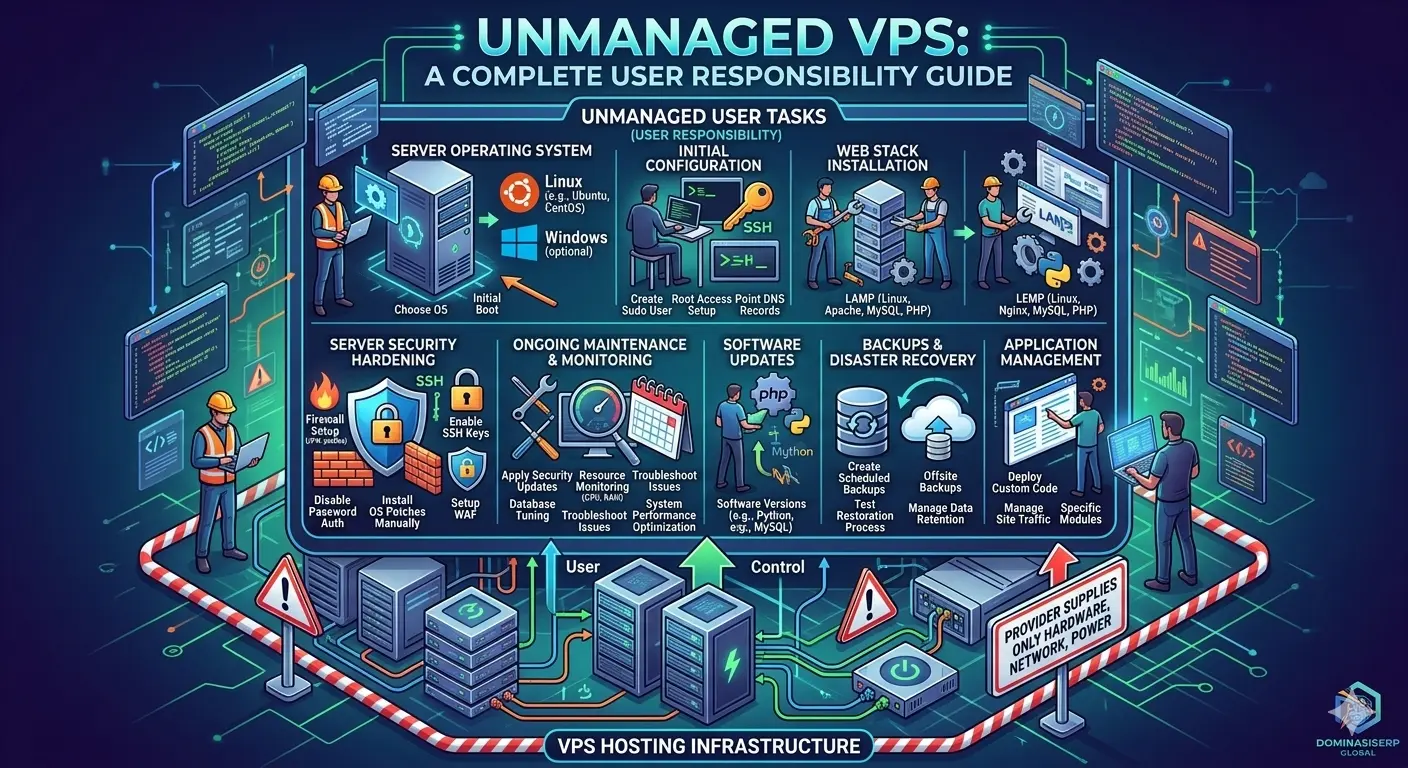
For developers, system administrators, and those eager to learn the inner workings of the web, an unmanaged Virtual Private Server (VPS) is the ultimate laboratory. Unlike managed environments where a provider handles the backend, an unmanaged VPS gives you full root access and complete control over every aspect of your server. While this requires a higher level of technical responsibility, it offers unparalleled flexibility and cost-efficiency for those who have the expertise to manage their own infrastructure.
This guide outlines the essential steps for setting up an unmanaged VPS, ensuring you build a foundation that is secure, fast, and optimized for your specific needs.
Why Choose an Unmanaged VPS?
Choosing an unmanaged VPS is a strategic decision for projects where you need to:
-
Implement Custom Stacks: You have complete freedom to choose your operating system, web server (Nginx, Apache, or OpenLiteSpeed), and database engine.
-
Optimize Costs: Unmanaged instances are generally cheaper than managed ones because you are paying only for the hardware and network, not the administrative overhead.
-
Learn Infrastructure: There is no better way to understand Linux, networking, and server security than by configuring them yourself.
Step 1: Initial Server Provisioning
Once you purchase your unmanaged VPS, the provider typically provides a fresh instance of a Linux distribution (such as Ubuntu or Debian). Your first task is to access the server via SSH.
-
Connect via SSH: Use your terminal or a tool like PuTTY to log in as the root user.
-
Update the System: Immediately run system updates to ensure all packages are current and secure.
-
sudo apt update && sudo apt upgrade -y
-
Step 2: Security Hardening
Security is the most critical aspect of an unmanaged environment. Since you have no provider to patch your system, you must be proactive.
Executive Deep-Dive
Scaling Beyond Traffic to Revenue
Most enterprises fail because they chase clicks instead of trust. While building your global presence, ensure your EEAT 3.0 signals are synchronized across all regions.
Recommended for you:
→ The Shift from Traffic to Trust: A New KPI for Enterprise SEO-
Create a Sudo User: Never run your server as the root user for daily tasks. Create a new user with sudo privileges.
-
Configure a Firewall: Use
ufw(Uncomplicated Firewall) to block all incoming traffic by default and allow only the necessary ports, such as SSH (22), HTTP (80), and HTTPS (443). -
Disable Password Authentication: Configure your SSH to use public/private key pairs instead of passwords, which effectively eliminates the risk of brute-force password attacks.
Step 3: Installing the Web Stack
With the server secured, you can now install your web stack. A common configuration for high-performance projects is the LEMP stack (Linux, Nginx, MySQL/MariaDB, PHP).
-
Install Nginx: A high-performance web server known for its stability and low resource usage.
-
Install MariaDB: A reliable, community-developed fork of MySQL that is excellent for database-heavy applications.
-
Install PHP-FPM: This allows your server to process dynamic PHP content efficiently.
Step 4: Domain and SSL Configuration
To make your site accessible, you must point your domain’s DNS records to your server’s IP address. Once the DNS propagates, install an SSL certificate using Certbot. This enables HTTPS, which is non-negotiable for modern web security and SEO performance.
Step 5: Ongoing Maintenance
Owning an unmanaged VPS means the responsibility for upkeep is entirely yours.
-
Regular Patching: Set a schedule to check for and apply security updates for your OS and installed software.
-
Monitoring: Use tools like Netdata or Glances to monitor CPU usage, RAM, and disk space to ensure your server remains stable.
-
Backups: Since you are in control, ensure you have an external backup strategy in place. Never rely on the local disk as your only copy of your data.
Conclusion
Setting up your own unmanaged VPS is a powerful way to take total ownership of your digital assets. While it demands a technical commitment, the rewards are a highly optimized, custom-tailored environment that perfectly supports your application’s unique requirements. For those building scalable, high-performance projects, the skills learned in managing your own VPS are invaluable for your long-term success.
related tags: unmanaged vps, linux server management, server security, web development, infrastructure engineering