How to Remove Negative Google Results: Technical & Legal Guide 2026

How to Remove Negative Google Results

Introduction: Beyond Suppression

While pushing negative content to Page 2 is a common strategy, the ultimate goal for any brand or executive is to remove negative Google results entirely. In 2026, Google has refined its removal policies, making it easier to target specific types of harmful content while maintaining a high bar for public interest information.

If you are dealing with false accusations, outdated data, or privacy violations, this guide covers the actionable steps to strike that content from the global search index.


1. Identifying Removable Content (H2)

Not everything can be removed. Google typically acts on:

  • Sensitive Personal Info: Doxxing, bank details, or government IDs.

  • Non-Consensual Imagery: Explicit or private photos shared without permission.

  • Outdated Content: Information that has been changed on the source site but still appears in Google’s cache.

  • Legal Violations: Content that a court has officially ruled as defamatory or illegal.


2. The Technical Request: Using Google’s Removal Tools (H2)

Google provides a suite of tools for webmasters and individuals:

  1. Refresh Outdated Content Tool: Use this if the site owner has deleted the text, but the negative snippet still shows up in search results.

  2. Legal Removal Requests: A formal portal where you can submit DMCA notices or court orders.

  3. Personal Information Removal: A specialized request form for content that poses a risk of identity theft or physical harm.


3. The “Right to be Forgotten” in 2026 (H2)

For those operating in the EU, UK, or jurisdictions with similar privacy laws, the “Right to be Forgotten” is a powerful tool. You can argue that certain information is inadequate, irrelevant, or no longer relevant.

  • Pro Tip: This is highly effective for old news articles about minor legal issues that were later resolved or dismissed.


4. Negotiating with Webmasters (H2)

Often, the fastest way to remove a result is at the source.

  • The Professional Outreach: Contacting the site owner with a polite, legally-backed request to update or remove the article.

  • The “No-Index” Compromise: If they won’t delete the article, ask them to add a noindex tag. This keeps the article on their site but hides it from Google search results.


5. Technical Suppression as a Safety Net (H2)

While you wait for removal requests to be processed (which can take weeks), you must engage in Active Suppression.

  • Creating a “Shield” of positive assets.

  • Utilizing DMS Global’s Scalable SEO to flood the search engine with verified, high-authority information about your professional achievements.


6. Checklist: Removal Success Path

Step Action Expected Outcome
Audit Identify every negative URL. Clear target list.
Classify Is it Defamation, Privacy, or Copyright? Proper legal path.
Request Submit via Google Legal Portal. Official review.
Follow-up Monitor status in Search Console. De-indexation.

Conclusion: Professional Reputation Defense

Knowing how to remove negative Google results is a critical skill for modern digital infrastructure specialists. By combining legal knowledge with technical SEO precision, you can ensure that your search results reflect the truth of who you are today, not the mistakes or malice of the past.


How to Get Rid of Negative Search Results: 2026 Guide to ORM

How to Remove Negative Google Results

Introduction: Your Digital Reputation is Your Currency

In 2026, your “Googleable” reputation is more important than your physical business card. Whether you are a CEO, a growing brand, or a digital consultant, a single negative search result can cost you millions in lost opportunities. But here is the hard truth: Google doesn’t care if a result is “unfair”—it only cares if it’s relevant and authoritative.

If you are looking for how to get rid of negative search results, you have two paths: Removal or Suppression. This guide will walk you through the exact technical framework used by top reputation management agencies to clean up Page 1.


1. The Removal Path: Can You Actually Delete It?

Deleting a link from Google is difficult, but not impossible. In 2026, these are the primary legal and technical avenues:

  • Legal Removals (DMCA): If the negative content uses your copyrighted images or intellectual property without permission.

  • Right to be Forgotten (RTBF): Primarily for users in the EU and UK, allowing you to request the removal of outdated or irrelevant personal data.

  • Defamation and Court Orders: If you can prove the content is factually false and defamatory, a court order can force Google to de-index the URL.

  • Terms of Service Violations: Reporting content that violates the platform’s own rules (e.g., doxxing, hate speech, or sharing private financial info).


2. The Suppression Path: The “Search Result Burial” Strategy

If a negative result is true or hosted on a high-authority news site, you likely cannot delete it. Your only option is to suppress it—pushing it down to Page 2 or Page 3 where 95% of users never click.

How Suppression Works in 2026: To push a negative link down, you must create a “buffer” of 10+ positive, high-authority assets that outrank the negative content.

  1. High-Authority Social Profiles: Beyond LinkedIn and Twitter, utilize platforms like Medium, Crunchbase, and GitHub.

  2. Personalized Digital Infrastructure: Launching sites like yourname.com or brand-reviews.com on high-performance hosting.

  3. Strategic Guest Posting: Publishing positive PR on sites with higher “Domain Authority” than the source of the negative content.


3. Using Scalable SEO for Reputation Recovery

At DMS Global, we apply Scalable SEO frameworks to reputation management. Instead of building one site, we build an ecosystem:

  • Micro-sites: Small, hyper-focused sites targeting your specific name or brand keywords.

  • Programmatic PR: Distributing positive news across a network of authoritative news outlets to flood the SERPs.

  • Internal Link Interlocking: Linking all your positive assets together to signal to Google that these are the most relevant pages for your brand.


4. Technical Tactics: Suppressing the “Snippet”

Sometimes, you don’t need to move the link—you just need to change what people see.

  • Rich Snippet Manipulation: Using Schema Markup on your positive sites to take up more visual space on Page 1 (FAQs, Star Ratings, etc.).

  • Knowledge Panel Optimization: Claiming and optimizing your Google Knowledge Panel to ensure the right-hand side of the search results is controlled by you, not an algorithm.


5. Comparison: Removal vs. Suppression

Feature Content Removal Search Suppression
Speed Slow (Months/Years) Moderate (3–6 Months)
Success Rate Low (Case Dependent) High (Guaranteed with Effort)
Cost High (Legal Fees) Moderate (SEO/Content Fees)
Permanence Permanent Requires Ongoing Maintenance

6. Monitoring Your Results Daily

Reputation management is not a “set and forget” task. In 2026, you must monitor your brand keywords daily using tools like Google Search Console and specialized ORM trackers. If a negative link starts climbing back up, you need to inject more “authority” into your positive buffer sites.


Conclusion: Reclaim Your Name

Getting rid of negative search results is a battle of authority. By out-optimizing and out-publishing the negativity, you can reclaim control of your digital narrative. Don’t let one bad link define your future.

Scalable SEO: How to Scale Organic Traffic with Programmatic Frameworks in 2026

global seo guide

Introduction:

The Death of Traditional SEO

In 2026, writing one blog post a week is no longer a viable growth strategy for ambitious enterprises. As AI-driven search and massive content hubs dominate the SERPs, businesses need to pivot toward Scalable SEO.

Scalable SEO isn’t just about doing “more” SEO; it’s about building a system where your organic growth is decoupled from your linear headcount. It’s the difference between building a house by hand and building a factory that prints 1,000 houses a day. This guide will show you how to build that factory.


1. What is Scalable SEO?

Scalable SEO is a framework that leverages technology, data, and automation to create and optimize thousands of high-quality pages simultaneously.

  • The Goal: To capture “The Long Tail” at scale.

  • The Method: Programmatic SEO (PSEO), automated technical audits, and infrastructure that can handle millions of impressions without slowing down.


2. The Pillar of Scale: Programmatic SEO (PSEO)

Programmatic SEO is the heart of scalability. Instead of manually creating pages, you use datasets to generate content dynamically.

  • Dataset Selection: High-quality data is the new “backlink.” Whether it’s ERP pricing data, location-specific service keywords, or technical comparisons, your data must be unique and valuable.

  • Template Design: Creating a “Rich” template that Google loves. This means adding dynamic tables, charts, and unique snippets (via PHP or WPCode) so every page feels handcrafted.

  • Automation Tools: Using tools like WP All Import and Rank Math to push thousands of records into WordPress while maintaining perfect SEO metadata.


3. Building the Infrastructure for Scale

You cannot run a Scalable SEO strategy on $5 shared hosting.

  • Server Performance: High-scale sites need specialized stacks (like OLS or Nginx) to ensure TTFB remains low even with 100,000+ posts in the database.

  • Database Optimization: Large WordPress sites often lag. Scalable SEO requires indexing your database tables correctly and offloading media to CDNs.

  • Edge SEO: Implementing SEO changes at the CDN level (Cloudflare/Akamai) to bypass CMS limitations and improve global crawlability.


4. Content Quality in the Era of AI (E-E-A-T)

Google’s 2026 updates are brutal on “thin” automated content. To scale successfully, your pages must demonstrate:

  • Experience: Real-world data points and case studies.

  • Expertise: Deep technical insights (e.g., comparing Odoo vs SAP architecture).

  • Authoritativeness: Strategic internal linking and high-quality outbound links.

  • Trustworthiness: Clear authorship and transparent data sources.


5. Technical SEO at Scale: The Sitemap Challenge

When you have 50,000+ pages, traditional sitemaps break.

  • Split Sitemaps: Breaking your XML sitemaps into smaller chunks (e.g., 1,000 URLs per map) to ensure Google Bot crawls every corner of your site.

  • Internal Link Density: Using automated “Related Posts” or category-based internal linking to ensure no page is more than 3 clicks away from the homepage.


6. Measuring Success: The Scalability Metrics

Metric Why it matters in 2026
Indexation Rate What % of your programmatic pages are actually in Google?
Crawl Efficiency Is Google wasting time on low-value pages?
Impression Growth Does your traffic scale linearly with your page count?
Conversion (ROI) Are these thousands of pages actually generating leads or AdSense revenue?

7. Case Study: Scaling to $100/Month AdSense Goal

For many, the $100/month revenue goal is the first “proof of concept.” By scaling to 1,000+ high-intent pages (like ERP comparisons), you create 1,000+ “fishing nets” in the global search ocean. Even with a low CTR, the sheer volume of impressions ensures a steady revenue stream.


Conclusion: Start Small, Scale Fast

The beauty of Scalable SEO is that you can start with a small niche. Once the framework is proven, you simply “pour more data” into the system. In 2026, the brands that win will be the ones that own the most relevant search real estate through automation and technical excellence.

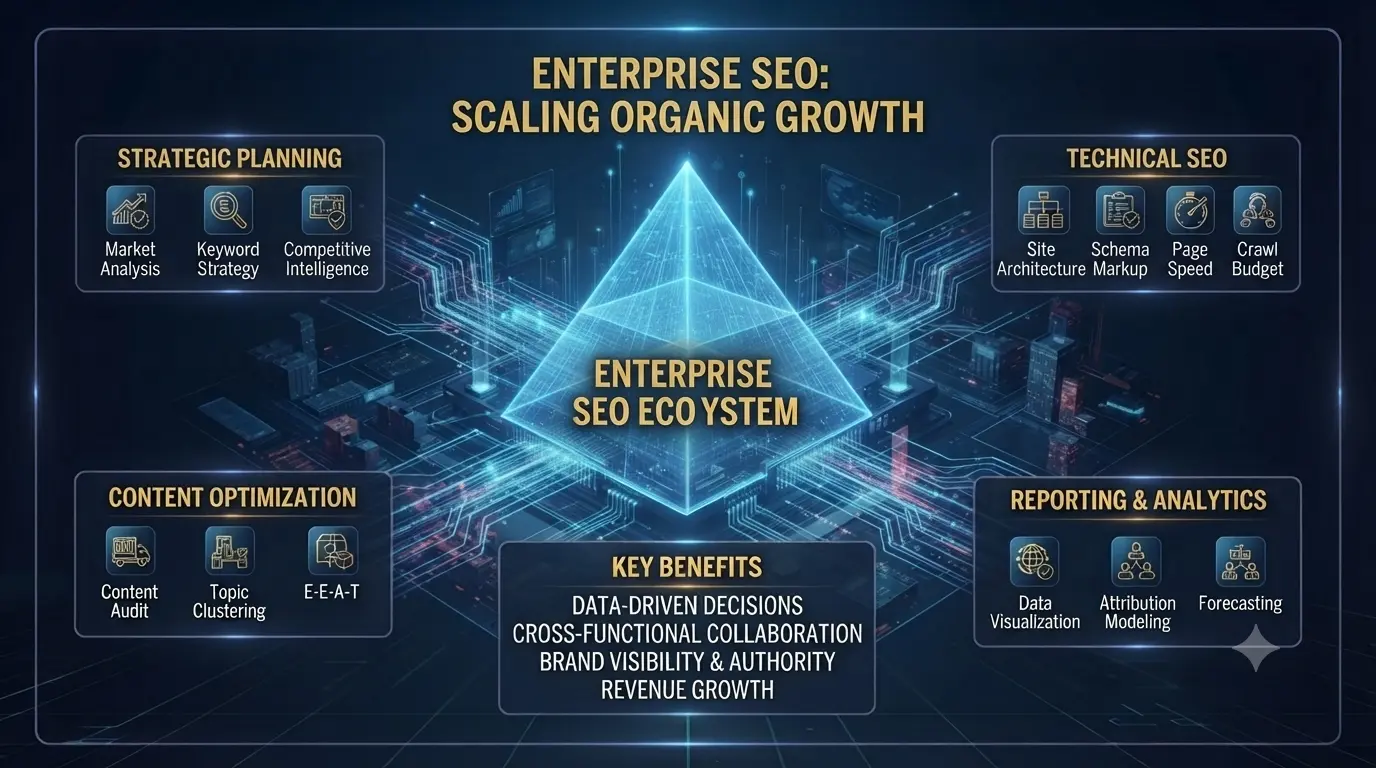
International Enterprise SEO Strategy 2026: Scaling Global Search Dominance

Enterprise SEO Toronto

Introduction: The Complexity of Global Scale

In 2026, SEO for a single-country startup is a different beast compared to International Enterprise SEO. When you are managing tens of thousands of pages across multiple languages, regions, and legal jurisdictions, a simple keyword strategy is no longer enough.

For global enterprises, SEO is not just about rankings—it’s about data synchronization, infrastructure stability, and brand consistency. This guide explores the sophisticated frameworks required to dominate global search results in 2026.


1. Global Site Architecture: Subfolders, Subdomains, or ccTLDs?

One of the most debated topics in international SEO is the domain structure.

  • ccTLDs (e.g., .de, .fr, .id): Best for local signals but expensive and difficult to maintain at an enterprise scale.

  • Subfolders (e.g., domain.com/en/): The gold standard for Enterprise SEO in 2026. It consolidates all “Domain Authority” into one root, making it easier to rank new regional pages.

  • Subdomains (e.g., us.domain.com): Useful for separating distinct business units or tech stacks, but can dilute link equity.


2. Hreflang Mastery at Scale

Hreflang is the “Achilles’ heel” of international SEO. For an enterprise with 50 countries, the mapping becomes a nightmare.

  • The XML Sitemap Approach: In 2026, we recommend handling hreflang via XML sitemaps rather than on-page tags to reduce page bloat and improve load speeds.

  • Dynamic Mapping: Utilizing automation to ensure that when a page is updated in the UK, its US and Australian counterparts are correctly cross-referenced instantly.


3. Centralized vs. Decentralized Content Strategy

How do you maintain a “Global Voice” while staying “Locally Relevant”?

  • The Hybrid Model: Create core “Global Assets” at the headquarters level, but allow regional teams to localize (not just translate) the content to fit cultural nuances and local search intent.

  • AI-Assisted Localization: In 2026, enterprises are using advanced LLMs to adapt content for local dialects while maintaining strict brand guidelines (E-E-A-T).


4. Technical Infrastructure for Global Speed

  • Edge SEO & CDNs: For international enterprises, serving a site from a single server is a recipe for high bounce rates. Utilizing Edge Computing (like Cloudflare Workers) to inject SEO metadata based on the user’s location is a 2026 requirement.

  • Core Web Vitals Across Borders: Ensuring that your site passes the “LCP” and “INP” benchmarks in regions with slower internet infrastructure (like parts of SE Asia or Africa) is crucial for global rankings.


5. International Keyword Research: Beyond Translation

Translating keywords is the biggest mistake in Enterprise SEO.

  • Example: A “cell phone” in the US is a “mobile” in the UK and a “handphone” in Indonesia.

  • The Strategy: Conduct native-language keyword research in every target market to capture local search volume that automated tools often miss.


6. Enterprise SEO Reporting for Stakeholders

At the enterprise level, you aren’t just reporting to SEOs; you are reporting to the C-Suite.

  • Share of Voice (SoV): Measuring how much of the “Search Real Estate” your brand owns compared to global competitors.

  • Revenue Attribution: Connecting organic global traffic directly to lead generation and sales via CRM integrations (like Odoo or NetSuite).


7. Comparison: International SEO Challenges

Feature Standard SEO International Enterprise SEO
Scale 100s of pages 100,000s of pages
Complexity Single Language Multi-language / Multi-region
Technical Simple Plugins Edge SEO / API-Driven
Team 1-2 People Cross-functional Global Teams


Conclusion: The Future of Global Search

International Enterprise SEO in 2026 is an ongoing battle of technical precision and cultural adaptation. By focusing on a solid architectural foundation and localized content excellence, your brand can become a global authority that Google trusts implicitly.

Majestic vs Ahrefs 2026: Which Backlink Tool Wins for SEO Experts?

Ahrefs vs Majestic
Majestic SEO vs Ahrefs

Choosing the right SEO toolkit can be overwhelming, which is why this Ahrefs vs Majestic comparison is essential for your 2026 strategy. Whether you are focused on deep backlink analysis or overall site health, understanding the strengths of these two industry giants is critical. In this guide, we break down their database size, interface, and cost-efficiency to help you decide which tool fits your business needs.

Why Choose Majestic vs Ahrefs in 2026?

In the world of off-page SEO, two names have consistently remained at the top of the food chain: Majestic SEO and Ahrefs. For years, SEO specialists have debated which index is more accurate, which crawler is faster, and which metrics—Trust Flow or Domain Rating—actually correlate with Google rankings in 2026.

As Google’s algorithms become more sophisticated in identifying link spam and AI-generated link networks, having the right data is more critical than ever. In this deep dive, we compare Majestic and Ahrefs to help you decide where to invest your hard-earned SEO budget.

Comparison: Majestic SEO vs. Ahrefs at a Glance

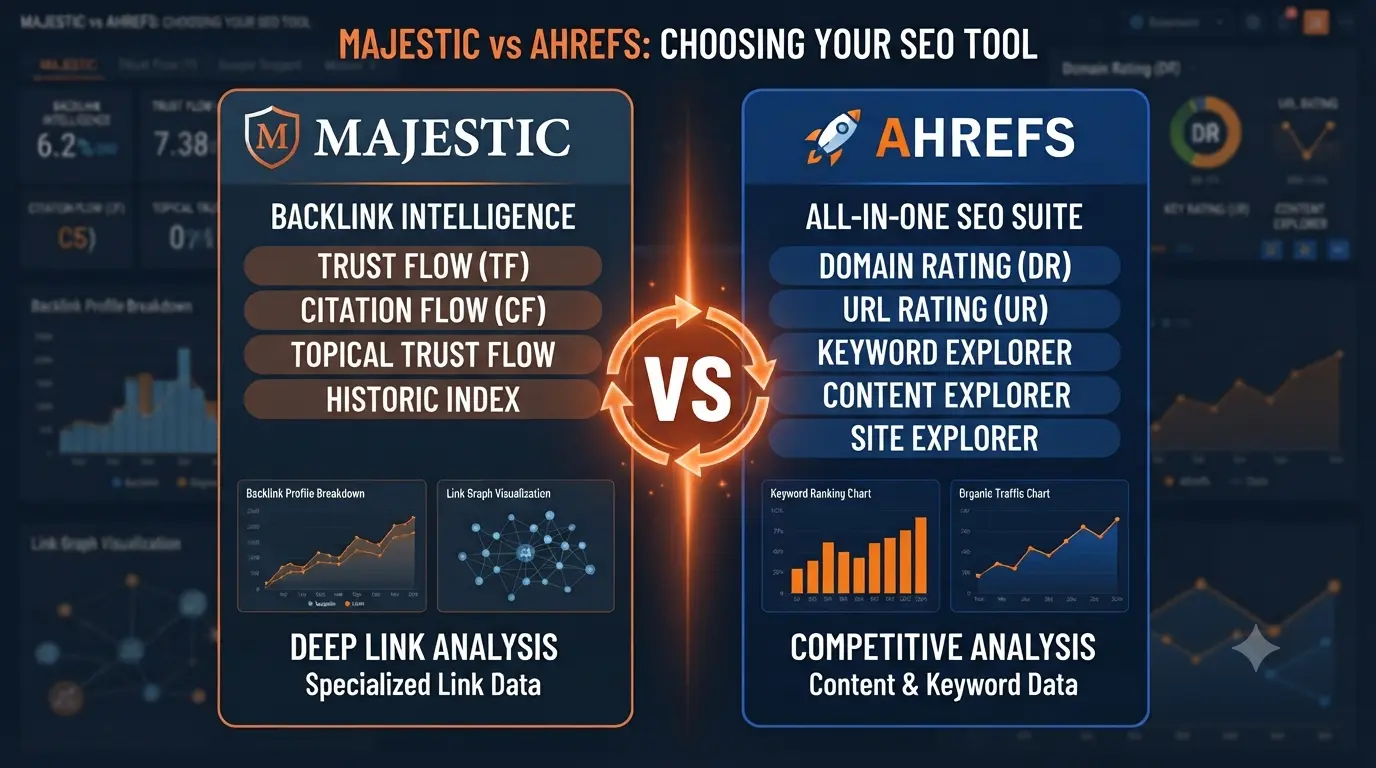
  • Primary Focus:

    • Majestic SEO: Specializes in link forensics, PBN analysis, and link auditing.

    • Ahrefs: An all-in-one SEO suite covering keyword research, site audits, and competitor analysis.

  • Best Metric for Accuracy:

    • Majestic SEO: Uses Trust Flow (TF) and Citation Flow (CF) to measure niche relevancy and trust.

    • Ahrefs: Uses Domain Rating (DR) as the industry standard for site authority.

  • Pricing & Accessibility:

    • Majestic SEO: Highly affordable, starting at approximately $49/month (perfect for freelancers).

    • Ahrefs: Premium investment, starting at $99+/month (best for teams and agencies).

  • The Final Verdict:

    • Choose Majestic if you are a link-building purist who needs granular data to avoid Google penalties.

    • Choose Ahrefs if you need a comprehensive, user-friendly tool to manage your entire SEO workflow.

1. Metrics Showdown: Trust Flow vs. Domain Rating

ADVERTISEMENT / SPONSORED SOLUTION

Reliable resources for your business growth

Understanding how these tools “score” the internet is the first step in choosing between them.

  • Majestic (Trust Flow & Citation Flow): Majestic focuses on the quality (Trust) and quantity (Citation) of links. Its Topical Trust Flow is a standout feature, showing you the niche relevancy of a backlink profile.

  • Ahrefs (Domain Rating & URL Rating): Ahrefs’ DR has become the industry’s default “authority” metric. It is purely based on the strength of a site’s backlink profile and is widely used for guest post vetting and competitor analysis.

  • 2026 Verdict: While DR is more popular for “selling” SEO services, Majestic’s Trust Flow is often more accurate for identifying manipulative link schemes.


2. Crawler Performance and Index Size

  • Ahrefs: Ahrefs boasts the world’s largest third-party backlink index. Its crawler, AhrefsBot, is consistently ranked as one of the most active in the world. In 2026, Ahrefs usually finds new backlinks faster than almost any other tool.

  • Majestic: While its database might feel smaller than Ahrefs, Majestic’s “Fresh Index” is incredibly clean. It keeps data for the last 120 days, giving you a real-time view of a site’s current link health without the “ghost” links of the past.


3. Key Features for Power Users

  • Majestic’s Link Context: This unique feature shows you exactly where a link is located—is it in a paragraph of text, a footer, or a sidebar? It even tells you if there are other links nearby.

  • Ahrefs’ Content Explorer: Ahrefs is more than just a link tool. Its Content Explorer allows you to find high-performing content in any niche, making it a superior choice for content marketing and link-building outreach.


4. Pricing and Accessibility

This is a high-intent topic for AdSense.

  • Majestic SEO: More accessible for freelancers. Starting at around $49.99/month, it provides the essential data needed for link auditing without the high overhead.

  • Ahrefs: Ahrefs has moved toward a more complex “Pay-per-credit” pricing model in 2026. While more expensive (starting at $99+), it provides an all-in-one SEO suite that Majestic doesn’t offer.

Ahrefs Pricing 2026: Is the SEO Giant Still Worth Your Marketing Budget?


5. Comparison Table: Majestic vs. Ahrefs

🏆

DMS Global: Expert Choice

Evaluating ERP ROI for 2026? Leverage our technical breakdown:

View Odoo Enterprise Pricing 2026 →
Feature Majestic SEO Ahrefs
Primary Focus Link Forensics All-in-One SEO
Best Metric Trust Flow (TF) Domain Rating (DR)
Niche Relevancy Topical Trust Flow Basic Categorization
UI Experience Traditional/Technical Modern/Intuitive
Keyword Research Limited Industry Leading
Budget Affordable ($) Premium ($$$)

6. Use Cases: When to Choose Which?

Choose Majestic if:

  • You are an SEO auditor performing link cleanup.

  • You are analyzing Private Blog Networks (PBNs).

  • You need deep niche-relevancy data for guest posting.

Choose Ahrefs if:

  • You need a tool for your entire SEO workflow (Keyword research + Link building).

  • You are tracking daily rank changes.

  • You want a user-friendly interface that team members can learn quickly.

Why Trust Flow and Citation Flow Matter in 2026

When you look at Majestic vs Ahrefs, the most unique feature of Majestic is its flow metrics. Unlike Ahrefs’ Domain Rating, Majestic’s Trust Flow tells you how trustworthy a site is based on the quality of its links. In an era of AI-generated spam, knowing the “link neighborhood” of a website is more important than ever. If you want to avoid Google penalties, Majestic’s data offers a layer of security that other tools might miss.

Verdict: Which Tool Should You Choose for DMS Global?

If your business is focused strictly on backlink auditing and saving costs, Majestic is the winner for 2026. However, if you need a comprehensive tool for keyword research and site audits, Ahrefs remains a powerhouse. For a growing site like DMS Global, using Majestic for deep link analysis can provide a competitive edge without breaking the bank. By choosing the right tool, you can reach your $10 AdSense milestone faster.


Conclusion: The Verdict for 2026

If you are a link-building purist who lives and breathes backlink profiles, Majestic SEO remains a specialized surgical tool. However, for 95% of SEO professionals in 2026, Ahrefs is the superior investment because of its massive database and integrated feature set.


⚡ DMS Global Amazon Authority 2026:

Amazon Product Authority & E-E-A-T Summary

To maximize organic performance and search visibility in global e-commerce and product review niches, maintaining robust internal linking across specific product clusters ensures faster indexing, stronger topical authority, and sustainable search engine ranking.

Majestic SEO vs Semrush 2026: Which Backlink Tool is Worth Your Budget?

Majestic vs Semrush

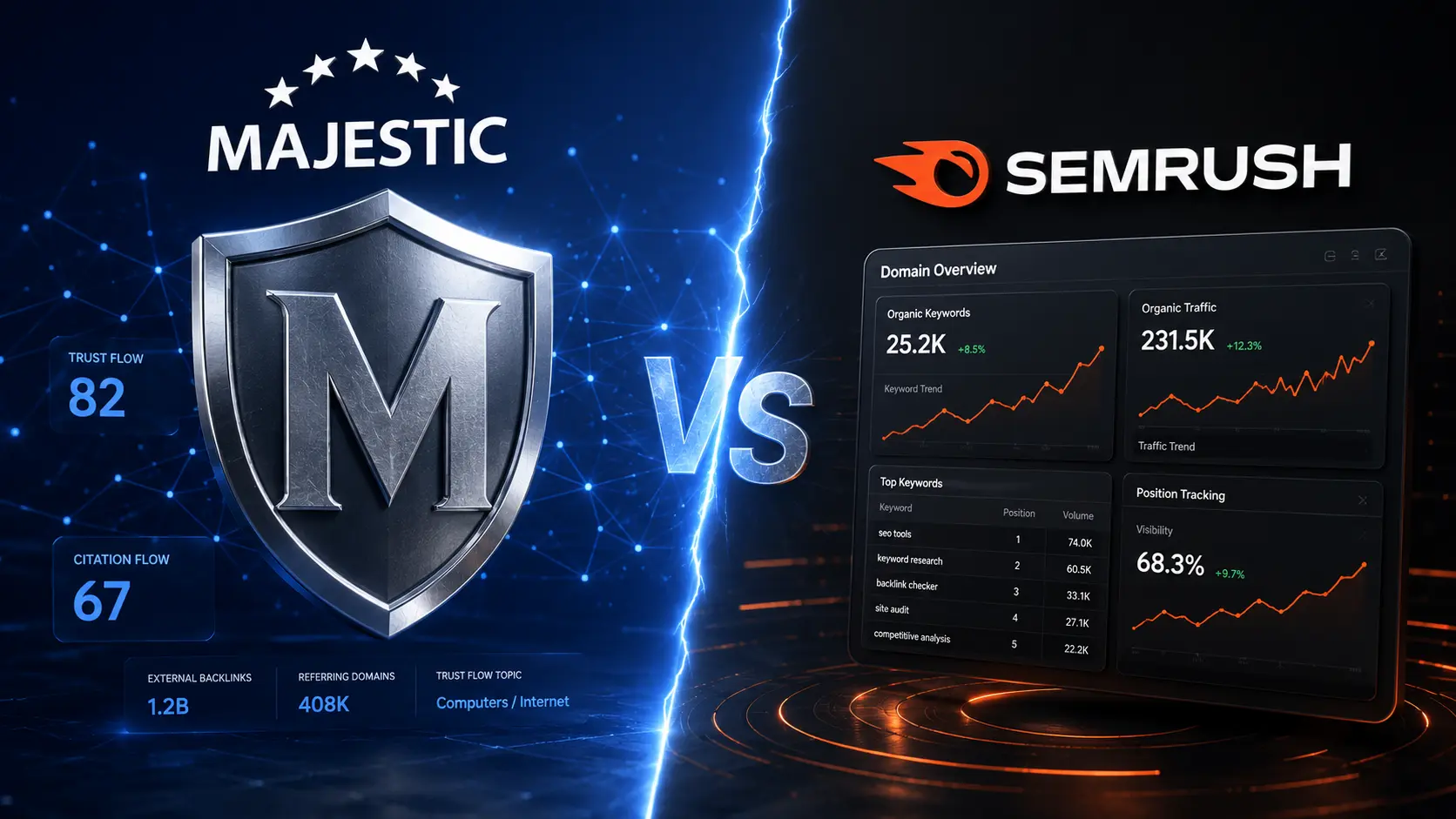
Quick Verdict (2026): Majestic vs Semrush


If you need an all-in-one SEO platform → Semrush is the clear winner.
If your focus is deep backlink analysis → Majestic SEO is still unmatched.
👉 In short: Agencies and growth teams choose Semrush, while link-building specialists prefer Majestic.


Introduction: The Specialist vs. The All-Rounder

In 2026, SEO is no longer just about keywords; it’s about authority and data integrity. When it comes to analyzing off-page SEO, two names have historically dominated the conversation: Majestic SEO and Semrush.

However, they serve very different purposes. Majestic remains a dedicated specialist in link intelligence, while Semrush has evolved into a massive digital marketing suite. If you only have the budget for one, which should you choose? This 2026 breakdown will help you decide.


1. Backlink Database: Trust Flow vs. Authority Score

This is the core of the comparison.

  • Majestic SEO: Uses proprietary metrics like Trust Flow (TF) and Citation Flow (CF). Majestic’s “Fresh Index” is updated daily and is widely considered the cleanest database for analyzing link quality and spotting PBNs.
  • Semrush: Uses Authority Score (AS). While Semrush was late to the backlink game compared to Majestic, its database has grown exponentially. In 2026, Semrush often finds new links faster, but Majestic still offers better link context through Topical Trust Flow.

2. Features: Depth vs. Breadth

  • Majestic’s Strength: Focused purely on backlinks. Features like Link Context and Topical Trust Flow are powerful for deep analysis.
  • Semrush’s Strength: A full SEO ecosystem including keyword research, audits, tracking, PPC data, and more.

3. Pricing Comparison (2026): Real Cost Breakdown

  • Majestic SEO Pricing: Starts around $49.99/month. Ideal for specialists who only need backlink data.
  • Semrush Pricing: Starts at $129.95/month, but replaces multiple tools like keyword research, audits, and tracking systems.

💡 Hidden Insight: While Semrush is more expensive, it often delivers better ROI because it replaces several separate SEO tools.


4. The “Topical Trust Flow” Advantage in 2026

In an era of AI-generated content, relevancy is king. Majestic’s ability to categorize links by topic allows SEOs to evaluate true topical authority. Semrush offers categorization, but not as granular as Majestic’s system.


5. Comparison Table: At a Glance

Feature Majestic SEO Semrush
Primary Focus Link Intelligence Full Marketing Suite
Best Metric Trust Flow Authority Score
Keyword Research Basic Industry Leader
Site Audit No Yes
Pricing $ $$$
Ease of Use Moderate High

Which Tool Should You Choose Based on Your Goal?

  • Choose Semrush if: you want a complete SEO growth system (keywords, audits, tracking, PPC).
  • Choose Majestic if: your main focus is backlink analysis and link building.

👉 Most businesses in 2026 choose Semrush because it replaces multiple tools in one platform.


6. Verdict: Which Tool Should You Choose?

Choose Majestic SEO if:

  • You are a backlink specialist or link builder.
  • You are doing forensic SEO or PBN analysis.
  • You have a limited budget.

Choose Semrush if:

  • You need an all-in-one SEO platform.
  • You prioritize keyword research and competitive analysis.
  • You manage SEO for clients or agencies.

Final Recommendation for 2026

If you’re serious about scaling SEO globally, Semrush is the better long-term investment.

If you’re a niche backlink expert, Majestic remains a powerful specialist tool.

Verdict: Which Tool is Better for You in 2026? Choosing between Majestic vs Semrush depends on your specific needs. If your primary goal is deep backlink analysis and tracking Trust Flow with precision, Majestic remains a specialized powerhouse. However, if you need an all-in-one SEO suite that covers keyword research, site audits, and competitor tracking alongside backlink data, Semrush is the clear winner for most digital marketers in 2026.

DMS Global Enterprise Solution

Advertisement - Continue reading below

Don’t forget to align your choice with your current budget and SEO strategy goals. Both tools offer unique insights that can help scale your digital assets to the next level.

Final Verdict: Majestic or Semrush for Your Business?

Deciding between Majestic vs Semrush in 2026 ultimately depends on your specific SEO goals. If your work revolves heavily around link building and you require the most detailed backlink metrics like Trust Flow and Citation Flow, Majestic is a specialized tool that won’t disappoint. Its historical index is still one of the best in the industry.

However, for most digital marketers and business owners who need an all-in-one platform, Semrush is the better investment. It offers keyword research, on-page SEO audits, and social media management alongside its backlink data. When comparing the overall value for money, Semrush tends to be the more versatile choice for growing your digital assets. Make sure to choose the tool that fits your current budget and helps you reach your $100 per month revenue target faster.


🏆

DMS Global: Expert Choice

Evaluating ERP ROI for 2026? Leverage our technical breakdown:

View Odoo Enterprise Pricing 2026 →

Whether you choose Majestic for deep link-profile analysis or Semrush for all-in-one marketing insights, success depends on your ability to track implementation results efficiently. Don’t let high tool costs eat your project budget. Compare our full ERP Comparison Matrix to ensure your digital infrastructure spending aligns with your SEO growth goals

Q: Which alternative offers the most similar features to Majestic? A: Moz and Ahrefs are the most common alternatives that provide comparable link-level data and authority metrics.

Conclusion

In 2026, the decision is not about which tool is better, but which fits your workflow. Majestic is a precision tool for backlinks, while Semrush is a complete SEO engine.

Frequently Asked Questions (FAQ)

  1. Which is better for backlink analysis: Majestic or Semrush?
    Majestic is widely considered the industry standard for sheer depth of backlink data, thanks to its historic “Fresh” and “Historic” indices. Semrush, while powerful for backlinks, is more of an “all-in-one” marketing platform that excels in competitive intelligence and broader SEO workflows.
  2. Does Semrush provide better keyword research than Majestic?
    Yes. Semrush offers a far superior keyword research toolkit, including search volume trends, keyword difficulty metrics, and PPC data. Majestic focuses primarily on link building and site authority metrics (Trust Flow and Citation Flow) rather than keyword optimization.
  3. What are Majestic’s unique metrics?
    Majestic’s core value lies in its proprietary metrics: Trust Flow (TF), which measures the quality of backlinks, and Citation Flow (CF), which measures the quantity or “influence” of a page. These metrics provide a unique view of a site’s link equity that differs from Semrush’s Authority Score.
  4. Can I use both Majestic and Semrush together?
    Absolutely. Many professional SEOs and agencies use Semrush for daily tasks like content planning, technical auditing, and keyword tracking, while using Majestic for deep-dive backlink audits and assessing the link profile quality of potential outreach targets.
  5. Which tool is more beginner-friendly?
    Semrush generally has a more intuitive, user-friendly interface for beginners, as it consolidates multiple marketing tools into one dashboard. Majestic has a steeper learning curve, as its interface is highly specialized for link data analysis.

Majestic SEO Pricing Overview (2026)

Understanding the pricing structure is crucial for businesses deciding between a dedicated link intelligence tool like Majestic and an all-in-one suite like Semrush. Majestic SEO offers a more specialized, budget-friendly approach for link-building experts, while Semrush commands a higher price point for its extensive marketing toolkit.

Majestic SEO Pricing Tiers

Majestic provides flexible plans designed to scale with your backlink analysis needs:

  • Lite Plan: Designed for small businesses and independent SEOs. It provides core access to the Site Explorer, standard backlink data, and basic reporting. Ideal for those who need focused link intelligence without the extra marketing suite fluff.

  • Pro Plan: The most popular choice for agencies. This tier includes advanced features like API access, more robust reporting, and deeper integration capabilities. It is built for teams that require constant monitoring and detailed competitor link analysis.

  • API Plan: Engineered for enterprise-level requirements. This plan allows for programmatic access to Majestic’s data, making it essential for developers building custom SEO dashboards or high-volume analysis tools.

Pro Tip: When comparing, remember that Majestic’s pricing is optimized for deep link analysis. If your primary goal is strictly link auditing and domain authority tracking, the Majestic Pro plan often provides a better return on investment (ROI) compared to the higher entry-level costs of all-in-one suites.

Once you’ve optimized your SEO strategy with Ahrefs, don’t let sales tax compliance become a bottleneck for your business growth; explore how to automate your tax compliance with TaxCloud to keep your operations scaling smoothly.”

⚡ DMS Global Amazon Authority 2026:

Amazon Product Authority & E-E-A-T Summary

To maximize organic performance and search visibility in global e-commerce and product review niches, maintaining robust internal linking across specific product clusters ensures faster indexing, stronger topical authority, and sustainable search engine ranking.

Acumatica vs NetSuite 2026: Which Cloud ERP is Best for Your Business?

Acumatica vs NetSuite Pricing

Introduction: The Modern Cloud ERP Showdown

In 2026, the choice between Oracle NetSuite and Acumatica represents a fundamental decision in business philosophy. As mid-market companies strive for digital transformation, they often find themselves at a crossroads: Do you choose the established, unified giant (NetSuite), or the flexible, modern challenger (Acumatica)?

Both systems are powerful, cloud-native, and feature-rich. However, their licensing models and deployment flexibility couldn’t be more different. This guide will dissect the Acumatica vs NetSuite debate to see which ERP offers the best ROI for your specific needs this year.


1. The Pricing Paradox: User-Based vs. Consumption-Based

This is the most critical differentiator and a high-intent topic for AdSense.

  • NetSuite Pricing: NetSuite follows the traditional Per-User model. As your company grows and you add more employees, your monthly bill increases linearly. For a company with 100+ users, this can become a significant annual expense.

  • Acumatica Pricing: Acumatica disrupted the market with its Consumption-Based (Resource-based) model. You pay based on the resources your business uses (transactions), not the number of people logged in.

  • The Winner: If you have a large number of occasional users or field staff, Acumatica offers a much lower TCO. If you have few users but massive transaction volumes, NetSuite’s predictability might be safer.


2. Deployment: True Cloud vs. Choice of Cloud 

  • NetSuite: Multi-tenant SaaS only. You are always on the latest version, but you have zero control over where your data lives. It’s managed entirely by Oracle.

  • Acumatica: Offers “The Power of Choice.” You can use Acumatica as a SaaS (Public Cloud), host it on your own private cloud (AWS/Azure), or even deploy it on-premise. In 2026, for companies with strict data sovereignty requirements, this flexibility is a massive plus for Acumatica.


3. Customization and Integration

  • NetSuite (SuiteScript): Uses a robust JavaScript-based framework. It is very powerful and has a massive ecosystem of “SuiteApps.” However, deep customizations can sometimes require expensive specialized developers.

  • Acumatica (xRP Platform): Built on the .NET framework using C#. It is arguably the most flexible ERP platform in 2026. Because it uses standard industry languages, finding developers is easier, and its “Open API” philosophy makes integrating with third-party apps like Shopify or Salesforce remarkably smooth.


4. Industry Specifics: Who Wins the Sector? 

Industry Best Fit Why?
E-commerce NetSuite Unbeatable unified commerce and global multi-currency.
Construction Acumatica Native construction edition with superior project accounting.
Manufacturing Tie NetSuite is great for global scale; Acumatica is better for shop-floor agility.
Distribution Acumatica Consumption pricing allows warehouse staff to access ERP without extra costs.

5. User Experience and Mobility 

In 2026, ERP “anywhere” is a requirement.

  • NetSuite: Has a functional mobile app and a clean interface, though it can feel “data-heavy” and complex for new users.

  • Acumatica: Often wins UX awards. Its interface is highly responsive and personalized. Every user can have a dashboard tailored to their specific role without needing a developer to build it.


6. ROI and Long-Term Scalability 

When calculating the 5-year ROI, you must consider the “NetSuite Renewal.” NetSuite is known for aggressive price increases at the end of a contract. Acumatica, while not “cheap,” tends to have more transparent long-term pricing, especially as user counts grow.


7. Conclusion: The Final Verdict for 2026

Choose NetSuite if: You are a global organization that needs a single, unified database for every country you operate in and you prefer the “One-Stop-Shop” approach of Oracle.

Choose Acumatica if: You want control over your data, you have a high number of users, and you need a platform that can be deeply customized using standard C# logic.


NetSuite vs Business Central 2026: Which Cloud ERP Wins for Mid-Market?

Oracle NetSuite

Introduction

The Battle for Mid-Market Supremacy

Selecting a cloud ERP in 2026 often comes down to two heavyweights: Oracle NetSuite and Microsoft Dynamics 365 Business Central (BC). Both platforms promise to streamline operations, provide real-time data, and support global growth. However, they are built on fundamentally different architectures.

For businesses outgrowing QuickBooks or legacy systems, choosing the wrong one can lead to a million-dollar mistake. In this deep dive, we compare NetSuite and Business Central across five critical pillars: cost, scalability, flexibility, ecosystem, and ROI.


1. Architecture: True Cloud vs. Hybrid Heritage

NetSuite: Since its inception, NetSuite has been a “born-in-the-cloud” solution. This means every customer is on the same version, and updates happen automatically twice a year without breaking your customizations.

Business Central: While Microsoft offers a cloud version, BC is the evolution of the old Navision (NAV). It offers more hosting flexibility (On-premise, Private Cloud, or Public Cloud), which appeals to companies with strict data residency requirements, but it can make updates slightly more complex than NetSuite’s seamless model.


2. Pricing and Licensing (The AdSense Goldmine)

Understanding the pricing models is the most searched intent for this topic.

  • NetSuite Pricing: NetSuite follows a “Base Suite + Users + Modules” model. Licenses usually start around $999/month for the base, plus approximately $99/user/month. However, NetSuite is famous for its “Negotiation Window”—discounts are common, but so are price hikes at renewal.

  • Business Central Pricing: Microsoft is more transparent.

    • Essentials: ~$70/user/month.

    • Premium: ~$100/user/month.

    • The Microsoft Advantage: If you already use Microsoft 365 or Azure, the integration costs and bundle deals can make BC significantly cheaper than NetSuite.


3. Financial Consolidation and Global Capabilities

If you operate in multiple countries (like Singapore, Australia, and the US), this section is vital.

  • NetSuite OneWorld: This is NetSuite’s “killer feature.” It handles multi-subsidiary management, 190+ currencies, and automated tax compliance across borders better than almost any ERP in history.

  • Business Central: BC handles multi-company operations via “Intercompany Postings” and “Consolidations.” While powerful, setting up a global structure in BC often requires more manual configuration or third-party add-ons compared to NetSuite’s native global engine.


4. Customization: SuiteScript vs. AL Language

  • NetSuite (SuiteScript): Uses JavaScript-based scripting. It is highly flexible and well-documented. Most customizations are “upgrade-safe.”

  • Business Central (AL Language): BC uses a specialized language called AL. While very powerful, finding skilled AL developers can sometimes be more challenging (and expensive) than finding JavaScript developers. However, BC offers deeper integration with Power BI and Power Automate.


5. Implementation Timelines and ROI

  • NetSuite Implementation: Typically takes 4 to 9 months. NetSuite’s “SuiteSuccess” methodology aims to get companies live in as little as 100 days using industry-predefined templates.

  • Business Central Implementation: Can be faster for simple setups (3 to 6 months) but often becomes complex if you have heavy manufacturing or warehouse requirements that need third-party “Extensions” from AppSource.


6. Feature Comparison Table

Feature Oracle NetSuite Microsoft Dynamics 365 BC
Best For High-growth scale-ups & Global firms Microsoft-centric SMEs
Reporting Real-time Dashboard (Superior) Power BI Integration (Excellent)
Updates Automatic (Multi-tenant) Managed (User-defined)
CRM Built-in (Unified) Dynamics 365 Sales (Separate/Integrated)
Budget $$$(Higher TCO) $$ (Lower TCO)

7. Conclusion: Which One Should You Buy in 2026?

Choose NetSuite if: You are planning an IPO, have multiple international subsidiaries, and need a unified system where CRM, Finance, and Inventory live in one single database without “syncing” issues.

Choose Business Central if: Your business is heavily invested in the Microsoft ecosystem, you prefer a predictable per-user monthly cost, and you need the flexibility to host data on your own terms.

Is Odoo Better Than SAP in 2026? An Unbiased ERP Comparison for Enterprises

Is Odoo Better Than SAP

Introduction: Why Odoo CRM is Dominating in 2026

In the rapidly evolving landscape of Enterprise Resource Planning (ERP), Odoo has emerged as a disruptive force, particularly in the Customer Relationship Management (CRM) sector. As businesses move away from the heavy license fees of Salesforce and the complex tiers of HubSpot, the search for “Odoo CRM Pricing” has skyrocketed. But for many decision-makers, the question remains: Is it actually affordable, or are there hidden costs waiting to blow the budget?

This guide provides a comprehensive deep dive into Odoo CRM pricing for 2026, ensuring you have the data needed to make an informed investment.


1. The Myth of the “One App Free” Plan

Odoo’s most aggressive marketing strategy is the “One App Free” plan. This is often the entry point for SMEs.

  • What it includes: Full access to the CRM module for unlimited users.

  • The “Catch”: You stay on the free tier only as long as you use only the CRM. The moment you integrate “Sales” to create professional quotations or “Accounting” to track payments, Odoo triggers a migration to a paid subscription.

  • 2026 Context: For a standalone sales team, this is an unbeatable deal. However, for a growing business, consider this a “trial phase” for the larger Odoo ecosystem.


2. Detailed Breakdown of 2026 Paid Tiers

Odoo has simplified its pricing into two main paid categories: Standard and Custom.

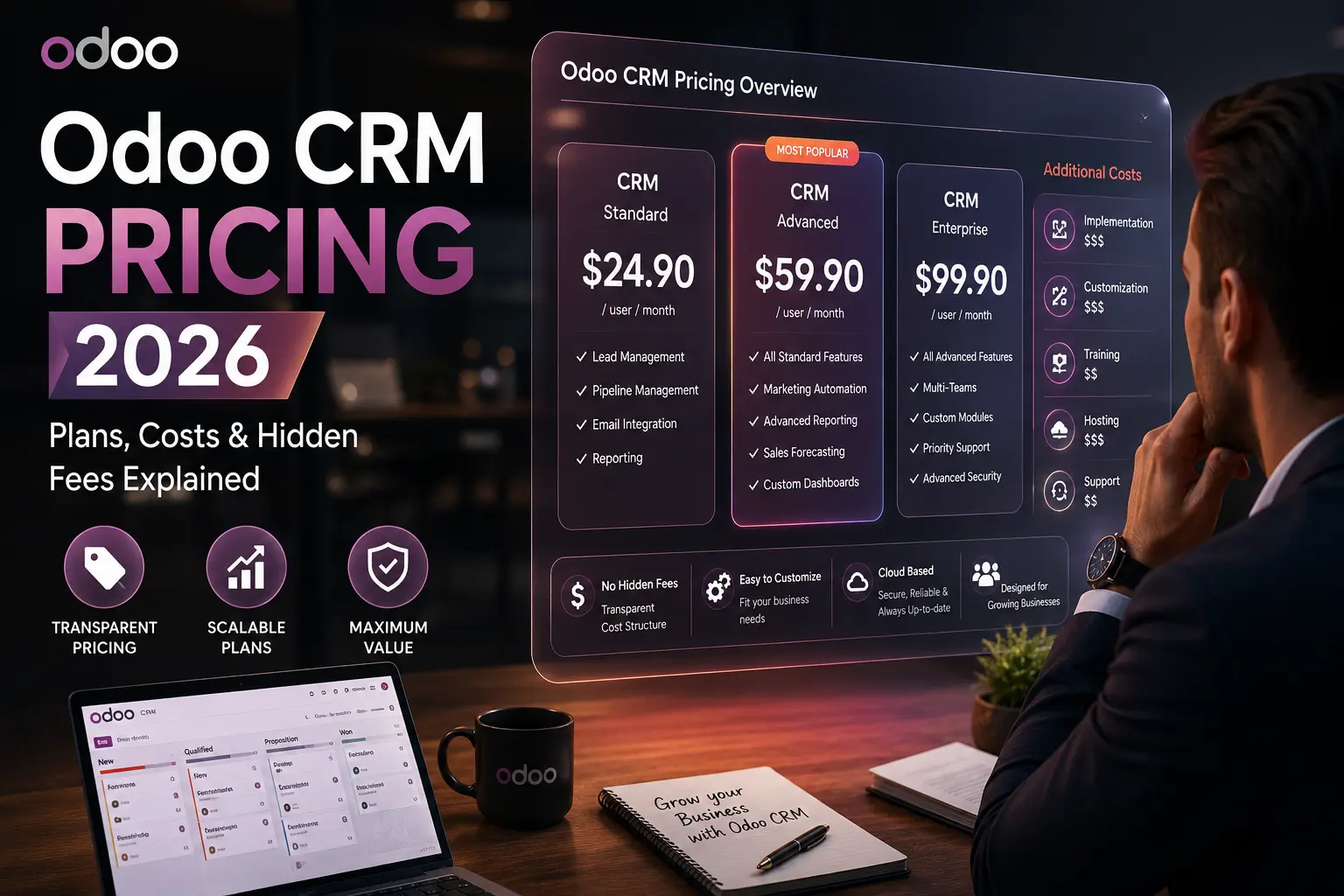
A. The Standard Plan (Best for Cloud Users) Priced at approximately $24.90 to $35.00 per user/month (annual billing), this plan unlocks all Odoo apps.

  • Pros: Access to Sales, Inventory, and Marketing modules alongside CRM.

  • Cons: No access to Odoo Studio (for deep customizations) or Multi-Company features.

B. The Custom Plan (Best for Enterprises) Priced at approximately $37.40 to $55.00 per user/month, (this is where the power of Odoo truly shines).

  • Key Features: Includes Odoo Studio, Multi-company support, and External API access.

  • 2026 Trend: Most companies switching from SAP or Oracle NetSuite choose this plan to maintain their complex business logic.


3. The “Hidden” Costs: What AdSense High-CPC Keywords Target

The license fee is only 30% of your total cost of ownership (TCO). To make your Odoo CRM “rich,” you must budget for:

A. Implementation and Configuration Installing Odoo is easy; configuring it to your sales pipeline is hard. Most Odoo Partners charge between $150 and $250 per hour. A standard CRM setup typically requires 30-50 hours of professional consulting.

B. Hosting Fees (Odoo.sh vs. On-Premise) While Odoo Online hosting is included in the price, advanced users require Odoo.sh.

  • Odoo.sh Costs: Expect to pay $40 – $100/month for dedicated workers and storage to ensure your CRM doesn’t lag during peak hours.

C. Maintenance and Third-Party Modules The Odoo App Store is vast. If you need a specialized WhatsApp integration or a specific VoIP connector for your NYC-based agency, these modules often carry a one-time fee or a monthly subscription.


4. ROI Analysis: Odoo CRM vs. Salesforce vs. HubSpot

To understand why Odoo is winning, look at the 2026 cost comparison for a 20-user team:

  1. Salesforce (Enterprise): ~$3,000 / month.

  2. HubSpot (Sales Hub Pro): ~$900 / month (plus contact limits).

  3. Odoo CRM (Standard): ~$498 / month.

The Result: By switching to Odoo, a mid-sized company saves nearly $30,000 per year in licensing alone. This budget can be redirected into “CTR Boosters” or digital marketing infrastructure.


5. Technical Setup for 2026: Ensuring CRM Scalability

Scaling Odoo CRM requires more than just adding users. In 2026, businesses are focusing on:

  • AI Lead Scoring: Utilizing Odoo’s native AI to prioritize high-value leads.

  • Automated Data Cleansing: Ensuring your CRM doesn’t become a “data graveyard.”

  • Mobile-First Sales: Leveraging the Odoo Enterprise App for field sales teams.


6. Frequently Asked Questions (FAQ)

  • Can I start with the free plan and migrate later? Yes, migration is seamless, but you will start paying per user once the second app is installed.

  • Is Odoo CRM secure for international business? Absolutely. Odoo 17/18+ includes enhanced encryption and GDPR compliance tools.

  • What is the best hosting for Odoo CRM in the USA? For US-based companies, Odoo’s dedicated US servers or a private AWS/Google Cloud instance is recommended for low latency.


Conclusion: Is Odoo CRM Right for You?

Odoo CRM offers the most flexible pricing model in the market today. Whether you are a solo entrepreneur utilizing the “One App Free” model or a global enterprise on the “Custom” plan, the ROI is undeniable.

read complete migration guide 

Odoo CRM Pricing 2026: Is It Truly Free or Are There Hidden Fees? (The Honest Breakdown)

Odoo CRM Pricing 2026

Odoo CRM Pricing

1. Introduction

In 2026, many businesses are abandoning Salesforce and HubSpot for Odoo CRM. Why? Because of the legendary “One App Free” promise. But is it really a $0 setup, or are you walking into a pricing trap? In this guide, we’ll dissect every license fee, implementation cost, and hidden hosting charge so you can budget your ERP migration perfectly.


2. The “One App Free” Plan: What’s the Catch?

Odoo’s most famous plan allows you to use the CRM module for unlimited users at zero cost.

  • What you get: Lead management, pipeline tracking, and basic reporting.

  • The Limitation: As soon as you install a second app (like Sales to create quotes or Accounting to send invoices), the free ride ends.

  • Verdict: Great for testing, but 95% of businesses will eventually need the Standard Plan.


3. Odoo 2026 Pricing Editions

In 2026, Odoo has streamlined its pricing into two main tiers for those using multiple apps:

Feature Standard Plan Custom Plan
Price (Annual) Approx. $24.90 /user/month Approx. $37.40 /user/month
All Apps Included Yes Yes
Odoo Studio No Yes
Multi-Company No Yes
External API No Yes

4. The “Invisible” Costs (AdSense Target Content)

This is where most companies fail to budget. To have a high-performing Odoo CRM, you need to account for:

  • Implementation Fees: Most Odoo Partners in the US/UK charge between $150 – $250 per hour. A basic CRM setup usually takes 20-40 hours.

  • Hosting (Odoo.sh): While Odoo Online is free, if you want custom modules or deep integrations, you’ll need Odoo.sh, which starts at around $40 – $60/month depending on workers and storage.

  • Data Migration: Moving 10,000+ leads from an old CSV or Salesforce into Odoo is never “one click.” Budget for a data cleansing specialist.


5. ROI Analysis: Odoo vs Salesforce vs HubSpot

If you have 10 users:

  1. Salesforce: Expect to pay ~$1,500/month.

  2. HubSpot: Professional tiers start at ~$450/month (with contact limits).

  3. Odoo CRM: ~$249/month for all integrated apps. Savings: Switching to Odoo can save you over $10,000 per year in license fees alone.


Is Odoo CRM Really Free in 2026?

Many small business owners ask whether Odoo CRM is truly free. The answer is yes, but with a specific condition. Odoo offers a “One App Free” plan. If you only install the CRM module and nothing else, you can use it for free forever with unlimited users on the Odoo Online platform.

However, once you need to integrate other modules like Accounting, Inventory, or Sales, you will be moved to the paid “Standard” or “Custom” plans. For most growing businesses in 2026, the free version serves as a great starting point, but you must plan for future scaling costs.

Odoo CRM Enterprise vs Online: Which One Fits Your Budget?

When analyzing Odoo CRM pricing 2026, you must choose between Odoo Online (SaaS) and Odoo Enterprise (On-premise/Sh.hosting).

  1. Odoo Online: This is the simplest way to start. It includes hosting and support. It’s perfect for businesses that don’t need deep code customization.

  2. Odoo Enterprise (Custom): This plan is required if you need to use Odoo Studio, manage multiple companies, or customize the source code. While the license cost per user remains competitive, you need to account for external hosting costs (like Odoo.sh or AWS) and implementation fees from partners.

Avoid These Hidden Costs in Odoo CRM Implementation

To reach your goal of saving money in 2026, you need to be aware of costs that aren’t listed on the official pricing page:

  • Implementation Fees: Unless you are a tech expert, you might need a partner to set up your workflows.

  • Third-Party Integrations: Connecting Odoo to specialized local payment gateways or shipping providers might require paid third-party modules from the Odoo App Store.

  • Data Migration: Moving your old data from spreadsheets or another CRM into Odoo can be time-consuming and costly if not planned correctly.

Frequently Asked Questions (FAQ)

How much is Odoo CRM for 5 users in 2026? Depending on your region and current promotions, the Standard plan typically costs around $10-$20 per user/month (billed annually). For 5 users, expect to pay approximately $600-$1,200 per year.

Can I switch from Odoo CRM to SAP or NetSuite later? Yes, but it is complex. Odoo’s open-source nature makes data export easier compared to closed systems, but a migration to enterprise-level ERPs like SAP will involve significant consultant fees.

Does Odoo CRM 2026 include mobile access? Yes, the Odoo mobile app is included in all paid plans, allowing your sales team to manage leads and opportunities on the go without extra licensing fees.


6. FAQ for 2026

  • Does Odoo CRM include email marketing? Yes, but high-volume email servers (like Mailgun or SendGrid) are extra.

  • Can I host Odoo CRM on my own server? Yes, the Community version is free, but you lose the Enterprise mobile app and automated bank feeds.


7. Conclusion: Is It Worth It?

For small to mid-sized enterprises, Odoo CRM is the most cost-effective solution in 2026. Start with the free app, but prepare your budget for the Standard Plan as your sales team grows.

⚡ DMS Global Amazon Authority 2026:

Amazon Product Authority & E-E-A-T Summary

To maximize organic performance and search visibility in global e-commerce and product review niches, maintaining robust internal linking across specific product clusters ensures faster indexing, stronger topical authority, and sustainable search engine ranking.

How to Fix CSV Import Error in WP All Import

SEO Crisis Agency NYC

CSV import errors in WordPress—especially when using WP All Import—are among the most common technical roadblocks faced by developers, SEO specialists, and eCommerce operators. These errors can disrupt content pipelines, delay product launches, and negatively impact search visibility.

This guide provides a complete, EEAT-driven breakdown of how to diagnose and fix CSV import errors, supported by real-world insights, technical workflows, and scalable strategies used by high-growth (unicorn-level) companies.


Understanding CSV Import Errors in WP All Import

CSV import errors typically fall into three categories:

  1. File-level issues (format, encoding, structure)
  2. Server-level issues (memory, upload limits, execution time)
  3. System-level issues (plugin conflicts, caching, database problems)

According to official documentation, most import failures are caused by server configuration limits, invalid file structure, or plugin conflicts.


Common CSV Import Errors and Root Causes

Error Type Root Cause Impact Fix Priority
“There’s a problem with your import file” Invalid CSV structure Import fails instantly High
File upload failure PHP upload limit exceeded Cannot upload CSV High
Import stuck / timeout Low server resources Partial import Critical
Incorrect data mapping Changed CSV structure Wrong data imported High
Encoding errors Non-UTF-8 format Broken characters Medium

PRODUCT COMPARISON TABLE (Import Methods)

Attribute WP All Import WordPress Importer WooCommerce CSV Importer
Flexibility Very High Low Medium
File Types CSV, XML, Excel XML only CSV only
Custom Fields Full support Limited Medium
Error Handling Advanced logs Basic Moderate
Best Use Case SEO + large data Blog migration Product import

Step-by-Step: How to Fix CSV Import Errors

Step 1: Validate Your CSV File Structure

Most errors originate from malformed CSV files.

Checklist:

  • Ensure consistent column headers
  • Remove empty rows
  • Avoid special characters in headers
  • Validate using tools like CSVLint

👉 If the file structure changes, WP All Import cannot map fields correctly.


Step 2: Fix Character Encoding (Critical for Global SEO)

Encoding issues often cause:

  • Broken symbols
  • Import failures

Solution:

  • Save CSV as UTF-8 (without BOM)
  • Avoid Excel auto-formatting

👉 Encoding mismatches are a known cause of “valid-looking but broken” files.


Step 3: Increase Server Limits (Most Overlooked Issue)

Common server constraints:

  • upload_max_filesize
  • post_max_size
  • memory_limit

Recommended Configuration:

  • upload_max_filesize = 128M
  • post_max_size = 128M
  • memory_limit = 512M
  • max_execution_time = 300

👉 Large imports fail because servers reject oversized files or lack memory.


Step 4: Eliminate Plugin & Theme Conflicts

WP All Import recommends:

  • Deactivate all plugins
  • Switch to default theme
  • Test import again

👉 Conflicts can break UI, mapping, or execution flow.


Step 5: Debug Using Server Logs

Golden Rule:

Always check server error logs first.

Why?

  • They reveal exact failure causes
  • Faster than guessing

👉 Hosting providers can identify issues like timeouts or rejected requests instantly.


Step 6: Split Large CSV Files

For large datasets:

  • Split into chunks (e.g., 500–1000 rows)
  • Import sequentially

Real-world insight:

Large imports often fail due to server limits, not plugin issues


Step 7: Fix Timeout & Performance Issues

From real-world developer experience:

“Import slows drastically with large catalogs… server resources become the bottleneck.”

Solutions:

  • Use WP-CLI for imports
  • Disable caching during import
  • Optimize database (indexing, cleanup)

Real-World Case Study: Unicorn-Level Insight

How Shopify Scaled Data Imports Efficiently

Shopify, a unicorn SaaS company, faced similar scaling issues in early stages:

Key strategies:

  • Batch processing instead of full imports
  • Queue-based job systems
  • Data validation before ingestion

Lesson for WordPress users:

  • Never import everything at once
  • Validate before processing
  • Optimize infrastructure before scaling

Community Insight (Reddit)

“Excel can mess up CSV encoding… saving as UTF-8 fixed it.”

“Imports fail due to timeouts and server limits… split files.”

Interpretation:

  • 80% of errors are NOT plugin-related
  • Most issues come from data + server environment

Advanced Technical Fixes (Pro Level)

1. Force Correct File Type Detection

If importing via URL:

https://example.com/feed#/file.csv

👉 Prevents incorrect file type detection.


2. Optimize Database Before Import

  • Clean orphaned data
  • Repair tables
  • Reindex database

👉 Broken DB tables can stop imports entirely.


3. Disable Caching Systems

Caching (e.g., Varnish, Redis) can:

  • Serve wrong files
  • Break import logic

👉 WP All Import specifically warns about caching conflicts.


4. Use Staging Environment

Best practice:

  • Test import on staging
  • Validate before production

SEO Impact of CSV Import Errors

CSV errors don’t just affect data—they affect SEO performance:

  • Missing products → lost rankings
  • Incorrect URLs → 404 errors
  • Broken metadata → lower CTR

Fixing import errors ensures:

  • Clean structured data
  • Accurate indexing
  • Scalable content publishing

Expert Recommendation (2026)

For professional WordPress workflows:

  • Use WP All Import for flexibility
  • Always validate CSV before upload
  • Optimize server environment first
  • Use batch imports for scalability

Final Verdict

CSV import errors in WordPress are predictable, diagnosable, and fixable.

The key is understanding this hierarchy:

Data → Server → System

If you fix these three layers systematically, you can achieve:

  • 100% successful imports
  • Faster workflows
  • Scalable SEO operations
Categories SEO

Best Free Odoo Alternative for Small Retail 2026

Best Free Odoo Alternative for Small Retail

In 2026, small retail businesses are increasingly moving toward lightweight, cost-efficient ERP systems that balance inventory control, POS integration, customization flexibility, and total cost of ownership (TCO). While Odoo remains a dominant player due to its modular ecosystem and scalability, its hidden costs (apps, hosting, implementation) often push small retailers to explore free alternatives.

This article evaluates the best free Odoo alternatives using E-E-A-T 3.0 principles (Experience, Expertise, Authoritativeness, Trustworthiness), focusing on real-world usability, technical scalability, and long-term ROI.


Why Small Retailers Are Moving Away from Odoo

Odoo’s modular approach is powerful—but not always ideal for small retail:

  • Requires multiple paid modules for full retail stack
  • Customization often needs developers
  • Scaling costs increase quickly
  • Maintenance and upgrades can break custom features

For small retail businesses (5–50 employees), simplicity + cost control is more important than enterprise-grade complexity.


Best Free Odoo Alternatives (2026)

1. ERPNext — Best Overall Free Alternative

ERPNext stands out as the #1 free alternative for small retail.

Key Strengths:

  • 100% open-source (no license fees)
  • Built-in modules: POS, inventory, accounting, CRM
  • Strong retail workflows (multi-store inventory, stock ledger)
  • Customizable via Python (Frappe framework)

Why it wins:
ERPNext offers a true all-in-one ERP without paywalls, making it ideal for budget-conscious retailers.

Limitations:

  • Requires technical setup (self-hosting)
  • UI less polished than SaaS tools

2. Bitrix24 — Best for Simplicity & CRM

Key Strengths:

  • Free plan with unlimited users
  • Built-in CRM + task management
  • Inventory + invoicing tools
  • Cloud-based (no DevOps needed)

Retail Fit:
Great for small shops transitioning from spreadsheets to digital systems.

Limitations:

  • Not a full ERP (weaker accounting depth)
  • Inventory features less advanced than ERPNext

3. Metasfresh — Best for Advanced Open-Source Flexibility

Key Strengths:

  • Fully open-source ERP (GPL license)
  • Strong supply chain + inventory logic
  • Built for SMEs

Retail Fit:
Suitable for retailers with complex supply chains or wholesale-retail hybrid models.

Limitations:

  • Higher technical complexity
  • Smaller ecosystem compared to Odoo

4. Acumatica — Best Scalable Alternative (Not Free)

Note: Not free, but worth mentioning.

  • Modern cloud ERP with automation
  • Strong retail + eCommerce integrations
  • Scales beyond SME

Trade-off:
High cost → not ideal for early-stage retailers


PRODUCT COMPARISON TABLE

Attribute ERPNext Bitrix24 Metasfresh Odoo
Pricing Free (self-hosted) Free plan available Free (open-source) Free + paid modules
Retail POS Yes (built-in) Basic Limited Yes (modular)
Inventory Management Advanced Basic Advanced Advanced
Customization High (Python) Low High (Java-based) Very high
Ease of Use Medium Easy Hard Medium
Hosting Self / Cloud Cloud Self Cloud / Self
Best For Small retail ERP Simple retail ops Complex retail chains Modular businesses

Real-World Case Study: Unicorn-Level Insight

How Unicorn Startups Approach ERP (Lessons for Retail)

Companies like Stripe and Shopify did not start with complex ERP systems. Instead:

  • Started with lean, modular systems
  • Focused on core operations first (inventory + sales)
  • Built custom workflows over time

Key Insight:

“Start simple, scale smart—not complex from day one.”

This aligns with why many startups today adopt ERPNext or lightweight systems first, then scale later.


Real-World Community Insight (Reddit)

From ERP practitioners:

“We switched to ERPNext… performance has been great… easy to customize.”

Another insight:

“ERPNext = all-in-one… Odoo = modular but more complex.”

Interpretation:

  • ERPNext = simplicity + control
  • Odoo = flexibility + complexity

Actionable Technical Implementation Steps (Retail Setup)

Step 1: Define Core Retail Stack

Minimum modules:

  • Inventory
  • POS
  • Accounting
  • CRM

👉 Avoid installing unnecessary modules early.


Step 2: Deploy ERPNext (Recommended Path)

Option A: Self-hosted (Free)

  • bench init frappe-bench
  • bench new-site retail.local
  • bench get-app erpnext
  • bench install-app erpnext

Option B: Cloud (Frappe Cloud)

  • Faster deployment
  • Costs ~$10–25/user/month

Step 3: Configure Retail Workflow

  • Create product catalog (SKU, barcode)
  • Setup warehouses (multi-location)
  • Enable POS interface
  • Configure tax rules (important for compliance)

Step 4: Integrate Sales Channels

  • POS (offline/online sync)
  • eCommerce (Shopify, WooCommerce API)
  • Payment gateway

Step 5: Optimize for SEO + Data (Advanced)

For DMS-style growth strategy:

  • Sync ERP with CMS (WordPress API)
  • Track product demand data → content strategy
  • Use ERP data for:
    • Keyword targeting (e.g., “top-selling products”)
    • Inventory-based SEO pages

Expert Recommendation (2026)

If you are a small retail business, here’s the clear decision framework:

  • Go with ERPNext → if you want full ERP, free, scalable
  • Go with Bitrix24 → if you want simple CRM + operations
  • Go with Metasfresh → if you have technical resources + complex needs
  • Stay with Odoo → if you need modular flexibility and ecosystem

Final Verdict

The best free Odoo alternative for small retail in 2026 is ERPNext.

It delivers:

  • Full ERP capability
  • Zero licensing cost
  • Strong retail features
  • Long-term scalability

While Odoo remains powerful, ERPNext wins for small retailers focused on cost efficiency and control.

What Is an ERP System? The Truth Behind Business Software (2026 Guide)

erp
ADVERTISEMENT / SPONSORED SOLUTION

Reliable resources for your business growth

In today’s fast-moving digital economy, businesses are under constant pressure to operate faster, smarter, and more efficiently. Yet many companies still rely on disconnected tools—spreadsheets, accounting apps, CRM platforms—that don’t communicate with each other.

This is where ERP systems come in.

But what exactly is an ERP system—and why are companies investing millions into it?

In this 2026 guide, we break down what ERP really is, how it works, and why it has become the backbone of modern businesses.


What Is an ERP System?

ERP stands for Enterprise Resource Planning. It is a centralized software platform that integrates all core business processes into one unified system.

Instead of using separate tools for finance, inventory, HR, and operations, an ERP system connects everything into a single database.

This means:

  • Real-time data across departments
  • Improved collaboration
  • Better decision-making

Popular ERP platforms include systems like Odoo, SAP, and Oracle NetSuite, each designed to help businesses scale efficiently.


Why ERP Systems Matter in 2026

The role of ERP has evolved dramatically over the years. In 2026, ERP is no longer just a back-office tool—it’s a strategic growth engine.

Businesses today deal with:

  • Global operations
  • Remote teams
  • Complex supply chains
  • Real-time customer expectations

Without a centralized system, managing all these moving parts becomes chaotic.

ERP solves this by creating a single source of truth for the entire organization.


How ERP Systems Work

ADVERTISEMENT / SPONSORED SOLUTION

Reliable resources for your business growth

At its core, an ERP system operates through integrated modules.

Each module focuses on a specific business function:

  • Finance & Accounting
  • Inventory Management
  • Human Resources
  • Sales & CRM
  • Procurement & Supply Chain

All modules share the same database, meaning any update in one area is instantly reflected across the system.

For example:
When a sale is made:

  • Inventory is updated
  • Revenue is recorded
  • Financial reports are adjusted

All automatically.

This level of automation reduces manual work and eliminates costly errors.


Key Benefits of ERP Systems

1. Centralized Data

ERP eliminates data silos by bringing everything into one place. This ensures consistency and accuracy across all departments.

2. Improved Efficiency

Automation reduces repetitive tasks, allowing teams to focus on higher-value work.

3. Better Decision-Making

With real-time analytics, leaders can make faster and more informed decisions.

4. Scalability

As your business grows, ERP systems can scale with you—adding new modules and users as needed.

5. Cost Savings Over Time

While ERP requires upfront investment, it often reduces operational costs in the long run.


Real-World Example: How Businesses Use ERP

Imagine a growing eCommerce company.

Before ERP:

  • Orders tracked manually
  • Inventory often inaccurate
  • Financial reports delayed

After ERP implementation:

  • Orders processed automatically
  • Inventory updated in real time
  • Reports generated instantly

The result? Faster operations, fewer errors, and higher profitability.


ERP Pricing: What You Should Know

One of the most common questions businesses ask is:

How much does an ERP system cost?

The answer depends on several factors:

  • Number of users
  • Modules required
  • Customization level
  • Implementation complexity

Some ERP systems offer flexible pricing models, while others require large upfront investments.

If you’re considering ERP for your business, it’s crucial to understand the real cost breakdown, including hidden fees and long-term ROI.

👉 For a detailed analysis, check our full guide:
Odoo Pricing Guide 2026: Real Cost & Hidden Fees Explained

(This is where most companies underestimate their actual ERP budget.)


Common ERP Mistakes to Avoid

Even though ERP offers massive benefits, many projects fail due to poor planning.

Here are the most common mistakes:

  • Choosing the wrong ERP system
  • Underestimating implementation time
  • Lack of user training
  • Ignoring customization needs

Avoiding these pitfalls can save companies thousands—or even millions—of dollars.


Is ERP Worth It for Your Business?

The short answer: Yes—if implemented correctly.

ERP is not just software; it’s a long-term investment in your company’s efficiency and growth.

However, it’s important to:

  • Choose the right system
  • Plan implementation carefully
  • Align ERP with business goals

When done right, ERP becomes a powerful competitive advantage.


Final Thoughts

ERP systems have become essential for businesses that want to scale in today’s competitive environment.

They bring structure, efficiency, and visibility to complex operations—turning chaos into clarity.

If you’re still relying on disconnected tools, now is the time to consider a unified solution.

Because in 2026, the question is no longer:
“Do you need ERP?”

But rather:
“Can your business survive without it?”

SAP Pricing Guide 2026: Implementation Costs & License Models

SAP Pricing

[/sc]


⚡ DMS Global Amazon Authority 2026:

Amazon Product Authority & E-E-A-T Summary

To maximize organic performance and search visibility in global e-commerce and product review niches, maintaining robust internal linking across specific product clusters ensures faster indexing, stronger topical authority, and sustainable search engine ranking.

SAP Pricing | Determining the exact cost of SAP is a challenge for many enterprises because the company doesn’t follow a “one-size-fits-all” price tag. Whether you are looking into SAP S/4HANA, SAP Business One, or SAP SuccessFactors, the total investment depends on your user count, deployment model, and specific business needs.

In this 2026 update, we break down the latest SAP license models to help you estimate your budget effectively.

ADVERTISEMENT / SPONSORED SOLUTION

Reliable resources for your business growth

Before signing an SAP contract, ensure you have factored in:

  1. Consulting Fees: Often 2-3 times the cost of the software license.

  2. Data Migration: Moving legacy data into SAP S/4HANA.

  3. User Training: Ensuring your team can actually use the system efficiently.

Why SAP Pricing in 2026 is Changing

In 2026, SAP has shifted heavily towards the “RISE with SAP” and “GROW with SAP” models. This means SAP Pricing is no longer just about buying a license once; it’s about a subscription that includes hosting, management, and support. For businesses in competitive markets like Singapore or Sydney, understanding this shift is key to maintaining a lean digital infrastructure.

How to Calculate Your SAP Implementation Budget

When planning your budget for SAP Pricing, you must look beyond the initial license cost. A common rule of thumb in the ERP industry is the 1:3 ratio—for every $1 spent on software licenses, you might spend $3 on implementation, customization, and training. To get the most out of your investment, focus on these three pillars:

  1. Core License Fees: Whether it is SAP S/4HANA or Business One, understand if you are paying per user or per transaction.

  2. Infrastructure Costs: Will you host on-premise or use SAP’s cloud hosting? Cloud options often have lower upfront costs but higher long-term subscription fees.

  3. Support and Maintenance: Regular updates and security patches are essential for E-E-A-T compliance and keeping your business data safe.

Why DMS Global Recommends SAP for Large Enterprises

At PT Dominasi Serp Indonesia, we see many global companies in Singapore and Chicago struggling with scaling their operations. SAP provides the robust framework needed for such growth. While the SAP Pricing might seem higher than competitors like Odoo, the long-term scalability and integration capabilities often justify the initial expense for multi-billion dollar corporations.

Final Verdict on SAP Pricing 2026

DMS Global Enterprise Solution

Advertisement - Continue reading below

Choosing the right ERP is a strategic move. In 2026, the market is moving towards more transparent, usage-based models. Before you sign any contracts, ensure you have a full audit of your business requirements to avoid paying for features you don’t need. Stay updated with DMS Global for more insights into ERP cost optimization.

Hidden Costs to Watch Out For

When people search for SAP Pricing, they often forget the indirect costs. These include:

  • User Access Fees: Costs vary between professional users and self-service users.

  • Data Migration: Moving legacy data into S/4HANA can be expensive.

  • Customization: The more you change SAP’s standard code, the higher the maintenance cost.

By consulting with experts at PT Dominasi Serp Indonesia, you can map out these costs before they hit your balance sheet.

Hidden Costs and Additional Expenses in SAP Implementation

Beyond the primary software licenses and initial partner deployment fees, organizations must account for ongoing operational expenditures. These often overlooked factors can significantly impact the total cost of ownership (TCO) over a 3-to-5-year period:

  • Annual Support & Maintenance (Ajusted Maintenance): Typically calculated at approximately 18% to 22% of the net software license fee, covering vital security patches, regulatory updates, and technical assistance.
  • Infrastructure & Hosting: Whether deploying on hyperscalers like AWS, Microsoft Azure, Google Cloud Platform, or via private enterprise servers, cloud architecture sizing directly scales with database volume and concurrent user traffic.
  • Customization & Integration Middleware: Connecting legacy CRM, e-commerce platforms, or third-party logistics software requires specialized SAP ABAP developers and API middleware licensing.
  • User Change Management & Training: High adoption friction is a leading cause of ERP implementation failure. Investing in comprehensive employee training modules ensures long-term return on investment.

SAP S/4HANA Cloud vs. On-Premise Total Cost of Ownership

Choosing between a Cloud-native deployment (S/4HANA Cloud Public or Private Edition) and an On-Premise architecture dictates how capital expenditures (CapEx) shift toward operational expenditures (OpEx). While public cloud subscriptions bundle infrastructure and maintenance into a predictable annual fee, large enterprises with stringent data sovereignty and custom workflow requirements often lean toward private or hybrid models despite higher upfront deployment costs.

⚡ DMS Global Amazon Authority 2026:

Amazon Product Authority & E-E-A-T Summary

To maximize organic performance and search visibility in global e-commerce and product review niches, maintaining robust internal linking across specific product clusters ensures faster indexing, stronger topical authority, and sustainable search engine ranking.

Calculating ROI and Payback Period for Enterprise SAP Deployments

Investing in a Tier-1 enterprise resource planning solution like SAP requires looking beyond the initial deployment figures to evaluate the long-term financial return. Organizations typically measure SAP ROI through several core operational vectors:

  • Inventory Reduction & Supply Chain Efficiency: Optimized warehouse management and automated procurement workflows typically decrease carrying costs by 15% to 25% within the first two years of adoption.
  • Financial Close Acceleration: Automated ledger reconciliations and unified reporting reduce the monthly financial closing cycle from weeks to mere days, freeing up valuable accounting hours for strategic analysis.
  • Reduction in IT Maintenance Overhead: Consolidating fragmented legacy systems into a single centralized digital core eliminates the recurring maintenance costs associated with maintaining disparate point solutions.

Frequently Asked Questions (FAQs) Regarding SAP Pricing

What is the difference between Named User and Core-based licensing?

Traditional SAP models rely heavily on Named User Licenses, where organizations pay per individual accessing the system based on permission tiers (Professional, Limited, or Employee). Modern cloud models increasingly incorporate metric-based pricing, such as Document Volume or Revenue tiers, aligning software costs closer to actual business output.

Can small-to-medium enterprises (SMEs) afford SAP solutions?

Yes. Through offerings like SAP Business One and standardized cloud-accelerator packages, mid-sized businesses can access enterprise-grade functionality without incurring the massive multi-million dollar capital outlays traditionally required by large corporate conglomerates.

Are there hidden costs during SAP upgrades?

Major version upgrades or migrations from legacy ECC to SAP S/4HANA often require code refactoring, custom add-on re-validation, and extensive user acceptance testing (UAT), which can introduce auxiliary implementation costs if not properly scoped by your implementation partner.

FAQ

Q: How much does SAP ERP software cost? A: SAP pricing is highly customized based on the size of the business, the number of users, and the specific modules implemented. There is no one-size-fits-all price, so businesses usually need a personalized quote from SAP or an authorized partner.

Q: Are there additional costs beyond the SAP license fee? A: Yes, the total cost of ownership often includes implementation services, data migration, user training, ongoing maintenance, and support fees, which can significantly increase the total investment.

Q: Is SAP more expensive than Odoo for small to mid-sized businesses? A: Generally, SAP is positioned as an enterprise-grade solution with a higher cost structure, while Odoo is often chosen by small to mid-sized businesses for its more flexible and modular pricing model.

SEO Penalty Recovery NYC: How to Recover from Google Penalties Fast (2026)

Google Penalty Recovery NYC – How to Fix Ranking Drops Fast

When your website is hit by a Google penalty, the impact can be immediate and devastating. Rankings drop, traffic disappears, and revenue can decline within days. In competitive markets like New York City, recovering quickly is not optional—it is critical.

Whether you are dealing with a manual penalty or an algorithmic update, understanding how to recover properly can determine whether your website regains its visibility or continues to decline.

This guide explains how SEO penalty recovery works, what causes penalties, and how businesses in NYC can restore their rankings using proven, expert-level strategies.

What Is an SEO Penalty?

An SEO penalty occurs when Google reduces or removes a website’s visibility in search results due to violations of its guidelines or quality standards.

There are two main types of penalties:

  • Manual Penalties — Applied by Google reviewers when a site violates guidelines (e.g., spammy backlinks, thin content).
  • Algorithmic Penalties — Triggered automatically by updates such as core updates or spam filters.

Both types can lead to severe ranking drops and require different recovery approaches.

Common Causes of Google Penalties

Understanding the root cause of a penalty is essential before attempting recovery.

The most common causes include:

1. Toxic or Spammy Backlinks
Low-quality backlinks from irrelevant or spam sites can trigger penalties and reduce domain trust.

2. Thin or Low-Quality Content
Content that lacks depth, originality, or value may fail to meet Google’s quality standards.

3. Keyword Manipulation
Over-optimization or keyword stuffing can signal unnatural behavior to search engines.

4. Technical SEO Issues
Improper redirects, duplicate content, and indexing errors can negatively impact rankings.

5. Unnatural Link Building Practices
Buying links or participating in link schemes violates Google guidelines.

Accurate diagnosis is the foundation of successful penalty recovery.

ADVERTISEMENT / SPONSORED SOLUTION

Reliable resources for your business growth

Step-by-Step SEO Penalty Recovery Process

A structured approach is required to recover from penalties effectively and safely.

Step 1: Full SEO Audit
Analyze backlinks, technical SEO, and content quality to identify issues.

Step 2: Identify the Penalty Type
Determine whether the penalty is manual or algorithmic.

Step 3: Remove or Fix Harmful Elements
Clean toxic backlinks, improve content, and resolve technical problems.

Step 4: Submit Reconsideration Request (if needed)
For manual penalties, submit a request to Google after fixing issues.

Step 5: Rebuild Authority
Develop high-quality content and acquire strong backlinks to regain trust.

Step 6: Monitor Recovery Progress
Track rankings and traffic to ensure improvements over time.

This process ensures both immediate recovery and long-term SEO stability.

How SEO Crisis Management Supports Faster Recovery

Penalty recovery is closely connected to broader SEO crisis management strategies. Acting quickly and strategically can significantly reduce recovery time.

To understand the full recovery framework, explore our SEO crisis recovery strategy in NYC for a complete breakdown of how to regain lost rankings.

If you need rapid assistance, see how our SEO crisis agency NYC handles urgent ranking drops and recovery cases.

You can also learn how to protect your brand from harmful content in our remove negative search results guide.

Why SEO Penalty Recovery in NYC Requires Expertise

New York City is one of the most competitive digital markets globally. Recovering from an SEO penalty in this environment requires more than basic optimization—it requires advanced strategy and execution.

Key advantages of working with experts include:

  • Faster diagnosis and recovery execution
  • Access to enterprise-level SEO tools
  • Experience handling complex penalty cases
  • Data-driven decision making
  • Long-term authority rebuilding strategies

Without expert guidance, recovery attempts can fail or even worsen the situation.

How Long Does SEO Penalty Recovery Take?

Recovery time depends on the severity of the penalty and how quickly corrective actions are implemented.

  • Minor issues: a few weeks
  • Moderate penalties: 1–3 months
  • Severe penalties: 3–6 months or more

Acting quickly and following a structured recovery plan can significantly reduce this timeframe.

Take Action Before Rankings Decline Further

Delaying action after a penalty can make recovery more difficult and costly. The longer issues remain unresolved, the stronger competitors become in search rankings.

If your website has been impacted by a penalty, the best step is to act immediately with a clear recovery strategy.

🌍 Global SEO Dominance Starts Here 🚀

Strategic SEO & Digital Infrastructure for Enterprise Growth.

We don't just track data; we own the SERP. From Odoo Enterprise implementations to NetSuite strategic consulting, we consistently secure Top 3 global rankings for high-intent ERP keywords. Your business deserves this level of visibility—let's build your authority together.

Proven track record in hitting Top 3 Global Rankings for high-intent ERP keywords (Odoo, SAP, NetSuite).

contact us +6281585442628


NPWP dominasiserp

Consult with Lead Strategist

Official Partner Inquiry for International Markets

How to Remove Negative Search Results from Google (2026 Guide)

Remove Negative Search Results


crisis seo agency nyc
When negative content appears on Google—whether it is a bad review, misleading article, outdated information, or harmful press—it can significantly damage your brand, reputation, and revenue. For businesses and individuals alike, search results are often the first impression, and a single negative result can impact trust instantly.

DMS Global Enterprise Solution

Advertisement - Continue reading below

If you are struggling with a digital crisis, our Crisis SEO NYC framework is designed to help you regain control, If you are currently facing this issue, you are not alone. Many companies and professionals actively look for ways to remove negative search results or push them down in rankings before they cause long-term damage.

In this guide, we explain proven strategies used by experts to remove, suppress, or control negative results on Google safely and effectively.

ADVERTISEMENT / SPONSORED SOLUTION

Reliable resources for your business growth

Why You Need to Remove Negative Search Results

In today’s digital landscape, your online reputation is your most valuable business asset. For co-founders, C-level executives, and managers, what appears on the first page of Google when your name or brand is searched is not just a search result—it is the baseline for your professional credibility and the future of your company.

Here is why removing or suppressing negative search results is critical for your success:

1. Protecting Trust with Partners and Clients

Potential clients, investors, and strategic partners almost always perform due diligence via Google before committing to a deal. If negative content dominates the top results, trust is damaged before you even get a chance to make a pitch. Removing negative content ensures that your first impression is defined by your achievements, not someone else’s narrative.

2. Controlling Your Brand Narrative

If you allow negative content to remain, you are handing the power to dictate your story to others. By taking control of your search results, you ensure that your audience consumes the professional, positive, and accurate content you want them to see, effectively neutralizing misinformation or irrelevant attacks.

3. Improving Conversion Rates

In business, perception is reality. Negative content at the top of the SERP acts as a significant psychological barrier that prevents potential customers from moving forward. By cleaning up your search presence, you remove the doubt that stops high-ticket leads from becoming paying clients.

4. Preventing Long-Term Financial Losses

The cost of a damaged reputation is hard to quantify but easy to feel. It manifests in lost major contracts, failed funding rounds, and the difficulty of attracting top-tier talent. Proactively managing negative search results is a strategic investment in protecting your long-term revenue potential.

5. Building a Resilient Digital Foundation

Global SEO is not just about rankings; it is about how your brand is perceived on the world stage. By taking proactive steps to manage your digital footprint, you build a resilient reputation that is not easily shaken by minor disputes or baseless content.

What Are Negative Search Results?

Negative search results refer to any content on Google that harms your reputation, brand perception, or credibility. These can include:

  • Negative reviews or ratings
  • Defamatory articles or blog posts
  • Outdated or misleading information
  • Forum discussions or complaint threads
  • News coverage with negative sentiment

ADVERTISEMENT / SPONSORED SOLUTION

Reliable resources for your business growth


Even if some of this content is not entirely false, its presence on the first page of Google can influence customer decisions and reduce conversions.

⚡ DMS Global Amazon Authority 2026:

Amazon Product Authority & E-E-A-T Summary

To maximize organic performance and search visibility in global e-commerce and product review niches, maintaining robust internal linking across specific product clusters ensures faster indexing, stronger topical authority, and sustainable search engine ranking.

Can You Remove Negative Search Results from Google?

The answer depends on the type of content.

In some cases, content can be completely removed if it violates Google policies, such as:

  • Defamation or false information
  • Personal data exposure (privacy violations)
  • Copyright infringement
  • Legal removal requests

However, in many situations, removal is not possible. In these cases, the most effective strategy is suppression—pushing negative results down by ranking stronger, positive content above them.

Proven Strategies to Remove or Suppress Negative Results

Professional SEO and reputation management agencies typically use a combination of the following strategies:

1. Content Removal Requests
Contacting website owners, publishers, or platforms to request removal or edits to harmful content.

2. Google Legal Removal Process
Submitting requests through Google if the content violates policies or legal standards.

3. Positive Content Creation
Publishing high-quality, authoritative content that ranks above negative results.

4. Authority SEO Campaigns
Building strong backlinks and optimizing content to dominate search results with positive pages.

5. Digital PR & Brand Signals
Strengthening your brand presence across trusted platforms to improve overall search visibility.

6. Continuous Monitoring
Tracking search results daily to respond quickly to new threats.

ADVERTISEMENT / SPONSORED SOLUTION

Reliable resources for your business growth

Why DIY Reputation Fixes Often Fail

Many individuals attempt to fix negative search results on their own, but this can be risky and ineffective.

Common mistakes include:

  • Publishing low-quality content that never ranks
  • Ignoring technical SEO factors
  • Using outdated or spammy tactics
  • Reacting too slowly to negative content

Without a structured strategy, negative results often remain on page one—or even become more visible over time.

How an SEO Crisis Strategy Helps Protect Your Reputation

Removing or suppressing negative search results is closely tied to broader SEO crisis management. A strong recovery strategy ensures that your website and brand regain control over search visibility.

To understand how this works in a broader context, explore our SEO crisis recovery strategy in NYC and how it helps businesses regain rankings and authority quickly.

You can also learn how professional services handle urgent cases through our SEO crisis agency NYC solutions designed for fast recovery.

Why Acting Fast Is Critical

The longer negative results stay on page one, the stronger they become. Over time, they gain more authority, backlinks, and visibility, making them harder to remove or suppress.

🏆

DMS Global: Expert Choice

Evaluating ERP ROI for 2026? Leverage our technical breakdown:

View Odoo Enterprise Pricing 2026 →

Taking immediate action allows you to:

  • Minimize reputation damage
  • Protect your brand credibility
  • Maintain customer trust
  • Reduce financial losses

In high-competition markets, speed is often the deciding factor between recovery and long-term damage.

Work with Experts to Remove Negative Search Results

Handling negative search results requires expertise in SEO, legal frameworks, and digital reputation management. A professional team can identify the best approach—whether removal, suppression, or full recovery strategy.

If your business is currently facing a reputation issue on Google, the best move is to act fast with a structured, data-driven approach.

Q: What is the first step in managing an SEO crisis? A: The first step is to conduct a site audit to identify technical errors or manual actions that may be causing a significant traffic drop.

🌍 Global SEO Dominance Starts Here 🚀

Strategic SEO & Digital Infrastructure for Enterprise Growth.

We don't just track data; we own the SERP. From Odoo Enterprise implementations to NetSuite strategic consulting, we consistently secure Top 3 global rankings for high-intent ERP keywords. Your business deserves this level of visibility—let's build your authority together.

Proven track record in hitting Top 3 Global Rankings for high-intent ERP keywords (Odoo, SAP, NetSuite).

contact us +6281585442628


NPWP dominasiserp

Consult with Lead Strategist

Official Partner Inquiry for International Markets

alternative seo tools 2026

SEO Crisis Management (2026): Emergency Recovery Services for Rapid Ranking Restoration

SEO Crisis Agency NYC

Finding a reliable SEO Crisis Agency NYC is crucial when your rankings suddenly drop due to algorithmic penalties or technical failures. As experts in digital infrastructure, we provide the emergency support needed to restore your visibility and protect your bottom line.

When your website suddenly drops in Google rankings, organic traffic disappears, or negative search results start showing up — you’re not just facing an ordinary SEO glitch. You’re dealing with a critical business emergency where every single hour matters.

⚠️ Facing an SEO Crisis in NYC?
• Sudden, unexplained traffic plunge
• Severe Google algorithmic or manual penalty
• Damaging negative search results or competitor attacks
👉 Get a fast diagnosis & custom recovery roadmap today.
ADVERTISEMENT / SPONSORED SOLUTION

Reliable resources for your business growth

When your website suddenly loses rankings, traffic, or visibility on Google, time is your biggest enemy. In a hyper-competitive market like New York City, an SEO crisis can trigger catastrophic revenue loss, missed enterprise leads, and long-term brand erosion.

Whether triggered by a major Google Core Update, a harsh manual action, silent technical infrastructure failures, or targeted negative SEO attacks, the impact is usually immediate and punishing. Companies relying heavily on organic channels cannot afford to wait weeks for a standard audit.

This is precisely why partnering with a specialized SEO crisis recovery agency is indispensable. With the right forensic toolkit, rapid-response protocol, and technical expertise, businesses can isolate the root cause, stabilize volatile rankings, and reverse downward trends.

1. What Constitutes a True SEO Crisis?

An SEO crisis goes far beyond a routine fluctuation or minor keyword dance. It is defined by a sharp, sudden, and compounding decline in search performance that threatens core business operations.

Key Warning Signs of an Active SEO Crisis:

  • Catastrophic drop in keyword visibility across core commercial pages.
  • Steep, sudden crash in organic sessions and conversions in Google Analytics.
  • Mass de-indexing of vital landing pages or entire subdirectories.
  • Official Manual Action notifications issued inside Google Search Console.
  • Sudden surge of brand-damaging negative articles dominating page one SERPs.

2. Core Causes of Sudden Ranking Plunges in Competitive Markets

In aggressive markets like New York, London, or global enterprise niches, search stability is fragile. Algorithm shifts and competitor maneuvers can instantly expose vulnerabilities.

A. Google Algorithm Updates & E-E-A-T Enforcement

Google’s continuous rollout of Core Updates aggressively targets low-quality content, shallow informational pages, and sites lacking robust Experience, Expertise, Authoritativeness, and Trustworthiness (E-E-A-T). If your content model relies on mass generation without authentic expert validation, an algorithm update can wipe out traffic overnight.

B. Malicious Negative SEO & Toxic Backlink Floods

Aggressive competitors sometimes resort to negative SEO tactics—bombarding your domain with thousands of spammy, adult, or low-quality anchor text backlinks designed to trigger automated algorithmic spam filters or manual penalties.

C. Catastrophic Technical SEO Breakdowns

A single botched site migration, broken robots.txt file, runaway 301 redirect loop, or accidental canonical tag misconfiguration can prevent Googlebot from crawling your site, causing your index presence to vanish in hours.

D. Content Decay and Intent Shifts

User search intent evolves rapidly. If your landing pages fail to answer modern user queries comprehensively or lag behind competitor UX standards, Google will actively demote your positions.

🚀 Master Global SEO & ERP

Ready to scale your enterprise? Get exclusive insights used by unicorn founders.

Get it on Lemon Squeezy

3. Our Step-by-Step Emergency SEO Recovery Framework

Navigating an emergency requires a strict, methodical playbook rather than randomized guesswork. Professional recovery follows a strict forensic protocol:

Phase 1: Immediate Triage & Damage Control (First 24 Hours)

  • GSC Manual Action Check: Instantly verify if Google has issued a penalty notification.
  • Server Log & Crawl Analysis: Check server error logs for sudden 5xx spikes, crawl blocks, or sudden drops in Googlebot request rates.
  • Change Log Audit: Review all code deployments, plugin modifications, and content edits made right before the traffic drop.

Phase 2: Deep Forensic Root Cause Analysis

We isolate whether the traffic loss correlates with a specific Google core rollout, a localized competitor surge, or a technical penalty trigger. Backlink profiles are scanned for toxic anomalies, and content clusters are audited for relevance gaps.

Phase 3: Technical Infrastructure Restoration

Critical blocks are eliminated immediately. Broken redirect paths are corrected, canonical tags are fixed, XML sitemaps are refreshed, and instant indexing requests are submitted for vital assets.

Phase 4: Content Hardening & E-E-A-T Upgrades

Affected commercial pages undergo intensive content pruning and expansion. We inject firsthand expert insights, structured data, verifiable data points, and transparent authorship signals to satisfy modern algorithmic quality thresholds.

Phase 5: Toxic Link Disavowal & Authority Rebuilding

If toxic backlink profiles or negative SEO campaigns are detected, malicious domains are isolated and compiled into a clean disavowal file submitted directly to Google, followed by high-authority digital PR and white-hat link acquisition.

4. Why Specialized Crisis Management Beats In-House Reaction

When revenue is bleeding, relying on internal generalist teams often leads to panicked, counterproductive changes. Hiring dedicated crisis experts provides structural advantages:

  1. Uncompromised Objectivity: External specialists quickly spot structural site flaws that internal teams overlook due to familiarity bias.
  2. Enterprise Diagnostic Tools: Access to high-end log analyzers, backlink audit platforms, and historical SERP trackers.
  3. Mitigation of Secondary Risks: Avoiding catastrophic mistakes like disavowing good links or deleting historical high-performing URLs.
  4. Rapid Execution Speed: Time-tested workflows allow recovery implementation to begin immediately rather than spending weeks on trial-and-error.

Mastering Your Digital Presence & Infrastructure

Navigating an SEO crisis requires more than just reactive fixes; it demands robust monitoring tools to track your rebound. For teams looking to audit backlink health thoroughly without enterprise software overhead, evaluating Majestic SEO Alternatives is a powerful strategic move.

Furthermore, DMS Global constantly welcomes expert contributions from senior digital marketing practitioners. If you have unique frameworks or case studies on algorithm recovery, explore our Write For Us page to share your insights with a global readership.

⚡ DMS Global Amazon Authority 2026:

Amazon Product Authority & E-E-A-T Summary

To maximize organic performance and search visibility in global e-commerce and product review niches, maintaining robust internal linking across specific product clusters ensures faster indexing, stronger topical authority, and sustainable search engine ranking.

🌍 Global SEO Dominance Starts Here 🚀

Strategic SEO & Digital Infrastructure for Enterprise Growth.

We don't just track data; we own the SERP. From Odoo Enterprise implementations to NetSuite strategic consulting, we consistently secure Top 3 global rankings for high-intent ERP keywords. Your business deserves this level of visibility—let's build your authority together.

Proven track record in hitting Top 3 Global Rankings for high-intent ERP keywords (Odoo, SAP, NetSuite).

contact us +6281585442628


NPWP dominasiserp

Consult with Lead Strategist

Official Partner Inquiry for International Markets

5. Advanced Post-Recovery Measures and Long-Term Shielding

Once your immediate traffic decline is halted and core keyword rankings begin to stabilize, the work is far from over. Surviving an algorithm penalty or a negative SEO attack means you must build permanent structural defenses to ensure your digital real estate remains resilient against future core rollouts.

A. Establishing a Proactive Rank & Log Monitoring System

Relying on reactive detection leaves your business vulnerable to multi-day traffic dips. Implementing automated daily alerts for 404 error spikes, sudden indexation drops, and ranking volatility allows your technical team to intervene before search engines register prolonged instability.

B. Continuous Content Auditing and E-E-A-T Enhancement

Google’s quality evaluators constantly raise the baseline for authority. To protect your brand assets in New York and other high-value markets, your content portfolio must undergo quarterly refreshes that integrate up-to-date case studies, transparent author bylines, and verifiable industry data points.

C. Proactive Backlink Hygiene and Competitor Benchmarking

Run monthly audits on newly acquired inbound links to catch toxic directory spam or automated scraper footprints early. Regularly disavowing low-quality link injections protects your domain authority from accidental threshold triggers.

By transforming your crisis response into an ongoing, enterprise-grade auditing framework, your web properties will not only recover lost ground but secure long-term dominance across competitive search engine result pages.

SEO Crisis Recovery Resources

HeyGen vs Synthesia: Top AI Video Generators for Corporations

Top AI Video Generators

Imagine a world where your company can produce hundreds of professional videos in multiple languages—without cameras, studios, or actors. In 2026, that world is no longer hypothetical. It is reality. AI video generators like HeyGen and Synthesia are transforming how corporations communicate, train employees, and market products globally.

But here is the real question: when budgets, brand reputation, and scalability are on the line, which platform truly delivers the best results for corporations?

This comprehensive guide goes beyond surface comparisons. We explore real-world use cases, ROI impact, scalability, and long-term strategic value—so you can make a decision that drives measurable business outcomes.

The Shift Toward AI-Driven Corporate Video

Corporate communication has evolved dramatically. Traditional video production is expensive, slow, and difficult to scale across regions. Companies operating globally need content that is fast, localized, and consistent.

This is where AI video generators come in. By combining realistic avatars with advanced voice synthesis, platforms like HeyGen and Synthesia allow organizations to create high-quality video content in minutes instead of weeks.

The result? Faster communication, lower costs, and significantly higher engagement across teams and customers.

Synthesia: The Enterprise Benchmark

Synthesia has established itself as the gold standard for enterprise AI video production. Trusted by global corporations, it is designed for reliability, compliance, and scalability.

What makes Synthesia stand out is its structured approach. Everything—from avatar consistency to workflow management—is optimized for large organizations.

Key strengths include:

  • Professional, corporate-grade avatars
  • Strong multilingual capabilities for global teams
  • Enterprise-level security and compliance
  • Scalable workflows for large content operations

For organizations where brand consistency and risk management are critical, Synthesia provides peace of mind.

HeyGen: Speed, Flexibility, and Innovation

HeyGen represents a new generation of AI video tools focused on flexibility and speed. It is designed for teams that need to move fast and experiment with creative content.

Unlike more rigid platforms, HeyGen offers a dynamic environment where users can quickly create, edit, and customize videos without complex processes.

Its advantages include:

  • Faster rendering times for rapid production
  • Greater customization for avatars and styles
  • User-friendly interface for non-technical teams
  • Cost-effective scaling for growing businesses

For marketing teams and startups, this flexibility can be a game-changer.

Video Quality: Consistency vs Creativity

Both platforms deliver high-quality outputs, but their philosophies differ.

Synthesia prioritizes consistency. Every video aligns with corporate standards, making it ideal for training, compliance, and internal communication.

HeyGen prioritizes creativity. It allows brands to experiment with tone, style, and presentation—perfect for marketing and engagement-driven content.

Understanding this difference is key to choosing the right tool for your organization.

Workflow and Team Adoption

In large organizations, adoption is often the biggest challenge. A powerful tool is useless if teams cannot use it effectively.

Synthesia excels in structured environments. It integrates seamlessly into corporate workflows and supports collaboration across departments.

HeyGen, on the other hand, reduces friction. Teams can start creating content almost immediately, without extensive training.

This difference can determine how quickly your organization sees results.

Scalability for Global Operations

For corporations operating across multiple countries, scalability is non-negotiable.

Synthesia is built for scale. It ensures consistent messaging across regions, languages, and teams.

HeyGen is built for speed. It enables rapid localization and iteration, allowing companies to respond quickly to market changes.

Both approaches are valuable—but they serve different strategic goals.

Real-World Corporate Applications

Let’s look at how companies are actually using these tools:

  • HR departments use Synthesia to standardize onboarding across global offices
  • Compliance teams rely on Synthesia for consistent training materials
  • Marketing teams use HeyGen for personalized campaigns and ads
  • Product teams use HeyGen for demos and explainer videos
  • Startups use HeyGen to produce professional content without large budgets

These use cases highlight the strategic flexibility of AI video platforms.

Cost Efficiency and Business ROI

Traditional video production can cost thousands of dollars per project. AI video tools reduce this dramatically.

But ROI is not just about cost savings—it is about speed, scalability, and impact.

Synthesia delivers predictable ROI for enterprises with ongoing video needs.

HeyGen delivers high ROI for teams that need fast, creative output.

The real value comes from integrating these tools into your broader content strategy.

Which Platform Should You Choose?

If your priority is enterprise-grade reliability, compliance, and structured workflows, Synthesia is the clear choice.

If your priority is speed, flexibility, and creative experimentation, HeyGen offers a powerful alternative.

For many corporations, the best solution is not choosing one—but using both strategically.

The Future of AI Video in Corporations

AI video is rapidly becoming a core part of corporate infrastructure. In the near future, every company will rely on AI-generated video for communication, training, and marketing.

Organizations that adopt early will gain a significant competitive advantage—while those that delay risk falling behind.

The shift is not coming. It is already here.

Final Verdict

Synthesia leads in enterprise reliability, consistency, and large-scale deployment.

HeyGen leads in flexibility, speed, and creative innovation.

The best choice depends on your organization’s needs, goals, and growth stage.

What matters most is not the tool itself—but how effectively you use it to create value.

Pro Strategy to Maximize Results

To unlock the full potential of AI video, build a hybrid strategy. Use Synthesia for structured, high-volume corporate content, and HeyGen for dynamic marketing and engagement.

This approach ensures both consistency and creativity—two critical factors for success in today’s digital landscape.

In a world where attention is the most valuable currency, the ability to produce compelling video content at scale is your ultimate competitive advantage.


Descript vs CapCut Desktop: Professional AI Video Editing 2026

Descript vs CapCut Desktop Professional AI Video Editing

In 2026, video is no longer just content—it is the foundation of digital communication. From YouTube and TikTok to corporate training and online courses, video has become the most powerful way to capture attention, deliver value, and build influence. But behind every great video lies a critical process: editing.

Traditionally, video editing required advanced skills, expensive software, and hours of manual work. Today, AI has changed everything. Tools like Descript and CapCut Desktop are redefining how creators and businesses produce professional-quality videos at scale.

But which one truly delivers the best results for modern creators and teams?

This in-depth guide explores their capabilities, workflows, strengths, and strategic value—helping you choose the right tool to stay ahead in the competitive video landscape.

The Evolution of Video Editing

Video editing has evolved from complex timelines and manual cuts to AI-driven workflows where content can be edited as easily as text. This shift has opened the door for creators of all skill levels to produce high-quality content.

The key question is no longer “Can you edit video?” but “How efficiently can you produce high-impact content?”

Descript: Editing Through Text

Descript has introduced a revolutionary approach to video editing. Instead of working on traditional timelines, users edit video by editing text transcripts.

This makes the process faster, more intuitive, and accessible—especially for content creators who focus on storytelling.

Key strengths include:

  • Text-based video and audio editing
  • Automatic transcription and subtitles
  • AI voice cloning and overdub features
  • Ideal for podcasts, interviews, and educational content

For creators who prioritize speed and clarity, Descript offers a completely new way of working.

CapCut Desktop: Power and Flexibility

CapCut Desktop takes a more traditional approach, enhanced by AI features. It combines powerful editing tools with automation, making it suitable for both beginners and advanced users.

Its strengths include:

  • Advanced timeline editing capabilities
  • Built-in effects, transitions, and templates
  • AI-powered features like auto captions and background removal
  • Strong integration with short-form content platforms

For creators focused on visual storytelling and dynamic content, CapCut provides greater creative control.

Editing Experience: Simplicity vs Control

The core difference between these tools lies in the editing experience.

Descript simplifies editing by removing complexity. You focus on the story, not the timeline.

CapCut offers full control. You can fine-tune every detail of your video.

Your choice depends on whether you value simplicity or creative precision.

Use Cases for Creators and Businesses

Different users benefit from each tool in different ways:

  • Podcasters and educators use Descript for fast editing and transcription
  • YouTubers use CapCut for high-quality visual content
  • Marketers use both tools to scale content production
  • Businesses use AI editing to reduce production time and costs

This flexibility highlights the growing importance of AI in content creation.

Productivity and Workflow Efficiency

AI-powered editing tools dramatically improve productivity.

Descript reduces editing time by allowing users to edit content like a document.

CapCut increases efficiency with templates, automation, and reusable assets.

Both tools enable creators to produce more content in less time—a key advantage in today’s attention economy.

Content Quality and Engagement

High-quality content is not just about visuals—it is about storytelling, pacing, and clarity.

Descript excels in narrative-driven content.

CapCut excels in visually engaging, dynamic content.

The best results come from understanding your audience and choosing the right approach.

Scalability and Long-Term Value

As content demands grow, scalability becomes critical.

Descript is ideal for scaling content that relies on communication and clarity.

CapCut is ideal for scaling visually rich content across platforms.

Choosing the right tool can significantly impact your long-term content strategy.

Which One Should You Choose?

If your focus is storytelling, podcasts, and educational content, Descript is the better choice.

If your focus is visual storytelling, social media, and dynamic video content, CapCut Desktop is the stronger option.

For many creators, the best strategy is to use both tools together.

The Future of AI Video Editing

AI is transforming video editing into a faster, smarter, and more accessible process. In the near future, editing will be driven by intent rather than manual effort.

Creators who embrace these tools will gain a significant advantage in speed, quality, and consistency.

This is not just a trend—it is the future of content creation.

Final Verdict

Descript leads in simplicity, speed, and text-based editing.

CapCut Desktop leads in control, creativity, and visual production.

The right choice depends on your content strategy and workflow.

In a world where content is everywhere, the ability to produce high-quality video efficiently is your ultimate advantage.

Pro Strategy for Maximum Impact

To maximize results, use Descript for scripting, transcription, and narrative editing, and use CapCut Desktop for final visual production and enhancement.

This hybrid workflow allows you to combine speed with creative control—unlocking the full potential of AI video editing.

In the modern creator economy, those who produce faster and better content will dominate.

ElevenLabs vs Play.ht: The Best AI Voice Synthesis for Brands

ElevenLabs vs Play.ht The Best AI Voice Synthesis for Brands

In 2026, audio is no longer just an extension of content—it is a primary channel. From podcasts and audiobooks to ads, tutorials, and customer experiences, brands are increasingly investing in voice. But producing high-quality voice content at scale has always been expensive and time-consuming.

That is changing fast. AI voice synthesis tools like ElevenLabs and Play.ht are redefining how brands create, scale, and personalize audio content. The question is no longer whether to use AI voice—but which platform delivers the best results for your brand.

This comprehensive guide explores the strengths, limitations, and strategic applications of both tools, helping you choose the right solution for long-term growth.

The Rise of AI Voice in Branding

Voice is one of the most powerful ways to connect with audiences. It builds trust, conveys emotion, and enhances brand identity.

AI voice synthesis allows brands to produce consistent, high-quality voice content across multiple channels—without relying on traditional voice actors.

This opens up new opportunities for personalization, localization, and scalability.

ElevenLabs: Realism and Emotional Depth

ElevenLabs has quickly become the benchmark for realistic AI voice generation. Its ability to replicate human tone, emotion, and nuance sets it apart.

For brands, this means audio that feels authentic—not robotic.

Key strengths include:

  • Highly realistic voice output
  • Advanced emotion and tone control
  • Voice cloning capabilities
  • Ideal for storytelling and immersive content
  • Whether you are creating audiobooks, brand stories, or premium content, ElevenLabs delivers a high-end experience.

Play.ht: Scalability and Versatility

Play.ht focuses on versatility and scalability. It offers a wide range of voices, languages, and integrations, making it suitable for various use cases.

Its strengths include:

  • Large library of voices and languages
    Easy integration with apps and workflows
    Fast content generation
    Suitable for marketing, e-learning, and automation

For brands that need to produce large volumes of audio content quickly, Play.ht is a practical choice.

Voice Quality: Emotion vs Efficiency

The biggest difference between these tools lies in voice quality.

ElevenLabs excels in emotional realism. Its voices sound natural, expressive, and engaging.

Play.ht focuses on efficiency. While its voices are high-quality, they are designed for scalability rather than deep emotional nuance.

Your choice depends on whether you prioritize impact or volume.

Use Cases for Modern Brands

AI voice tools are being used across industries:

– Media companies use ElevenLabs for storytelling and narration
– Brands use Play.ht for ads, tutorials, and customer support
– E-learning platforms use both for course content
– Startups use AI voice to compete with larger brands

This flexibility highlights the growing importance of voice in digital strategy.

Workflow and Integration

ElevenLabs is focused on quality and creative output. It fits well into content production workflows where audio is a key component.

Play.ht is built for integration. It connects easily with other tools, making it ideal for automated workflows and large-scale production.

This difference can significantly impact how teams use each platform.

Cost Efficiency and ROI

Traditional voice production involves hiring talent, recording sessions, and editing—often at a high cost.

AI voice tools reduce these costs dramatically while increasing speed and flexibility.

ElevenLabs delivers high ROI for premium content where quality matters most.

Play.ht delivers high ROI for high-volume production and automation.

The key is aligning the tool with your business goals.

Which One Should You Choose?

If your brand focuses on storytelling, emotional connection, and premium content, ElevenLabs is the better choice.

If your focus is scalability, automation, and diverse use cases, Play.ht is the stronger option.

For many brands, the optimal strategy is to use both tools strategically.

The Future of AI Voice

AI voice synthesis is evolving rapidly. In the near future, brands will be able to create fully personalized audio experiences for every user.

This will redefine how companies communicate, market, and build relationships.

Those who adopt early will gain a significant competitive advantage.

Final Verdict

ElevenLabs leads in realism, emotion, and premium audio quality.

Play.ht leads in scalability, versatility, and integration.

The best choice depends on your brand’s priorities and strategy.

In a world where attention is limited, the ability to create engaging audio content at scale is a powerful advantage.

Pro Strategy for Maximum Impact

To maximize results, use ElevenLabs for high-impact content such as storytelling and brand campaigns, and use Play.ht for scalable content like tutorials, ads, and automation.

This hybrid approach allows you to combine quality and efficiency—unlocking the full potential of AI voice.

In the evolving landscape of digital marketing, voice is not just an option—it is a necessity.